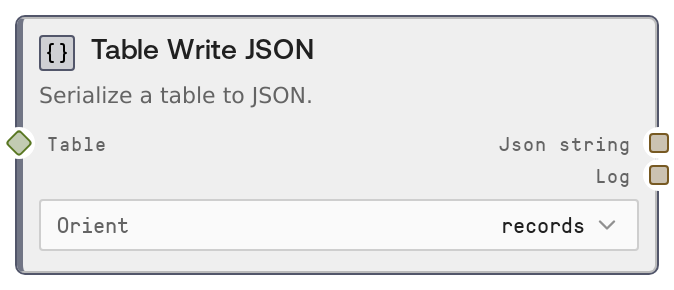
Table Write JSON
This node converts a TABLE (or DataFrame-like value) into a JSON string. It supports multiple JSON orientations so you can match downstream system expectations. It also logs a concise summary of how many rows were serialized and with which orientation.
Usage
Use this node when you need to pass tabular data as JSON to other tools, APIs, or workflow branches. A common pattern is: first ingest or build a TABLE using nodes like Table Read CSV (SaltTableFromCSV) or Table Read JSON (SaltTableFromJSON), optionally transform it with table operations (filters, joins, type casts), and then use Table Write JSON (SaltTableToJSON) at the end of that branch to serialize the result. The json_string output is ideal as the body for HTTP/API request nodes, as a field in a larger JSON payload, or as content for generic output nodes (such as SaltOutput or a file-writing node). Choose orient="records" for a list of JSON objects (most REST APIs expect this), orient="columns" when a consumer prefers columnar dicts, and orient="values" when you only need a simple matrix of values. Keep heavy filtering, sampling, and schema adjustments upstream in table-focused nodes so this node can strictly handle serialization.
| Field | Required | Type | Description | Example |
|---|
| table | True | TABLE | The tabular data to serialize. Accepts Salt TABLE objects or compatible DataFrame-like values. All visible columns and rows are included; complex or non-JSON-native types (such as timestamps or decimals) are converted to strings so the result remains valid JSON. | A TABLE with columns ["user_id", "email", "signup_date"] and 2 rows, internally similar to: [{"user_id": 101, "email": "alice@example.com", "signup_date": "2024-01-05"}, {"user_id": 102, "email": "bob@example.com", "signup_date": "2024-01-06"}] |
| orient | True | STRING | Controls the JSON layout: "records" produces a list of row objects (for example, [{"col": value, ...}]); "columns" produces a dict mapping column names to arrays of values; "values" produces a list of lists containing only row values. Choose the option that matches your downstream consumer. | records |
Outputs
| Field | Type | Description | Example |
|---|
| json_string | STRING | The JSON-serialized representation of the input table, formatted according to the chosen orientation. This string can be embedded directly in HTTP request bodies, combined into larger JSON documents, or written to files by downstream nodes. | [{"user_id":101,"email":"alice@example.com","signup_date":"2024-01-05"},{"user_id":102,"email":"bob@example.com","signup_date":"2024-01-06"}] |
| log | STRING | A concise, human-readable summary of the serialization operation, including the number of rows and the orientation that was used. Helpful for debugging and monitoring multi-step workflows. | Serialized 250 rows to JSON (records) |
Important Notes
- Performance: Serialization cost and output size grow with the number of rows and columns; very large tables can produce large JSON strings and use significant memory. Consider sampling or filtering rows and columns upstream before serializing.
- Limitations: Values that are not directly JSON-serializable (such as datetimes, decimals, or custom objects) are converted to strings. If strict typing is required by the consumer, perform explicit type conversions in upstream table nodes.
- Behavior: The node first normalizes the input using a table abstraction (for example, ensuring a TABLE from a DataFrame-like object) and then converts to a DataFrame for JSON export. Structural changes (renaming, dropping columns) should be done before this node, not during serialization.
- Behavior: The orient setting directly changes the JSON shape. Using an orientation different from what an API or downstream parser expects is a frequent source of integration bugs, so verify the required format in external documentation.
Troubleshooting
- Unexpected JSON shape at API: If an API rejects the payload or reports schema errors, check the orient value. Many APIs expect a list of objects (use orient = records) instead of columns or values.
- Type or parsing issues downstream: If a consumer complains that numbers or dates are strings, inspect the upstream data types and remember that some complex types are stringified in JSON. You may need to cast columns to simple numeric or string types before this node.
- Oversized payloads or timeouts: When requests fail due to size limits or slowness, reduce the table size first using nodes like SaltTableSample, SaltTableFilter, or SaltTableSelectColumns, and then run Table Write JSON.
- Empty or tiny JSON output: If json_string is unexpectedly empty or has very few records, inspect the upstream table with nodes like SaltDisplayTable or SaltTableInfo to confirm that the earlier steps did not filter out all rows.