Storage Read
Usage
Use Storage Read when you need to reuse results from earlier runs or other workflows, such as loading cached LLM outputs, reusing generated assets, or resuming from saved checkpoints. It typically follows a storage write node that has written a result with a known key and precedes processing or routing nodes that consume the loaded data.
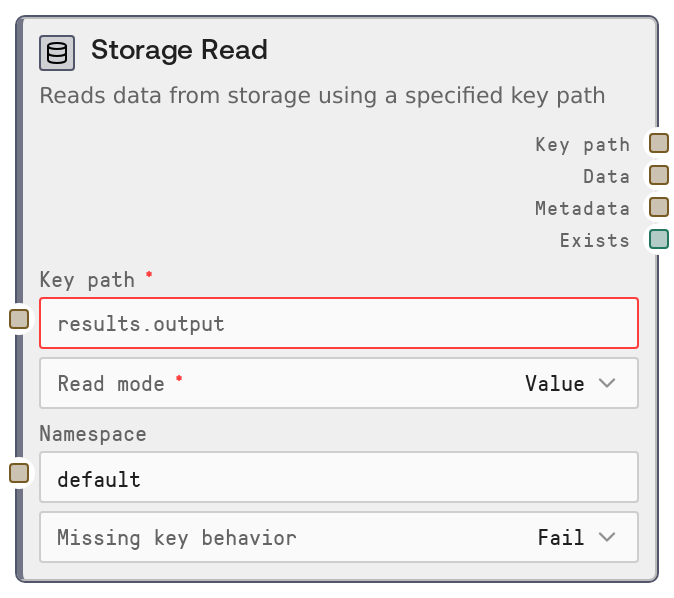
Set key_path to the exact key used when the object was stored (for example, results.summary or datasets/users/2024-04-01.json). Use namespace to separate different projects or logical environments so keys do not collide across workflows. The read_mode controls whether you want the full value ("Value") or just a metadata-only existence check ("Metadata Only"), which is useful for conditional flows or checking if a cached result already exists before recomputing.
If a key might be absent, configure missing_key_behavior: choose to fail the workflow, return an empty or placeholder result, or return a custom default_value (JSON string). Upstream, pair this node with data-producing nodes plus a storage write node that persists their outputs. Downstream, route data into parsing, transformation, or model nodes, and use metadata and exists for control-flow logic. This node works well together with Storage Write, Storage Delete, and Storage List & URL for complete lifecycle management of persisted artifacts.
Inputs
| Field | Required | Type | Description | Example |
|---|---|---|---|---|
| key_path | True | STRING | Logical key path of the stored object to read. Must conform to storage-key validation rules (no leading or trailing spaces, only allowed characters, hierarchical segments like folder.item). This must exactly match the key used when the data was written. | experiments/v1/summarized_reports/2024-04-01 |
| read_mode | True | READ_MODES | Controls whether to download the full stored value or only check and return metadata. Typical options include Value (downloads and returns the stored data) and Metadata Only (skips download, returns metadata and existence flag). | Value |
| namespace | False | STRING | Logical namespace that scopes keys, allowing the same key name to be reused in different projects or environments. Blank or whitespace-only values are normalized to default. Must match the namespace used when the object was originally written. | marketing-playground |
| missing_key_behavior | False | MISSING_KEY_BEHAVIORS | Determines how the node behaves when the key does not exist. Typical options include: Fail (raise an error and stop the workflow), Return empty (return an empty value and metadata with exists = false), and Return default (return the provided default_value instead of failing). | Return default |
| default_value | False | STRING | Fallback value to use when the key is missing and missing_key_behavior is set to Return default. This should be a JSON-formatted string so it can be interpreted consistently by downstream nodes. Only used when the missing-key behavior is Return default. | {"status": "not_found", "items": []} |
Outputs
| Field | Type | Description | Example |
|---|---|---|---|
| key_path | STRING | Echo of the requested key path after validation. Useful for logging, downstream audit, or passing along to other storage-related nodes that need to operate on the same key. | experiments/v1/summarized_reports/2024-04-01 |
| data | STRING | The stored value as a UTF-8 decoded string when read_mode is Value and the key exists. In metadata-only mode, this will be an empty string. For JSON-serialized objects, the content is a JSON string suitable for parsing by downstream nodes. | {"summary": "Sales increased 18% week-over-week.", "top_drivers": ["email", "paid_search"]} |
| metadata | STRING | JSON-serialized metadata about the stored object. Includes at least a serialization_format field (for example, json or raw), and may include size, timestamps, tags, or other attributes. This is returned whether you choose value or metadata-only mode, as long as the key exists. | {"serialization_format": "json", "size_bytes": 2456, "created_at": "2024-04-01T10:05:00Z", "tags": ["weekly-report", "region-us"]} |
| exists | BOOLEAN | Indicates whether the storage key exists. True when the object was found and its value or metadata was retrieved; false when the key is missing but a non-failing missing-key behavior was applied. | True |
Important Notes
- Performance: Use Metadata Only when you just need to check for existence or inspect metadata; this avoids downloading the full value and is much faster and cheaper for large artifacts.
- Performance: Values are always decoded as UTF-8. For large binary artifacts stored as raw, the decoded string may contain replacement characters; design downstream handling accordingly (for example, treat as an opaque or encoded payload).
- Limitations: Key paths and namespaces are case-sensitive and must exactly match the values used when writing the data. A mismatch is treated as a missing key and handled according to missing_key_behavior.
- Behavior: When missing_key_behavior is Fail, the node raises an error on a missing key and stops the workflow. With Return empty or Return default, it returns a normal result with exists = false, allowing you to branch or apply custom logic.
- Behavior: The node requires a valid user context (salt_user_id). If this is unavailable, the node raises an explicit error instead of attempting storage access.
Troubleshooting
- Key appears missing when it should exist: If exists is false or you see empty data, double-check key_path and namespace against the values used by your write node. Ensure there are no leading or trailing spaces and that hierarchy segments match exactly.
- Error: User ID is not available in this context.: This indicates the node did not receive salt_user_id from the environment. Make sure you are running inside a Salt workflow and not calling the node code directly or from an unsupported context.
- Unexpected empty data in Value mode: If read_mode is Value but data is empty, inspect exists and missing_key_behavior. You may have configured Return empty or Return default, causing the node to handle a missing key without throwing an error.
- Garbled or unreadable data: If data looks corrupted, check the serialization_format field in metadata. For non-JSON or binary content stored as raw, consider adjusting how it is stored (for example, base64 within JSON) or ensure downstream nodes know how to interpret the payload.