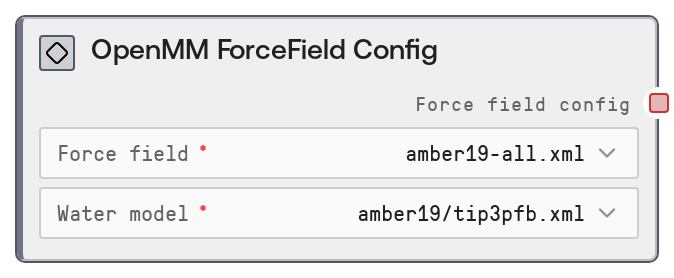
OpenMM ForceField Config
This node builds a consistent force field configuration for molecular simulations by pairing a selected OpenMM force field with a compatible water model. It validates the combination against a predefined compatibility map and raises clear errors for invalid pairs. The resulting configuration object is designed to be reused across solvation, energy minimization, and production simulation nodes to maintain consistent physics settings.
Usage
Use this node at the start of any OpenMM-based simulation workflow where you need to standardize force field parameters. Typical usage: select a biomolecular force field (for example, AMBER19, AMBER14, CHARMM36) and an explicit solvent water model (for example, TIP3P-FB variants) that is compatible with that force field. The node returns a force_field_config object that you then connect directly into downstream OpenMM nodes such as "OpenMM Solvate", "OpenMM Energy Minimize", and "OpenMM Simulate" so they all share identical force field and water model settings. This pattern ensures that system preparation (solvation and parameterization), minimization, and dynamics are physically consistent. In most pipelines, you will: (1) generate or load a structure (for example, from a PDB parsing or modeling node), (2) call OpenMM ForceField Config to choose an AMBER or CHARMM force field and a suitable water model, (3) pass the resulting force_field_config into OpenMM Solvate to create a solvated system, then (4) feed the solvated system and the same force_field_config into OpenMM Energy Minimize and OpenMM Simulate. Best practice is to use the recommended AMBER19 plus TIP3P-FB pairing for general protein simulations, and switch to CHARMM36-based options for membrane or lipid-heavy systems, relying on this node’s validation to prevent incompatible field and model combinations.
| Field | Required | Type | Description | Example |
|---|
| force_field | True | STRING: choice from predefined list | The OpenMM force field definition file to use for parameterizing the system. The node presents all available keys from the internal FORCE_FIELD_WATER_MODEL_COMPATIBILITY mapping as a dropdown, such as "amber19-all.xml", "amber14-all.xml", or charmm36-style entries. This must be one of the supported force fields; otherwise the node raises an error. AMBER19 is recommended for most modern protein simulations because it includes ff19SB protein parameters; AMBER14 is the older standard; CHARMM36 options are preferred for membrane proteins and lipid systems. | amber19-all.xml |
| water_model | True | STRING: choice from predefined list | The explicit solvent water model file to pair with the chosen force field. The dropdown is built from all water model entries used across the compatibility map (for example, "amber19/tip3pfb.xml", various "amber14/*" models, and "charmm36/*" or "charmm36_2024/*" options). The selected water model must be compatible with the chosen force_field; otherwise, an error is raised. For AMBER force fields, choose amber14/* or amber19/* water models; for CHARMM, choose charmm36/* or charmm36_2024/*. TIP3P-FB variants (for example, "amber19/tip3pfb.xml") are recommended for many general-purpose simulations. | amber19/tip3pfb.xml |
Outputs
| Field | Type | Description | Example |
|---|
| force_field_config | OPENMM_FORCE_FIELD_CONFIG | A configuration object (internally a small dictionary) that encodes a coherent pair of force_field and water_model. This object is the standardized way to pass force field settings into other OpenMM nodes so that solvation, minimization, and simulation all use the same parameters. Downstream nodes read these fields to load the correct OpenMM force field and water model files. | {'force_field': 'amber19-all.xml', 'water_model': 'amber19/tip3pfb.xml'} |
Important Notes
- Performance: The node itself is lightweight; it only validates strings and constructs a small config object, so it adds negligible overhead even in large workflows.
- Limitations: Only force fields and water models present in the internal compatibility map are allowed. Custom or user-supplied force field files cannot be referenced through this node.
- Behavior: If you choose an unknown force field name, the node raises a ValueError listing all valid force field options rather than silently defaulting.
- Behavior: If you choose a water model that is not compatible with the selected force field, the node raises a ValueError explaining the incompatibility and listing valid water models for that specific force field.
Troubleshooting
- Unknown force field error: If you see an error like "Unknown force field: X. Valid options: ...", ensure that force_field is one of the items in the dropdown and not a manually typed or modified string.
- Incompatible force field and water model: An error such as "Incompatible force field and water model combination: amber19-all.xml + charmm36/tip3p.xml" indicates that the selected water model does not belong to the allowed set for that force field. Change water_model to one of the suggested options listed in the error message.
- Downstream node complaining about missing config fields: If later OpenMM nodes fail with messages about missing force_field or water_model, verify that you passed the force_field_config output from this node directly into their corresponding force_field_config input without altering or unpacking it.