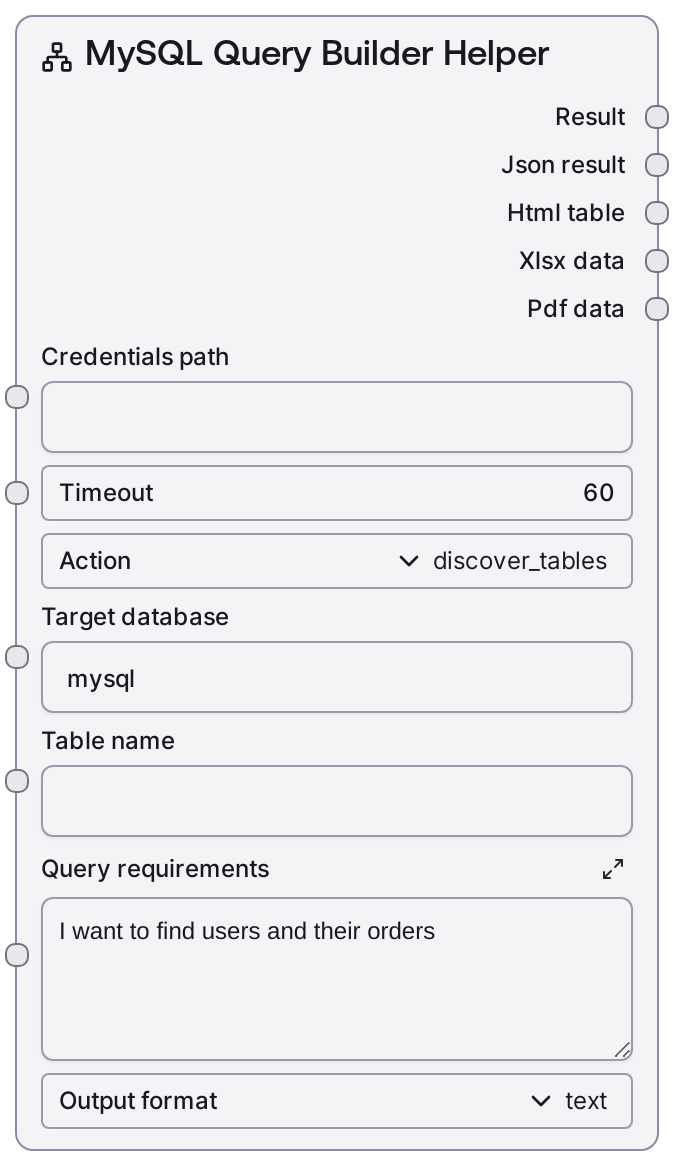
MySQL Query Builder Helper
This node assists with MySQL query design by discovering tables, inspecting columns, suggesting joins based on foreign keys, and proposing query patterns from a natural language description. It calls the configured MySQL service endpoints to inspect schema metadata and, for join suggestions, runs a metadata query over information_schema to infer relationships. Results can be returned as plain text plus JSON, or exported as simple HTML, Excel, or PDF helper outputs.
Usage
Use this node when you need to understand a MySQL schema and design queries without manually inspecting database metadata. A practical workflow is: (1) set action to "discover_tables" to list tables in a specific database; (2) switch to "get_table_columns" to view the structure of a particular table; (3) use "suggest_joins" on your primary fact or dimension table to discover likely JOIN conditions based on foreign key relationships; (4) choose "build_query" and describe your analytical goal in query_requirements to get generic SQL patterns and guidance, then implement the final SQL via nodes like "MySQL Visual Query" or "MySQL Query". Upstream, it depends on MySQL credentials configured via the shared credential template and the common DatabaseBaseNode inputs (credentials_path and timeout). Downstream, its text_output and json_output are typically consumed by documentation/reporting steps, LLM/agent nodes that refine the suggestions into concrete SQL, or human operators who then plug the resulting SQL into MySQL Query, MySQL Visual Query Builder, or MySQL Execute for actual data retrieval or modification.
| Field | Required | Type | Description | Example |
|---|
| action | True | ["discover_tables", "get_table_columns", "suggest_joins", "build_query"] | Selects which helper operation to perform. "discover_tables" lists tables in the target database; "get_table_columns" fetches column metadata for a given table; "suggest_joins" inspects foreign key metadata to infer JOIN conditions involving the table; "build_query" returns generic SQL patterns and guidance based on the natural-language query_requirements. | suggest_joins |
| target_database | True | STRING | Name of the MySQL database (schema) to explore. Used when listing tables, describing tables, and constructing join suggestions. Must refer to a database the configured credentials can access. | ecommerce_db |
| table_name | False | STRING | Table name for column discovery or join suggestions. Required when action is "get_table_columns" or "suggest_joins"; if left empty for those actions, the node returns an error. Ignored for "discover_tables" and "build_query". | orders |
| query_requirements | False | STRING | Free-text description of the data you want to retrieve, used when action is "build_query". The node returns human-readable SQL patterns and example query structures based on this description; it does not auto-generate schema-specific SQL. | Show each active user with their total order amount from the last 90 days, grouped by country. |
| output_format | True | ["text", "html", "xlsx", "pdf", "all"] | Specifies how the helper result should be packaged. "text" returns formatted text plus JSON. "html" wraps the text in a simple HTML fragment. "xlsx" and "pdf" export the formatted text as a one-column table into Excel or PDF binary data. "all" behaves like the text mode for this helper and does not generate binary exports. | text |
Outputs
| Field | Type | Description | Example |
|---|
| text_output | STRING | Human-readable formatted text summarizing the helper result: table listings, column details, join suggestions, or generic query-building advice. In case of errors, this field contains a descriptive error message. | Join Suggestions for ecommerce_db.orders: JOIN users ON orders.user_id = users.id JOIN order_items ON orders.id = order_items.order_id |
| json_output | STRING | JSON-encoded string containing structured results for programmatic consumption. For join suggestions it includes a "suggestions" array; for build_query it includes an array of suggestion strings and the original requirements; for errors it contains an object with an "error" field. | {"suggestions": ["JOIN users ON orders.user_id = users.id", "JOIN order_items ON orders.id = order_items.order_id"]} |
| html_output | STRING | If output_format is "html", this contains a small HTML fragment with a heading and a preformatted block of the helper text. For other formats this will be an empty string. | Join Suggestions: ecommerce_db.ordersJOIN users ON orders.user_id = users.id JOIN order_items ON orders.id = order_items.order_id |
| xlsx_output | BYTES | If output_format is "xlsx", this contains an Excel file (binary data) where the formatted helper text is placed into a simple one-column table. For other formats this output is empty. | |
| pdf_output | BYTES | If output_format is "pdf", this contains a PDF document (binary data) that embeds the helper text in a simple report layout. For other formats this output is empty. | |
Important Notes
- Performance: The "suggest_joins" action runs a metadata query against information_schema.KEY_COLUMN_USAGE, which may be slow on large schemas; increase timeout or limit usage to specific schemas in high-volume environments.
- Limitations: The "build_query" action only returns generic SQL patterns and textual guidance; it does not produce fully schema-aware SQL or execute any queries on its own.
- Behavior: For actions that require a table_name (get_table_columns and suggest_joins), leaving table_name empty triggers a validation error that is returned as a formatted error message in both text_output and json_output.
- Behavior: When output_format is set to "all" for this helper node, it effectively behaves like the "text" mode and does not generate HTML, XLSX, or PDF exports, so those outputs remain empty.
- Behavior: If any underlying MySQL metadata request fails (for example due to permission issues or network errors), the node logs the issue and returns an error payload instead of propagating an unhandled exception.
Troubleshooting
- Table name required errors: If you see messages such as "Table name is required for column discovery" or "Table name is required for join suggestions", ensure that table_name is filled when action is set to "get_table_columns" or "suggest_joins".
- No join suggestions found: When the result says "No foreign key relationships found for table ...", it means the information_schema query did not find relevant foreign keys. Confirm that foreign keys are actually defined, that you are using the correct target_database, and that your credentials can read information_schema.
- Access or connection errors: Messages like "Query builder action failed: Access denied" or errors indicating failures on /list-tables or /table-info calls typically mean invalid credentials or insufficient privileges. Verify the credentials referenced by credentials_path and ensure they have rights to the chosen database and information_schema.
- Unexpectedly empty HTML/XLSX/PDF outputs: If html_output, xlsx_output, or pdf_output are empty, check that output_format is correctly set to "html", "xlsx", or "pdf". When set to "text" or "all", the helper intentionally does not populate those binary/HTML exports.