Neo4J Transaction
Usage
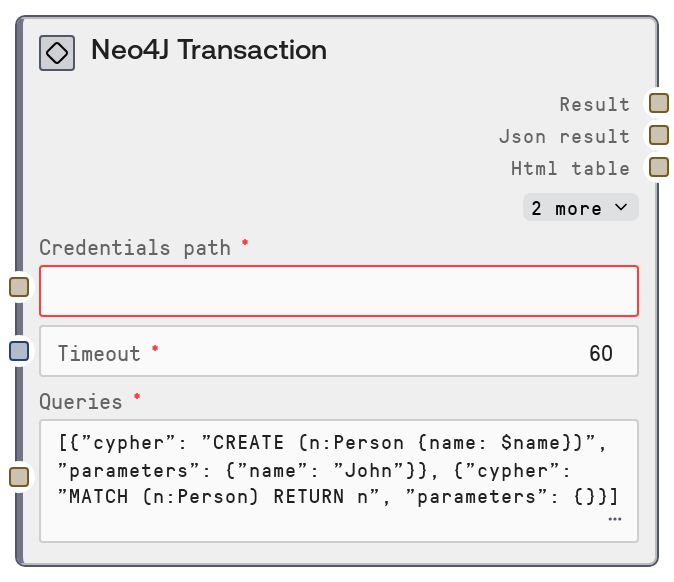
Use this node when you need to group several related Neo4J operations into a single atomic unit. Common scenarios include ingesting related entities and relationships in one commit, performing multi-step graph refactors (create/link/remove), or executing a series of dependent queries (such as create-then-verify). In a typical workflow, upstream configuration supplies the Neo4J credentials and timeout through the shared database credential mechanism, this node performs the transactional execution, and downstream nodes consume the results for validation, reporting, or further querying.
Prepare the queries input as a JSON array where each element has a cypher string and a parameters object. For example, the first entry can create a node, and the second can create relationships from that node to others, all within the same transaction. The node sends this payload to the service’s /transaction endpoint and returns both a human-readable text summary and a JSON-encoded result. Validate your JSON, keep parameter names aligned with Cypher placeholders, and scope each transaction to a logical unit of work to avoid long-running or resource-heavy operations.
This node complements other Neo4J nodes: use "Neo4J Query" for single read operations, "Neo4J Write" for simple single-statement writes, and "Neo4J Graph Explorer" to inspect graph structure or paths after your transactional changes have been applied.
Inputs
| Field | Required | Type | Description | Example |
|---|---|---|---|---|
| queries | True | STRING | JSON array of query objects to be executed in one transaction. Each element must be an object with `cypher` (the Cypher statement as a string) and `parameters` (a JSON object containing named parameters for that statement). If parsing fails due to invalid JSON, the node logs a warning and defaults to an empty list, resulting in no queries being sent. | [{"cypher": "CREATE (p:Person {name: $name, age: $age}) RETURN p", "parameters": {"name": "Alice", "age": 32}}, {"cypher": "MATCH (p:Person {name: $name})-[:WORKS_AT]->(c:Company) RETURN p, c", "parameters": {"name": "Alice"}}] |
Outputs
| Field | Type | Description | Example | ||||
|---|---|---|---|---|---|---|---|
| text | STRING | Human-readable summary of the transaction outcome, including a title and key information about executed queries and their effects. Suitable for logs, human review, or input to text-focused downstream nodes. | Neo4J Transaction Results Executed 2 queries successfully. Created 1 Person node and returned 1 Person–Company path. See JSON output for detailed records and counters. | ||||
| json | STRING | JSON-encoded structured response from the Neo4J transaction endpoint, including per-query records, statistics (nodes/relationships created or deleted, properties set, etc.), and any errors. Downstream nodes can parse this for validation, monitoring, or conditional branching. | {"results":[{"cypher":"CREATE (p:Person {name: $name, age: $age}) RETURN p","summary":{"counters":{"nodesCreated":1,"relationshipsCreated":0}}},{"cypher":"MATCH (p:Person {name: $name})-[:WORKS_AT]->(c:Company) RETURN p, c","records":[{"p":{"labels":["Person"],"properties":{"name":"Alice","age":32}},"c":{"labels":["Company"],"properties":{"name":"Acme Corp"}}}]}],"errors":[]} | ||||
| html | STRING | HTML-formatted representation of the transaction results, typically including headings and tabular data for inspected records and summaries. This is useful for dashboards or rich reporting views and may be empty if the formatter does not generate HTML for the given response. | Neo4J Transaction ResultsExecuted 2 queries successfully.
| ||||
| file | STRING | Identifier or path for any file-based artifact produced alongside the transaction results (for example, an exported report). For most transactions this will be an empty string when no file is generated. | |||||
| metadata | STRING | JSON-encoded auxiliary metadata about the run, such as query count, timing, and a high-level status flag. Helpful for logging, monitoring, or driving conditional logic in subsequent nodes. | {"queryCount":2,"durationMs":145,"status":"success"} |
Important Notes
- Performance: Large or complex transaction batches can increase memory and execution time on the Neo4J server; if you encounter timeouts or slowdowns, split the work into several smaller transactions instead of one very large batch.
- Limitations: The
queriesfield must be valid JSON; if parsing fails, the node logs a warning and silently substitutes an empty list, so the transaction will execute with no queries and make no changes. - Behavior: All provided queries are sent within one call to the Neo4J
/transactionendpoint, meaning either the entire set commits or every change is rolled back on error; there is no partial commit of successful statements. - Behavior: Parameters are passed exactly as defined in each element’s
parametersobject; mismatches between parameter names and Cypher placeholders or incompatible types will appear as errors returned by Neo4J, not as validation errors from this node.
Troubleshooting
- Invalid JSON in
queries: Symptom: No changes appear in Neo4J and logs mention invalid JSON in queries. Fix: Validate thequeriesstring using a JSON validator, correct syntax issues such as missing quotes or trailing commas, and re-run the node. - Cypher or parameter mismatch errors: Symptom: The
jsonoutput includes Neo4J errors complaining about missing parameters or invalid Cypher. Fix: Ensure every placeholder in your Cypher (for example$name) appears as a key in that query’sparametersobject and verify the statement runs as expected in a Neo4J console. - Transaction timeout: Symptom: The node fails after the configured timeout, especially for heavy write workloads or complex traversals. Fix: Increase the
timeoutinput to a reasonable higher value or refactor the work into multiple smaller transactions. - Connection or authentication failures: Symptom: Errors indicate that the Neo4J service cannot be reached or credentials are invalid. Fix: Confirm that
credentials_pathpoints to a valid Neo4J configuration, that the target host and port are reachable, and that credentials stored under that path are correct.