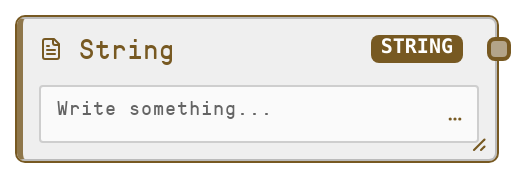
String
String is a primitive node that holds and outputs a single text value. It simply returns whatever you type into its multiline field, with no transformation. Use it to centralize prompts, labels, IDs, or any fixed text instead of hard-coding strings inside other nodes.
Usage
Use the String node whenever you need a fixed piece of text that may be reused or updated across a workflow. Common scenarios include LLM prompts, system messages, labels, file or key prefixes, API parameters, or template fragments. Typically, String appears near the start of a pipeline as a source node feeding text into processing nodes such as SaltLLM, SaltDeployedModel, or tool nodes that require string inputs (for example, URLs, identifiers, JSON snippets). Upstream, it usually has no inputs and acts as a constant source. Downstream, connect its output to any node expecting a STRING input, including other primitive wrappers like SaltObject or SaltList, or control and logic nodes that operate on strings. Group related prompts or configuration values into multiple String nodes so you can revise them without editing many nodes. Best practices: give each String node a clear purpose and readable label, keep long prompts or configuration text in these nodes instead of scattering them, and reuse a single String node wherever the same text is needed. Combine with SaltInteger, SaltFloat, SaltBoolean, SaltList, and SaltObject to build small, declarative configuration subgraphs.
| Field | Required | Type | Description | Example |
|---|
| value | True | STRING | The literal text value to output. Supports multiline text. There is no enforced length limit from the node itself, but extremely large strings may impact performance. Dynamic prompts are disabled here; this is intended for static or manually edited content. | You are an expert marketing assistant. Write a concise product description in under 120 words, focusing on benefits rather than features. |
Outputs
| Field | Type | Description | Example |
|---|
| value | STRING | The exact string provided in the input, normalized so that a missing value becomes an empty string. Downstream nodes consume this as a plain text field, for example as a prompt, label, key, or any other string parameter. | weekly_reports/2024-Q4/customer-churn-summary |
Important Notes
- Performance: The node itself is effectively free in terms of computation; performance concerns only arise if you store extremely large texts, which can slow UI rendering and downstream processing.
- Limitations: It does not perform templating, variable substitution, or dynamic prompt assembly; the output is exactly what you type, aside from empty normalization.
- Behavior: If the input value is ever passed in as null or missing from an automated call, the node will output an empty string rather than failing.
- Behavior: This is a pure primitive source node with no inputs; it does not read external data or maintain state across runs, and changes only occur when you manually edit the text.
Troubleshooting
- Empty output when text was expected: If downstream nodes receive an empty string, confirm that the String node's value field is filled and that you have connected the correct output port. Also verify that no upstream automation is overriding the value with a null or empty string.
- Downstream type mismatch: If a consumer node reports an unexpected type, ensure you are connecting the String node to an input explicitly typed as STRING. Some numerical or boolean inputs will not auto-convert; use a dedicated converter node or a more appropriate primitive type if required.
- Prompt changes not taking effect: If updating the text does not change behavior, ensure all relevant downstream nodes are wired to this specific String node and not to an older duplicate String node elsewhere in the canvas. Refresh the workflow view if needed to clear any cached display.