Comparison Operation
Usage
Use this node whenever you need to compare two numeric values or constrain a value within a range as part of a larger workflow.
Specific use cases: - Enforcing numeric bounds (e.g., clamping a user-provided parameter between safe minimum and maximum limits before it drives a model or transformation). - Computing the minimum or maximum between two computed signals, scores, or metrics. - Driving conditional branches by checking if one value is greater/less than another, or approximately equal, and then gating downstream behavior with the boolean output.
Typical workflow position and pipeline context:
- Upstream nodes: feed FLOAT outputs from nodes like "SaltFloatMathOperation", "SaltAdvancedMathOperation", "SaltLogarithmicOperation", or "SaltStatisticalOperation" into inputs a and b. You can also use configuration or parameter nodes that emit numeric values.
- Downstream nodes: connect the FLOAT result to any numeric input that should receive a min/max/clamped value or a conditionally passed-through value. Connect the BOOLEAN comparison_result to nodes that support conditional routing, toggling, or selection logic.
Related nodes and integration patterns: - Combine with "SaltFloatMathOperation" to compute derived values first (e.g., a difference or ratio) and then compare or clamp them here. - Use "SaltRoundingOperation" before this node if you need more controlled numeric precision before equality or relational checks. - Pair with control or routing nodes that can interpret BOOLEAN inputs to decide which branch of the workflow to execute.
Best practices:
- For range enforcement, set operation to "clamp", feed the raw value into a, and configure clamp_min/clamp_max according to your allowed bounds. Ignore b in this case.
- For equality checks between floats, prefer operation = "equal" rather than building your own tiny-difference checks elsewhere; this node already uses a small tolerance to reduce issues with floating-point noise.
- For relational checks (greater/less/greater_equal/less_equal), rely primarily on comparison_result for branching, and use the FLOAT result only when you explicitly want to pass through a only when the condition is true.
Inputs
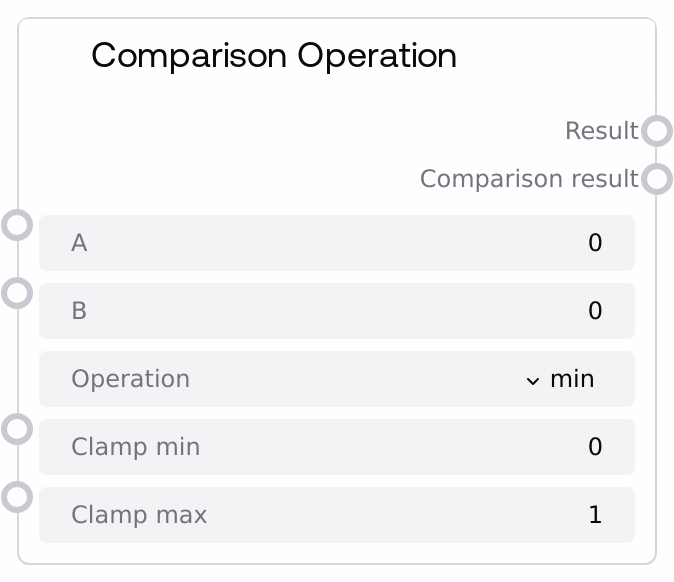
| Field | Required | Type | Description | Example |
|---|---|---|---|---|
| a | True | FLOAT | First float operand used in all operations. For min/max it is one of the values being compared; for clamp it is the value being clamped; for equal/greater/less-type operations it is the left-hand side of the comparison. Valid range is from -1e10 to 1e10. | 0.75 |
| b | True | FLOAT | Second float operand. Used as the other value for min/max and comparison operations. It is not used by the clamp calculation but still must be provided. Valid range is from -1e10 to 1e10. | 0.5 |
| operation | True | ENUM[min,max,clamp,equal,greater,less,greater_equal,less_equal] | Selects which comparison or range operation to perform. "min" returns the smaller of a and b; "max" returns the larger; "clamp" restricts a to the [clamp_min, clamp_max] range; "equal" tests approximate equality of a and b; "greater" checks a > b; "less" checks a < b; "greater_equal" checks a >= b; "less_equal" checks a <= b. | greater_equal |
| clamp_min | True | FLOAT | Lower bound used when operation is "clamp". The node returns a value that is at least clamp_min and at most clamp_max by clamping `a` into this range. Valid range is from -1e10 to 1e10. | 0.0 |
| clamp_max | True | FLOAT | Upper bound used when operation is "clamp". For intuitive behavior, clamp_max should be greater than or equal to clamp_min. Valid range is from -1e10 to 1e10. | 1.0 |
Outputs
| Field | Type | Description | Example |
|---|---|---|---|
| result | FLOAT | The numeric result of the selected operation. For min/max, this is the minimum or maximum of a and b. For clamp, this is `a` clamped into the [clamp_min, clamp_max] range. For comparison operations (equal/greater/less/greater_equal/less_equal), this is `a` when the comparison is true and 0.0 when it is false, which allows you to gate `a` numerically based on a condition. | If a=0.75, b=0.5, operation="greater", then result = 0.75. If a=1.5, clamp_min=0.0, clamp_max=1.0, operation="clamp", then result = 1.0. |
| comparison_result | BOOLEAN | Boolean flag indicating the outcome of comparison-type operations. For min, max, and clamp this is always False. For equal, greater, less, greater_equal, and less_equal, this is True when the comparison holds and False otherwise. Use this as a condition signal to drive routing, toggling, or other control logic downstream. | If a=0.75, b=0.5, operation="greater", then comparison_result = true. If a=0.5, b=0.75, operation="greater", then comparison_result = false. |
Important Notes
- Performance: All operations are simple numeric computations with constant-time complexity, so the node is inexpensive to use even in large or heavily branched workflows.
- Limitations: The "equal" operation uses a fixed tolerance (1e-9) for floating-point equality; values whose difference is smaller than this are treated as equal, which may be too strict or too lenient depending on your numeric scale.
- Behavior: For comparison operations (equal/greater/less/greater_equal/less_equal),
resultis either the originalaif the condition is true or 0.0 if false, whilecomparison_resultdirectly reflects the condition as a boolean. - Behavior: For non-comparison operations (min, max, clamp), the boolean
comparison_resultis always False; only the FLOATresultcarries meaningful data. - Limitations: The node does not enforce that clamp_min ≤ clamp_max; if you invert these bounds you may get unintuitive clamping behavior, so configure ranges carefully.
Troubleshooting
- Unexpected 0.0 result: If
resultis 0.0 when you expect a non-zero value, verify that you are using a comparison operation (equal/greater/less/greater_equal/less_equal). When the condition is false, the node intentionally outputs 0.0 forresultand False forcomparison_result. - Boolean always False: If
comparison_resultis always False, check which operation you selected. For "min", "max", and "clamp" this output is always False by design; switch to one of the comparison operations if you need a True/False evaluation. - Clamp not behaving as expected: If the clamped value is surprising, double-check that
operationis set to "clamp", that the value to clamp is connected toa, and thatclamp_minis not greater thanclamp_max. - Equality check failing for close values: If numbers that should be considered equal are not passing the "equal" check, you may be dealing with differences slightly larger than 1e-9. Consider normalizing or rounding values with "SaltRoundingOperation" before comparison, or adjust your workflow logic to tolerate larger numeric differences (for example, by using separate comparisons like a > b - epsilon and a < b + epsilon with custom math).