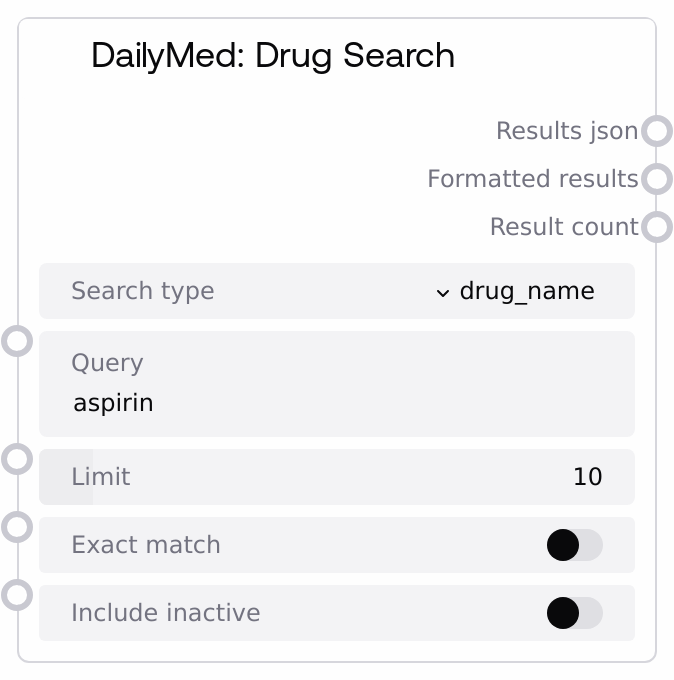
DailyMed: Drug Search
This node integrates with the U.S. National Library of Medicine DailyMed API to retrieve structured drug information. It supports searching by NDC code, drug name, SPL set ID, and active ingredient, then returns both the raw JSON response and a concise, human-readable summary. Typical results include label metadata such as title, set ID, brand and generic names, manufacturer, active ingredients, dosage form, route, and NDC codes.
Usage
Use this node when you need authoritative U.S. drug label metadata from DailyMed in workflows like medication validation, formulary review, mapping free-text medications to structured data, or building clinical decision support context. Upstream, another node or user input usually provides the query (for example, an NDC parsed from a prescription, a drug name extracted from a note, a known SPL set ID, or an ingredient of interest). Downstream nodes commonly parse results_json to extract fields (such as dosage form, manufacturer, or NDC lists) for analytics, mapping, or display, while formatted_results is ideal for quick inspection, UI panels, or LLM prompts. This node is often paired with DailyMedNDCLookupNode for stricter NDC validation and DailyMedIngredientSearchNode for more focused ingredient-centric exploration. For best results, choose the most specific search_type available (set_id or ndc where possible), keep limit reasonable to avoid large payloads, and rely on results_json for programmatic logic while using formatted_results as a human-facing summary.
| Field | Required | Type | Description | Example |
|---|
| search_type | True | CHOICE: ['ndc', 'drug_name', 'set_id', 'ingredient'] | Controls which DailyMed field is searched. 'ndc' searches by National Drug Code and expects a product NDC, with or without dashes or spaces. 'drug_name' searches by product name (brand or generic) and can return many matches. 'set_id' targets an exact SPL set identifier associated with a specific DailyMed label. 'ingredient' searches products whose active ingredient matches the query name. | drug_name |
| query | True | STRING | The text value sent to the DailyMed API, interpreted according to search_type. For 'ndc', provide an NDC such as '0378-6015-10' or '0378601510' (the node strips dashes and spaces). For 'drug_name', provide a drug name such as 'ibuprofen'. For 'set_id', provide the full SPL set ID string. For 'ingredient', provide an active ingredient name like 'metformin'. Extremely generic terms can produce large and noisy result sets. | aspirin |
| limit | True | INT | Maximum number of results to request for list-based searches. Valid range is 1 to 100. It is applied for 'ndc', 'drug_name', and 'ingredient' searches and influences the 'limit' parameter sent to the API. For 'set_id' searches, the API returns at most one record regardless of this value, but the parameter must still be within the valid range. | 10 |
| exact_match | False | BOOLEAN | When true, adds an exact-match flag to DailyMed queries for 'drug_name' and 'ingredient', instructing the API to return only exact matches to the query term. This is useful when you know the precise product or ingredient name. It has no effect when search_type is 'ndc' or 'set_id'. | False |
| include_inactive | False | BOOLEAN | Intended to indicate whether inactive products should be included in results. In the current implementation, this flag is not passed through to the DailyMed API and does not alter the behavior of the search. Treat it as informational only and perform any active versus inactive filtering downstream using results_json. | False |
Outputs
| Field | Type | Description | Example |
|---|
| results_json | STRING | A JSON-formatted string of the raw DailyMed API response. For 'ndc', 'drug_name', and 'ingredient' searches, this is a JSON array of result objects. For 'set_id', the node wraps the single SPL object into a one-element array for structural consistency. Each result may include keys such as 'title', 'setid', 'openfda' (brand_name, generic_name, manufacturer_name), 'active_ingredient', 'product_ndc', 'dosage_form', and 'route'. Use this output for programmatic parsing, filtering, and integration with other systems. | [{"title":"ASPIRIN 81 MG TABLET, DELAYED RELEASE","setid":"e5c37e3e-96ad-4b36-9c89-5ecf4f6d9a26","openfda":{"brand_name":["ASPIRIN"],"generic_name":["ASPIRIN"],"manufacturer_name":["Example Pharma Inc"]},"active_ingredient":["ASPIRIN 81 mg"],"product_ndc":["12345-6789"],"dosage_form":["TABLET"],"route":["ORAL"]}] |
| formatted_results | STRING | A human-readable, multi-line text summary of the search results. It begins with a header indicating the search type (for example, 'DailyMed Search Results (Drug Name)') and then lists each result in numbered order. For each record, it shows available fields such as title, set ID, brand and generic names, manufacturer, active ingredients, up to three NDC codes, dosage form, and route. This is intended for quick inspection, logs, user interfaces, or as compact context for language models. | DailyMed Search Results (Drug Name) ================================================== 1. Title: ASPIRIN 81 MG TABLET, DELAYED RELEASE Set ID: e5c37e3e-96ad-4b36-9c89-5ecf4f6d9a26 Brand Name: ASPIRIN Generic Name: ASPIRIN Manufacturer: Example Pharma Inc Active Ingredients: ASPIRIN 81 mg NDC Codes: 12345-6789 Dosage Form: TABLET Route: ORAL |
| result_count | INT | The number of records returned in this search. For list-based searches, this equals the length of the results array (up to the requested limit). For 'set_id', it is 1 if a record is found or 0 if not. Use this to quickly branch workflow logic, for example, handling no hits versus multiple hits without parsing the JSON. | 5 |
Important Notes
- Performance: Each run makes a live HTTP request to the DailyMed API with a 30-second timeout. Large limits or very broad 'drug_name' or 'ingredient' queries can increase response time and payload size; prefer specific queries and modest limits.
- Limitations: The include_inactive input is currently not forwarded to the DailyMed API and does not filter active versus inactive products. If you need that behavior, you must inspect and filter the records in results_json yourself.
- Behavior: For search_type 'set_id', the underlying API returns a single SPL object, which the node wraps in a one-element list so that results_json is always an array. Downstream nodes should always expect an array in this field.
- Behavior: When no matches are found, results_json is the string representation of an empty array ("[]"), formatted_results is "No results found", and result_count is 0. When an exception occurs (such as an HTTP error), results_json contains a JSON object with an 'error' field and formatted_results contains a matching error message.
- Integration: For workflows focused on NDC validation and detailed package information, DailyMedNDCLookupNode builds on this node's NDC search capability and adds format validation and richer formatting, and can be used downstream or as an alternative in NDC-centric pipelines.
Troubleshooting
- No results found: If formatted_results shows "No results found" and result_count is 0, verify that search_type matches the field you intend to query, check the spelling and completeness of query, and for name or ingredient searches consider turning off exact_match or using a less restrictive phrase.
- API error or timeout: If formatted_results begins with an error message and results_json contains an object with an 'error' field, the DailyMed request may have failed or timed out. Check network connectivity to the DailyMed service, try again later, and consider reducing limit or using a more specific query.
- Sparse or missing fields: If certain details (such as brand_name, generic_name, manufacturer_name, or product_ndc) are missing from formatted_results even though you expect them, this often reflects missing or incomplete fields in the upstream DailyMed/OpenFDA record. Inspect results_json directly to confirm what the API returned before assuming a node malfunction.
- NDC searches returning no hits: If known NDCs do not produce any results, confirm the NDC is complete and corresponds to a product-level NDC rather than a truncated or misformatted code. The node strips dashes and spaces automatically, but it cannot correct invalid or incomplete codes.