Oracle Test Connection
Usage
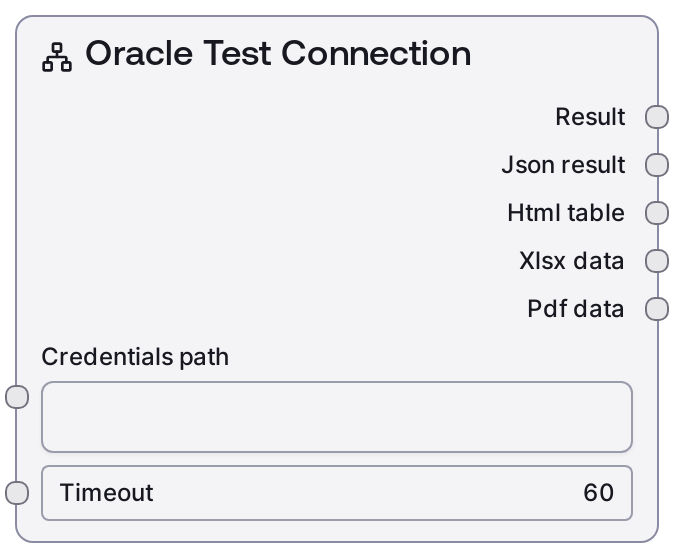
Use the Oracle Test Connection node at the start of any workflow that depends on Oracle data, immediately after selecting or providing your Oracle credentials. The node consumes a credentials_path pointing to an Oracle credential template and a timeout value, loads the credentials, and invokes a /test-connection operation on the Oracle integration backend. Typical upstream nodes are credential selection or management nodes that output credentials_path, or helper nodes like SaltOracleConnectionString (if you embed the connection string into a credentials file). Downstream nodes commonly include SaltOracleQuery, SaltOracleVisualQuery, SaltOracleTableInfo, SaltOracleListTables, or SaltOracleDatabaseInfo once connectivity has been verified. A practical workflow pattern is: (1) select or configure Oracle credentials, (2) run SaltOracleTestConnection with an environment-appropriate timeout, (3) on success, proceed to query or schema exploration; on failure, route to logging, alerting, or remediation steps. In scheduled or production jobs, include this node to fail fast on network or configuration issues rather than discovering them after heavier operations.
Inputs
| Field | Required | Type | Description | Example |
|---|---|---|---|---|
| credentials_path | True | STRING | Path or identifier to the saved Oracle credential configuration. This should reference an Oracle credential template (template key "oracle") that contains connection details such as host, port, service/SID, username, and password or connection string. The path must be valid and readable by the runtime, and the content must be well-formed and complete for an Oracle connection. | /workspace/credentials/oracle/hr_reporting_oracle.json |
| timeout | True | INT | Maximum time in seconds to wait for the Oracle test-connection request before treating it as failed. Use higher values for remote or high-latency networks (e.g., cross-region, VPN) and lower values for local data centers. Must be a positive integer; overly small values can cause false negatives due to normal network latency. | 30 |
Outputs
| Field | Type | Description | Example |
|---|---|---|---|
| text_output | STRING | Human-readable summary of the Oracle connection test result, suitable for console display, logs, or status cards in the UI. Usually includes a success/failure status and brief context about the target connection. | Oracle Connection Test: SUCCESS - Connected to db-prod-01.acme.local:1521 (service: ORCL) in 0.42 seconds. |
| json_output | STRING | A JSON document serialized as a string containing the raw response from the /test-connection endpoint and any additional metadata added by the formatter. This typically includes a status field, message, and diagnostic details such as latency, resolved host, and error codes when failures occur. | {"status": "success", "message": "Connection successful", "details": {"host": "db-prod-01.acme.local", "port": 1521, "service_name": "ORCL", "latency_ms": 420}} |
| html_output | STRING | HTML-formatted version of the test result, generated by the shared database node formatter. This can be rendered directly in web-based dashboards or embedded into reports and notifications. | Oracle Connection TestStatus: SUCCESS Host: db-prod-01.acme.local:1521 Service: ORCL Latency: 420 ms |
| file_output | STRING | Path or identifier for any file-based artifact the formatter produces for this test, if applicable. In many cases this may be an empty string, but some configurations can emit a small JSON or HTML report file for auditing or archiving. | /workspace/outputs/oracle/connection_tests/2024-05-10T09-30-00Z-oracle-connection-test.json |
| ui_payload | STRING | Serialized payload (typically JSON encoded as a string) describing how to present the test results in the Salt UI. It may specify component types, status indicators, and key-value fields for display, and can be used by downstream orchestration or monitoring nodes. | {"type": "status_card", "title": "Oracle Connection Test", "status": "success", "details": {"host": "db-prod-01.acme.local", "service_name": "ORCL", "latency_ms": 420}} |
Important Notes
- Performance: Response time depends on network conditions and Oracle server load; for remote databases, pick a timeout that accounts for worst-case latency to avoid spurious failures.
- Limitations: The node validates connectivity and basic authentication only; it does not check privileges on individual schemas or tables, nor does it guarantee that subsequent SQL statements will succeed.
- Behavior: The node uses the Oracle credential template specified by credentials_path; any mismatch in host, port, service/SID, or credentials in that file will cause the test to fail even if another Oracle environment is healthy.
- Behavior: The structure of the JSON response is dictated by the backend /test-connection API and may include additional fields over time; code that parses json_output should handle missing or extra keys gracefully instead of assuming a fixed schema.
Troubleshooting
- Connection timed out or host unreachable: If the node reports a timeout or unreachable host, increase the timeout value and verify network connectivity from the Salt environment to the Oracle host and port. Check firewalls, VPN tunnels, security groups, and that the Oracle listener is running on the expected port.
- Authentication failed (invalid username/password): Errors indicating bad credentials mean the stored username or password in the credentials file is incorrect or expired. Update the credential at credentials_path with correct values and rerun the connection test.
- Service name or SID errors: If the error mentions an unknown service name, SID, or similar Oracle listener error, confirm that the service_name or SID in your Oracle configuration matches what the database is actually exposing (for example, ORCL vs XE) and that the credentials file uses the correct value.
- SSL or protocol-related errors: Messages about TLS/SSL handshake failures or protocol mismatches often indicate that the Oracle listener is configured differently from what the client expects (for example, SSL required vs plaintext). Validate listener configuration, certificates, and any proxy or load balancer between Salt and the Oracle server, and adjust your Oracle connector settings or credentials accordingly.