MSA Search
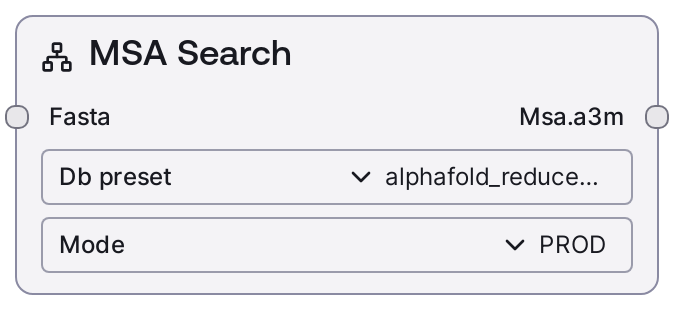
Usage
Use this node whenever you need high-quality multiple sequence alignments as input to downstream protein structure prediction or evolutionary analysis. Place it upstream of nodes such as "SaaSAlphafoldNode" that expect A3M-formatted MSAs.
Typical workflow: 1) Prepare your protein sequence(s) as a valid FASTA string (single or multiple entries). 2) Run this node with an appropriate database preset (Toy/Reduced/Full) depending on speed vs. coverage. 3) Feed the resulting msa.a3m output into "SaaSAlphafoldNode" for structure prediction, or into analysis nodes that consume A3M alignments.
Common use cases include generating MSAs for de novo structure prediction, testing sequences quickly against toy databases, or using MOCK mode for workflow demonstrations. In production pipelines, set mode to "PROD" and choose alphafold_reduced_dataset for a balance of runtime and accuracy, or alphafold_full_dataset when maximum coverage is required and long runtimes are acceptable. MOCK mode is useful for validating workflow wiring without incurring real compute. TEST mode forces a small toy database to reduce runtime for integration or regression tests.
Best practices: ensure your FASTA sequences are reasonably sized for the chosen database, batch related sequences together to amortize overhead, and avoid using the Full dataset for exploratory runs. Downstream, pair this node with "SaaSAlphafoldNode" for structure prediction, or with custom nodes that parse and visualize A3M alignments.
Inputs
| Field | Required | Type | Description | Example |
|---|---|---|---|---|
| fasta | True | FASTA | One or more protein sequences in FASTA format. The value must be a single string containing standard FASTA headers (lines starting with '>') and amino acid sequences using canonical one-letter codes. Multiple sequences can be concatenated in the same string as separate FASTA entries. Sequences should be biologically reasonable in length for Alphafold MSA search (for example tens to a few thousand residues, depending on the database and runtime constraints). | >sp\|P69905\|HBA_HUMAN Hemoglobin subunit alpha OS=Homo sapiens VLSPADKTNVKAAWGKVGAHAGEYGAEALERMFLSFPTTKTYFPHF >my_protein Hypothetical enzyme MSTNPKPQRITGILGLSGAGKSTLLSAFLAQLGKKGVEVVNTAGI |
| db_preset | True | STRING (enum: alphafold_toy_dataset \| alphafold_reduced_dataset \| alphafold_full_dataset) | Specifies which managed MSA database preset to use. alphafold_toy_dataset is a very small toy dataset for debugging and test runs. alphafold_reduced_dataset uses a reduced BFD to speed up searches with moderate coverage. alphafold_full_dataset uses the full Alphafold database stack for maximal alignment depth at the cost of significantly longer runtimes. | alphafold_reduced_dataset |
| mode | True | STRING (enum: MOCK \| PROD \| TEST) | Controls how the node executes. PROD runs real MSA searches against the selected database preset. TEST overrides the chosen preset to alphafold_toy_dataset regardless of your input, providing fast but low-coverage searches for debugging or CI pipelines. MOCK does not call backend services; instead it loads predefined MSA data from mock files and rewrites IDs to match the provided FASTA headers, ideal for demos and offline testing. | PROD |
Outputs
| Field | Type | Description | Example |
|---|---|---|---|
| msa.a3m | MSA | A mapping from input FASTA entry IDs to their combined MSA in A3M format. The structure is a dictionary-like object where each key is the FASTA header identifier (for example sp\|P69905\|HBA_HUMAN) and each value is an A3M-formatted alignment string created by aggregating and converting results from multiple backend databases. This output is directly consumable by Alphafold-based nodes or any tool that accepts A3M MSAs. | { "sp\|P69905\|HBA_HUMAN": "sp\|P69905\|HBA_HUMAN/1-142 VLSPADKTNVKAAWGKVGAHAGEYGAEALERMF...\nseq1/1-142 VLSPADKTNVKAAWGKVGSHAGEYGAEALERMF...\nseq2/1-142 VLSPADKTNVKAAWGKVGAHAGEYGAEALDRMF...\n", "my_protein": "my_protein/1-210 MSTNPKPQRITGILGLSGAGKSTLLSAFLAQLG...\nseqA/1-210 MSTDPKPQRITGILGLSGAGKSTLLSAFLAQLG...\n" } |
Important Notes
- Performance: Runtime scales with both the number of sequences and the chosen database preset; the full dataset can imply very long timeouts per sequence, especially for large proteins.
- Performance: Timeout limits are automatically adjusted based on the database (toy, reduced, full) and number of sequences, but extremely large batches may still hit platform-level limits.
- Limitations: TEST mode always forces the toy dataset regardless of the db_preset value, so do not use TEST mode when you need production-quality MSAs.
- Limitations: MOCK mode returns fixed precomputed alignments adapted only in their identifiers and does not reflect your actual sequence content; use it only for wiring and UX tests.
- Behavior: When multiple backend sources return different formats (Stockholm versus A3M), results are normalized by converting everything to Stockholm, aggregating, and then converting once to A3M per sequence.
- Behavior: The node writes alignment metadata, such as configuration and folder name, into the output metadata, which downstream nodes may use for provenance or storage.
Troubleshooting
- No alignments for some sequences: If certain FASTA entries are missing from the output, check that the headers are unique and that the sequences are valid amino acid strings; also ensure they are not excessively long for the chosen database.
- Very long runtimes or timeouts: If executions hang or time out, switch from alphafold_full_dataset to alphafold_reduced_dataset or alphafold_toy_dataset, reduce the number of sequences per run, or use TEST mode for quick verification.
- Unexpected toy-dataset behavior: If results look low-depth despite selecting a larger db_preset, verify that mode is not set to TEST, as TEST mode silently overrides the preset to alphafold_toy_dataset.
- Mock data looks inconsistent with input sequence: In MOCK mode the alignments are synthetic and only header IDs are adapted. Switch to PROD mode for real MSA searches if you need biologically meaningful results.