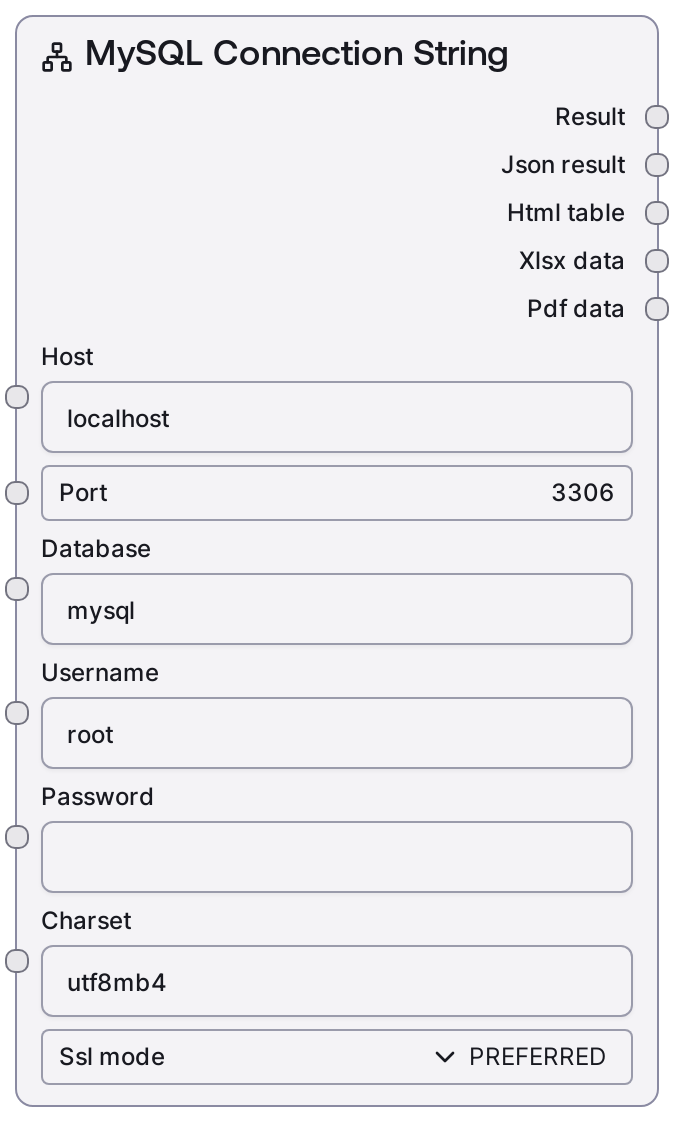
MySQL Connection String
This node constructs a properly formatted MySQL connection string from separate connection parameters. It embeds credentials, targets a specific database, and can append charset and SSL mode as query parameters. Use it when downstream nodes or external tools expect a single MySQL connection URI instead of individual configuration fields.
Usage
Use the MySQL Connection String node when you need to convert structured MySQL connection details into a single URI string for other nodes or external systems. Typical scenarios include integrating with tools or custom components that accept a mysql://... URI, configuring ETL jobs, or passing connection details into generic database adapters. Place this node near the start of database-related workflows: provide host, port, database, username, and password (ideally sourced from Salt credentials or secure variables), optionally adjust charset and SSL mode, then route the first output (connection_string) to downstream consumers. It complements MySQL-oriented nodes in the same category and is especially useful when you need a portable, self-contained connection string. For security, avoid wiring its output into logging, debug, or chat-display nodes and keep it confined to secure, database-facing paths.
| Field | Required | Type | Description | Example |
|---|
| host | True | STRING | Hostname or IP address of the MySQL server. Must be reachable from the workflow execution environment. Accepts DNS names or IPv4/IPv6 addresses. | db-prod.internal.company.local |
| port | True | INT | TCP port where the MySQL instance is listening. Must be between 1 and 65535. Default 3306 is the standard MySQL port. | 3306 |
| database | True | STRING | Name of the default database (schema) to connect to. SQL statements will target this database by default unless fully qualified. | analytics_db |
| username | True | STRING | MySQL username used for authentication. The account must exist and have appropriate privileges on the given database. | reporting_user |
| password | True | PASSWORD | Password for the specified MySQL user. It is embedded directly in the URI, so avoid exposing the resulting connection string in logs or user-visible outputs. | |
| charset | True | STRING | Client character set for the connection. If left as the default `utf8mb4`, it is not added to the URI; any other value is appended as `charset=VALUE` in the query string. | utf8mb4 |
| ssl_mode | True | ENUM[DISABLED, PREFERRED, REQUIRED, VERIFY_CA, VERIFY_IDENTITY] | SSL connection mode. When set to `PREFERRED` (default), it is omitted from the URI; other values are appended as `ssl_mode=VALUE`. Use stricter modes like `REQUIRED`, `VERIFY_CA`, or `VERIFY_IDENTITY` when your environment mandates encrypted, validated connections. | REQUIRED |
Outputs
| Field | Type | Description | Example |
|---|
| connection_string | STRING | The constructed MySQL connection URI of the form `mysql://username:password@host:port/database` with optional `?charset=...` and `&ssl_mode=...` query parameters. This first output is what you pass to downstream nodes or external tools that accept a MySQL URI. | mysql://reporting_user:@db-prod.internal.company.local:3306/analytics_db?ssl_mode=REQUIRED |
| json | STRING | Always an empty string for this node; included only to align with the standard multi-output shape of related database nodes. | |
| html | STRING | Always an empty string. The node does not render any HTML representation of the connection string. | |
| xlsx | BYTES | Always empty. No spreadsheet or binary export is generated by this node. | |
| pdf | BYTES | Always empty. The node does not create PDF output. | |
Important Notes
- Performance: The node only performs simple string concatenation and does not contact any database, so execution is effectively instantaneous with negligible resource usage.
- Limitations: The resulting URI contains the raw password; never route this output into logging, debugging, or chat-display nodes, and avoid copying it into tickets or documentation.
- Limitations: The node does not validate connectivity or credentials; an apparently valid URI may still fail when used if host, port, database, or user permissions are incorrect.
- Behavior: The
charset parameter is appended only when it differs from utf8mb4, and ssl_mode only when it differs from PREFERRED, so two configurations that look similar in the UI may produce URIs with slightly different query strings.
- Behavior: The node always returns five outputs (connection string plus four empty placeholders) to remain consistent with the output signature used by other database-related nodes.
Troubleshooting
- Charset missing from URI: If you expect
charset in the URI but do not see it, verify that the charset input is not utf8mb4. The default is intentionally omitted from the query string.
- SSL mode missing from URI: If
ssl_mode is not present, ensure it is not set to PREFERRED. Choose REQUIRED, VERIFY_CA, or VERIFY_IDENTITY if you need the SSL mode explicitly encoded.
- Downstream connection failures: When tools consuming this URI cannot connect, test the same host, port, database, username, and password with a standard MySQL client. Most issues are due to network, firewall, or permission problems rather than URI formatting.
- Credentials exposed accidentally: If the full connection string appears in logs or UI, rotate the affected database password immediately and reconfigure the workflow so this node’s output is only consumed by secure, non-logging nodes.