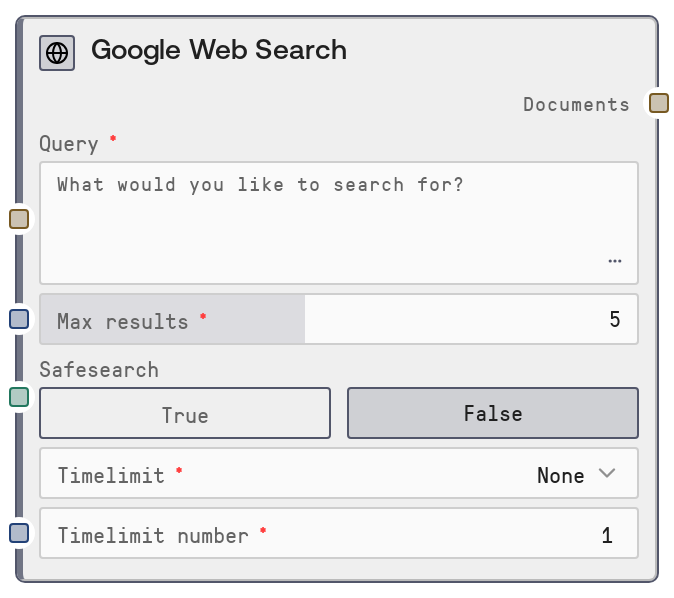
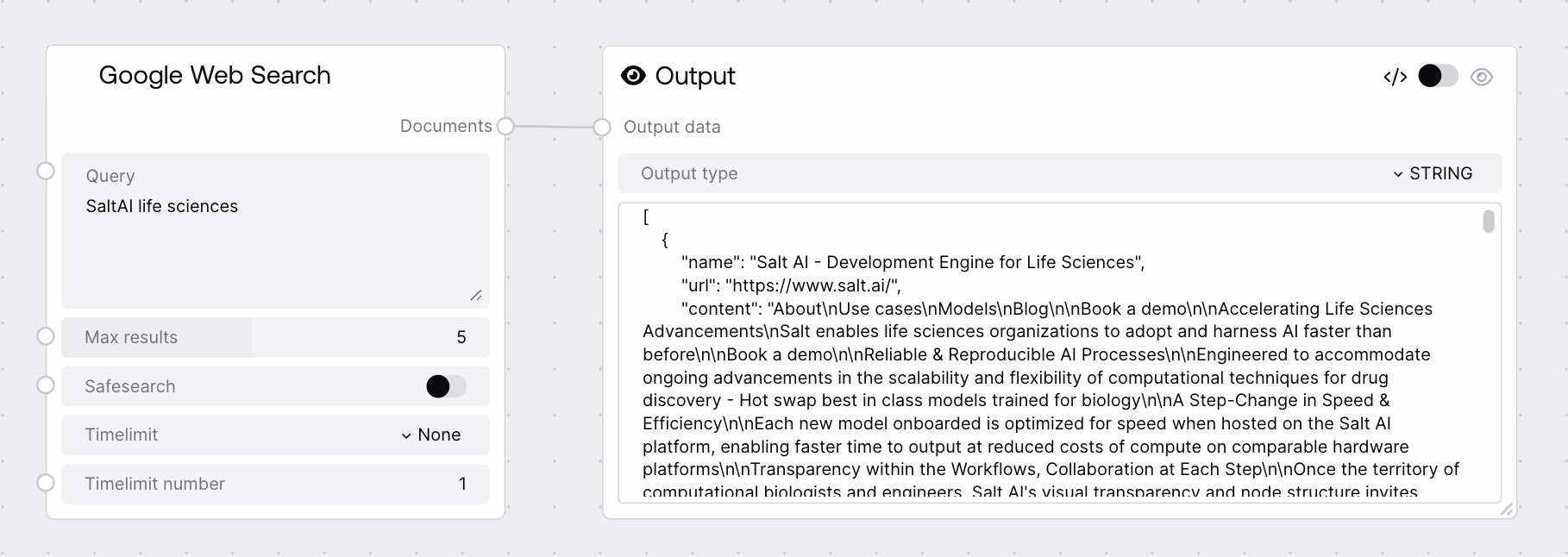
This node sends a query to the Agents service using its Google endpoint and retrieves web search results as a JSON string. It supports common Google-style search operators (exact phrases, exclusions, site/domain filters, file types, related sites) and lets you control the number of results, SafeSearch behavior, and recency filtering. The output is intended for downstream parsing, retrieval-augmented generation, or analytic workflows that operate on structured search result metadata.
Use this node when you need up-to-date information from the public web or want to feed Google search results into a research or retrieval-augmented generation pipeline. Place it early in your workflow: an upstream node (for example, a planner or LLM-based node) can craft a precise query, then Google Web Search retrieves matching results, and downstream nodes parse the returned JSON to extract URLs, titles, and snippets. Typical patterns include: collecting recent news or blog posts about a topic before summarization; restricting results to a specific domain using site: filters; or fetching technically focused documents (for example, PDFs or standards) using filetype: operators. Common upstream nodes are task planners and prompt generators that turn high-level user questions into targeted search queries. Common downstream consumers include WebScraper for fetching full page content, custom JSON-processing nodes for selecting and ranking results, and embedding or RAG indexer nodes that ingest URLs and snippets into vector stores. Adjust max_results for breadth versus cost, enable safesearch when you need filtered content, and tune timelimit and timelimit_number to focus on very recent or somewhat historical content depending on your use case.
The Google search query string. Supports common Google operators such as quoted exact phrases, minus-prefixed terms for exclusion, site:domain filters, filetype:extension filters, and related:domain queries. Multi-line input is allowed in the UI but is treated as a single query string. Use clear, specific wording and operators to get focused results; extremely long or vague queries may reduce result quality.
Maximum number of search results to request from the Google endpoint. Must be between 1 and 10 inclusive. Higher values increase coverage but also increase the size of the returned JSON and the cost of any downstream processing (especially if passing content into language models).
8
safesearch
True
BOOLEAN
Whether to request SafeSearch-style filtering from the backend. When true, the service attempts to filter out adult or explicit content in line with Google SafeSearch behavior. When false, results may include unfiltered content depending on the underlying Google configuration.
True
timelimit
True
ENUM
Time unit used to restrict results to recent content. Allowed values are "None" (no time restriction), "d" (days), "w" (weeks), "m" (months), and "y" (years). Used together with timelimit_number to define a relative lookback window, such as the last 7 days or last 3 months.
m
timelimit_number
True
INT
Number of time units for the timelimit constraint. Only applicable when timelimit is not "None". For example, timelimit set to "w" and timelimit_number set to 4 will request results roughly from the last four weeks. Must be a positive integer; very large values may behave similarly to having no effective time restriction.
A JSON-formatted string containing the search results returned by the Google endpoint of the Agents service. Typically this is a JSON array of result objects, each with fields such as title, url, and snippet or description, plus any additional metadata defined by the backend. Downstream nodes should parse this string as JSON and then operate on the structured data to select, scrape, index, or summarize individual results.
[{"title": "Understanding large language models", "url": "https://arxiv.org/abs/2301.12345", "snippet": "This paper provides an overview of recent advances in large language models, including scaling laws and alignment techniques..."}, {"title": "Alignment of advanced language models", "url": "https://arxiv.org/abs/2302.67890", "snippet": "We discuss challenges and methods for aligning powerful language models with human values..."}]
Performance: Each query calls an external Agents service and Google, so latency is primarily driven by network and API response times; complex or high-traffic scenarios may see several seconds of delay per query.
Performance: Larger max_results values generate larger JSON outputs, which can significantly increase memory use and processing time in downstream nodes, especially when passing content into language models.
Limitations: The exact JSON schema of the results is determined by the backend Agents service and may evolve over time; downstream consumers should parse defensively and check for the presence of fields rather than assuming a fixed structure.
Limitations: Time-based filtering via timelimit and timelimit_number is best-effort and tied to how Google exposes recency; it may not precisely match publication dates for all pages.
Behavior: safesearch provides a content-filtering hint but cannot absolutely guarantee that all sensitive or unwanted content is removed; additional downstream filtering may be required for strict compliance needs.
Behavior: The node only returns result metadata and URLs; it does not fetch or clean full page content. Use scraping or document-loader nodes when you need complete page text or structured extraction.
Common Error 1: Requests time out or an error indicates the web search or Agents service is unavailable. This usually reflects a temporary outage or network issue. Verify network connectivity, confirm that the Agents service is configured and reachable, and retry after a short delay.
Common Error 2: The documents output is empty or contains very few results despite a broad topic. This is often due to overly strict operators (for example, multiple exclusions, narrow site: filters) or aggressive timelimit settings. Simplify the query, loosen time constraints, or increase max_results and test again.
Common Error 3: Downstream nodes report JSON parsing failures. The documents output is a STRING, so consumer nodes must explicitly parse it as JSON. Ensure your downstream logic treats it as JSON text and handles missing or additional fields gracefully.
Common Error 4: Results appear outside the intended timeframe when using timelimit and timelimit_number. Because recency filtering is implemented on top of Google behavior, it can be approximate; narrow the time window, incorporate date-related keywords into the query, or apply additional date filtering in downstream processing if precise recency is critical.