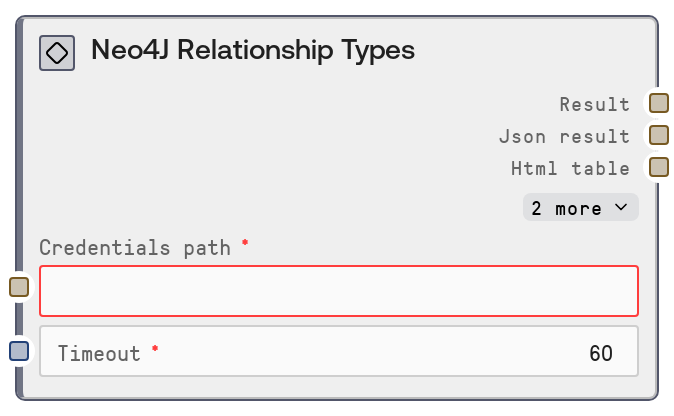
Neo4J Relationship Types
This node connects to a Neo4J database via stored credentials and fetches all distinct relationship types present in the graph. It calls the Neo4J data connector’s /relationship-types endpoint, then formats the response into a human-readable summary along with the full JSON payload. Use it to quickly understand or audit the relationship vocabulary used in your graph schema.
Usage
Use the Neo4J Relationship Types node when you need to inspect or discover all relationship types defined in your Neo4J instance before building queries, schema exploration tools, or analytics. It typically appears early in a workflow after a credentials setup step (for example, a node that writes the Neo4J credentials file or tests the connection, such as SaltNeo4JTestConnection) and before nodes that depend on relationship type names, like SaltNeo4JRelationshipsByType or custom Cypher query builders. A common pattern is: (1) configure credentials and timeout globally, (2) run this node to list available relationship types, (3) feed the discovered type names into a UI selector or downstream query nodes for targeted relationship exploration. Because it returns both formatted text and raw JSON, you can send the text to user-facing components and the JSON to programmatic consumers for filtering, validation, or dynamic query construction.
| Field | Required | Type | Description | Example |
|---|
| credentials_path | True | STRING | Filesystem path or storage reference to the saved Neo4J credentials configuration. The credentials must specify connection details and authentication information compatible with the Neo4J connector’s neo4j credential template. The path must point to a valid, readable credentials file or entry; otherwise, the node will fail to connect. | /data/credentials/neo4j/production_neo4j.json |
| timeout | True | INT | Maximum time, in seconds, the node will wait for the Neo4J service to respond to the /relationship-types request. Use higher values for slow or remote databases, and lower values in interactive environments where responsiveness is critical. Must be a positive integer. | 30 |
Outputs
| Field | Type | Description | Example |
|---|
| text | STRING | A human-readable summary of the relationship types retrieved from Neo4J. Typically used for display in UIs, logs, or chat-style responses to describe which types exist and how many were found. | Neo4J Relationship Types: - KNOWS - WORKS_AT - PURCHASED Total relationship types: 3. |
| json | STRING | Raw JSON string containing the full response from the /relationship-types endpoint. This usually represents an array of relationship type names or a structured object providing additional metadata, depending on the connector configuration. Downstream nodes can parse this JSON for dynamic query building, validation, or analytics. | ["KNOWS", "WORKS_AT", "PURCHASED", "FOLLOWS"] |
| status | STRING | A status message or code indicating the outcome of the request, such as success or an error message returned by the connector. Use this in downstream logic to branch on success versus failure. | success |
| debug | STRING | Optional diagnostic or debug information produced by the underlying database base node. This may include timing data, endpoint used, or error context, and is intended for logging or troubleshooting rather than end-user display. | {"endpoint": "/relationship-types", "duration_ms": 142, "request_id": "b8e3a9b2-7b51-4b34-9b1d-9bf2d5f3f5e1"} |
Important Notes
- Performance: Fetching relationship types is usually lightweight, but in environments with slow connectors or network latency you may need to increase the timeout value to avoid premature failures.
- Limitations: This node only lists relationship types; it does not return counts of relationships per type or any node or relationship data. For actual relationship records, pair it with nodes like SaltNeo4JRelationshipsByType or a query node.
- Behavior: The node relies entirely on the credentials referenced by credentials_path. If those credentials point to a different database or environment than expected (for example, staging vs production), the relationship types will reflect that target, which can be a subtle source of confusion.
- Behavior: Output format is standardized through the base database node. Even on errors, the node may still return JSON containing an error field rather than raising a hard exception, so downstream consumers should inspect the status or JSON content.
Troubleshooting
- Missing or invalid credentials file: If the node returns an error such as "Failed to load credentials", verify that credentials_path is correct, the file exists, and it matches the neo4j credential template (including URI, username, and password or token).
- Connection timeout or unreachable database: Errors mentioning timeouts or connection failures usually indicate network issues, firewall blocking, or an incorrect host or port in the credentials. Test connectivity with SaltNeo4JTestConnection or a separate network tool and increase the timeout if needed.
- Empty relationship type list: If the node succeeds but returns an empty array, confirm that you are connected to the correct database and that it actually contains relationships. Check with a generic query node such as SaltNeo4JQuery using a basic MATCH ()-[r]-() RETURN DISTINCT type(r) query to validate the graph contents.
- Unexpected JSON structure: If downstream nodes fail when parsing the JSON output, log the raw json string to inspect its exact structure. Adjust your parsing logic to match the connector’s output, or normalize the data with an intermediate transformation node.