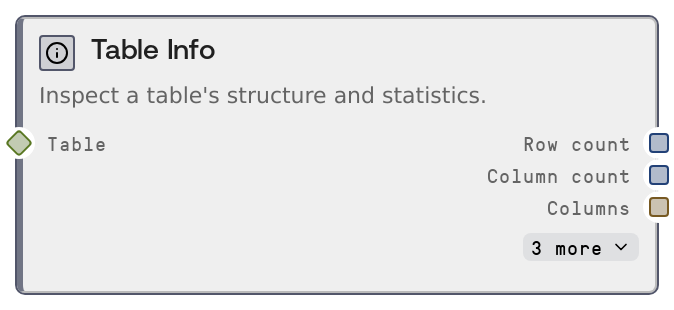
Table Info
This node inspects a TABLE or DATAFRAME and returns structural metadata plus a markdown summary. It reports row and column counts, column names, data types, per-column null counts, and basic statistics (min, max, mean, standard deviation) for numeric columns. The input data is never changed, so it is safe to drop into any workflow purely for analysis and validation.
Usage
Use this node whenever you need to understand, validate, or document a table before or after transformations. Typical scenarios include: (1) right after loading data from a file or API via nodes like SaltTableFromCSV or SaltTableFromJSON to confirm that parsing produced the expected schema; (2) after major operations like SaltTableFilter, SaltTableJoin, SaltTableGroupBy, SaltTableCastType, or SaltTableFillNull to verify that row counts, column counts, and dtypes match your expectations; (3) before exporting with SaltTableOutput to sanity-check the final dataset. Place SaltTableInfo directly downstream of any node that outputs a TABLE or DATAFRAME. The row_count and column_count outputs can feed into conditional or control-flow logic (for example, stopping or branching when a table is empty or too small), while the columns, dtypes, and null_counts outputs can drive dynamic configuration for downstream nodes that expect specific columns or types. The summary markdown is best consumed by display or logging nodes (such as SaltDisplayAny or other inspection nodes) to provide a human-friendly overview, including a compact numeric statistics table for int and float columns. In larger pipelines, a common pattern is: loader → SaltTableInfo → cleaning steps (SaltTableFillNull, SaltTableFilter) → SaltTableInfo again → feature engineering or joins → SaltTableInfo → export (SaltTableOutput).
| Field | Required | Type | Description | Example |
|---|
| table | True | TABLE | The table to inspect. Must be a TABLE (or compatible DATAFRAME) object that Salt can wrap via TableData.ensure. The table should expose a schema with column names and dtypes; numeric statistics are only computed for columns whose dtype is 'int' or 'float'. Very large tables are supported, but because the node scans columns to compute null counts and numeric statistics, execution time and memory use will grow with dataset size. | A TABLE produced by SaltTableFromCSV after loading 'transactions_2024.csv' with columns ['tx_id', 'customer_id', 'country', 'amount', 'created_at']. |
Outputs
| Field | Type | Description | Example |
|---|
| row_count | INT | Total number of rows in the inspected table. Useful for quick size checks, detecting empty or unexpectedly small datasets, and validating the impact of filters, joins, or sampling operations. | 250000 |
| column_count | INT | Total number of columns in the table. Helps confirm that schema width is as expected after column selection, joins, or type-casting steps. | 8 |
| columns | STRING | Comma-separated list of column names in the order they appear in the table. This simple text representation can be logged, displayed to users, or split by downstream logic to dynamically configure other nodes. | tx_id, customer_id, country, amount, currency, created_at, channel, refunded |
| dtypes | STRING | JSON-encoded mapping of column name to its data type as understood by the table schema. Downstream consumers can parse this JSON to check for type mismatches, enforce constraints, or branch logic based on column type. | {"tx_id": "int", "customer_id": "int", "country": "string", "amount": "float", "currency": "string", "created_at": "datetime", "channel": "string", "refunded": "bool"} |
| null_counts | STRING | JSON-encoded mapping from each column name to the count of null or missing values in that column. This is key for data-quality assessments and can guide where to apply SaltTableFillNull, filtering, or more advanced imputation logic. | {"tx_id": 0, "customer_id": 0, "country": 124, "amount": 532, "currency": 0, "created_at": 87, "channel": 145, "refunded": 0} |
| summary | STRING | Markdown-formatted overview summarizing the table. It includes a primary table listing each column with its type, non-null count, and null count, plus an additional Numeric Statistics section for columns typed as 'int' or 'float' that shows min, max, mean, and standard deviation. Designed for consumption by text display or logging nodes so human reviewers can quickly understand the dataset. | ## Table Summary **Rows:** 250,000 \| **Columns:** 8 \| Column \| Type \| Non-Null \| Null \| \|-------------\|----------\|----------\|------\| \| tx_id \| int \| 250,000 \| 0 \| \| customer_id \| int \| 250,000 \| 0 \| \| country \| string \| 249,876 \| 124 \| \| amount \| float \| 249,468 \| 532 \| \| currency \| string \| 250,000 \| 0 \| \| created_at \| datetime \| 249,913 \| 87 \| \| channel \| string \| 249,855 \| 145 \| \| refunded \| bool \| 250,000 \| 0 \| ### Numeric Statistics \| Column \| Min \| Max \| Mean \| Std \| \|--------\|------\|-------\|-------\|-------\| \| tx_id \| 1 \| 250000\| 125000\| 72111 \| \| amount \| 0.01 \| 999.9 \| 54.23 \| 87.45 \| |
Important Notes
- Performance: The node computes null counts for every column and numeric statistics for all int and float columns by scanning the data, so very large tables can increase runtime and memory usage. For quick exploration of huge datasets, consider applying SaltTableSample before this node.
- Limitations: Numeric statistics are only generated for columns whose dtype in the schema is exactly 'int' or 'float'. If numeric values are stored as strings or other types, they will not appear in the Numeric Statistics section until you convert them using nodes like SaltTableCastType.
- Behavior: This is a read-only, inspection-only node. It never modifies the incoming table and does not output a TABLE itself, only metadata and text summaries. Adding or removing it from a pipeline does not affect downstream data content.
- Behavior: The dtypes and null_counts outputs are JSON strings, not native map objects, and the columns output is a plain comma-separated string. Any workflow that needs structured access must parse these strings explicitly in downstream logic or companion nodes.
Troubleshooting
- No Numeric Statistics section in summary: If the summary markdown lacks a Numeric Statistics table, ensure that your numeric columns are typed as 'int' or 'float' in the schema. If they are 'string' or another type, add a SaltTableCastType step before SaltTableInfo to convert them.
- Unexpected row_count or column_count: If counts differ from expectations, insert additional SaltTableInfo nodes at earlier points in the pipeline to pinpoint where a filter, join, group-by, or select changed the size or schema. Verify configurations in nodes like SaltTableFilter, SaltTableJoin, and SaltTableSelectColumns.
- Very large null_counts for key fields: When null_counts shows unexpectedly high nulls on important columns, inspect upstream parsing or casting steps such as SaltTableFromCSV (for delimiter or encoding issues) or SaltTableCastType (which may coerce invalid values to null). Adjust those nodes or add SaltTableFillNull after them to handle missing data appropriately.