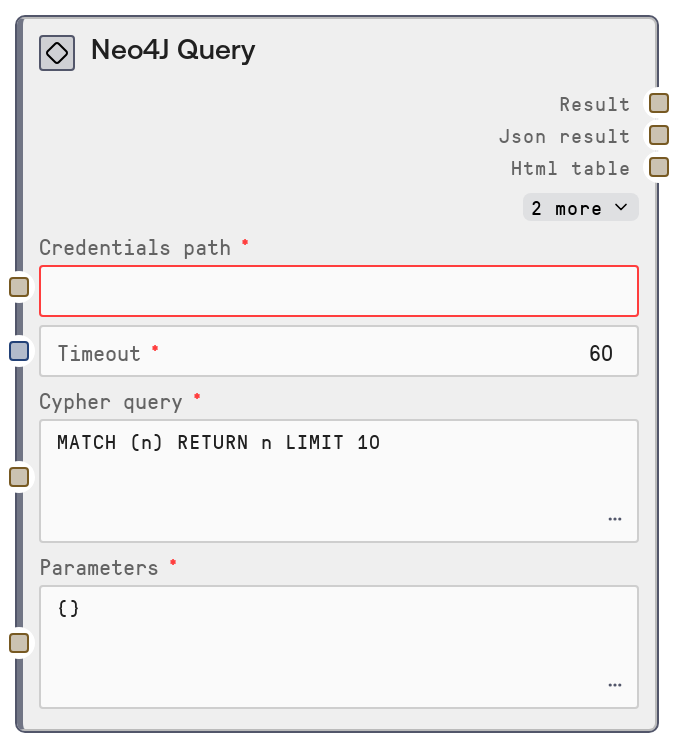
Neo4J Query
This node runs a Cypher query against a Neo4J database using stored credentials and a configurable timeout. It accepts a Cypher query string and optional JSON parameters, sends them to the Neo4J connector service, and returns both a human-readable text summary and the raw JSON response. It is intended for flexible graph data exploration, reporting, and analysis workflows.
Usage
Use this node when you need to read or analyze graph data from a Neo4J instance using Cypher. Typical use cases include exploring neighborhoods around key entities, building analytics on relationships, powering recommendation or search features, and extracting subgraphs for further processing by downstream nodes. In a workflow, it usually sits after a credentials or connection setup step (which provides the hidden credentials_path and timeout inputs) and before nodes that consume text or JSON, such as summarization, table-building, or visualization nodes. A common pattern is: credentials/config node -> Neo4J Query -> JSON processing or analysis node. Combine it with schema-inspection nodes like SaltNeo4JNodeLabels or SaltNeo4JRelationshipTypes to first discover labels and relationship types, then construct more precise Cypher queries. For best results, test your Cypher in a Neo4J client first, then paste it into this node, and supply parameters as valid JSON so that queries are reusable and safe.
| Field | Required | Type | Description | Example |
|---|
| cypher_query | True | STRING | The Cypher query to execute. Supports any valid read-style Cypher including MATCH, OPTIONAL MATCH, UNWIND, aggregations, and RETURN clauses. Can reference named parameters using the $name syntax; these are bound from the parameters input. Multi-line queries are allowed. | MATCH (u:User {id: $userId})-[:PURCHASED]->(p:Product) RETURN p.id AS product_id, p.name AS product_name ORDER BY p.name ASC LIMIT $limit |
| parameters | True | STRING | JSON string representing a parameter object for the Cypher query, where keys correspond to parameter names (without the $ prefix) used in the query. Values may be strings, numbers, booleans, arrays, or nested objects as supported by the Neo4J connector. If the string is empty or not valid JSON, the node logs a warning and uses an empty parameter set instead. | { "userId": "user_9876", "limit": 50 } |
Outputs
| Field | Type | Description | Example |
|---|
| text_output | STRING | Human-readable summary of the Neo4J query results. This is suitable for quick inspection in the UI or logs and typically includes a short header plus a compact preview of returned records. | Neo4J Query Results: 2 records returned. 1) {"product_id": "P123", "product_name": "Noise-Cancelling Headphones"} 2) {"product_id": "P456", "product_name": "Wireless Mouse"} |
| json_output | STRING | Raw JSON response from the Neo4J query connector, serialized as a string. Usually includes an array of result objects and may include metadata like row counts. Intended for downstream nodes that parse and transform structured data. | { "records": [ {"product_id": "P123", "product_name": "Noise-Cancelling Headphones"}, {"product_id": "P456", "product_name": "Wireless Mouse"} ], "summary": { "row_count": 2, "query": "MATCH (u:User {id: $userId})-[:PURCHASED]->(p:Product) RETURN p.id AS product_id, p.name AS product_name ORDER BY p.name ASC LIMIT $limit" } } |
| extra_output_1 | STRING | Reserved extra output channel provided by the shared database base node. For this node it is typically unused and returned as an empty string, but remains available for future extensions. | |
| extra_output_2 | STRING | Second reserved extra output channel from the base node, normally unused. Provided for consistency across database-related nodes. | |
Important Notes
- Performance: Cypher queries that traverse many hops or lack appropriate indexes can be slow and may hit the timeout; consider adding indexes on frequently filtered properties and limiting traversal depth.
- Limitations: The parameters input must be valid JSON; if parsing fails, the node silently substitutes an empty parameter map, which can change query results without an obvious error in the output.
- Behavior: This node relies on shared credential loading via the database base node; if credentials_path is wrong or credentials are missing, you will see connection or authentication errors from the underlying request.
- Behavior: Both the human-readable summary and the raw JSON are returned as strings; any downstream structured processing must explicitly parse the json_output value.
Troubleshooting
- Query appears to ignore parameters: When results look unfiltered, inspect the parameters string for JSON syntax issues such as missing quotes or trailing commas. Correct the JSON and rerun so that named parameters (like $userId) are actually bound.
- Connection or authentication failures: Errors indicating failure to connect, unauthorized access, or invalid credentials usually mean the credentials_path does not point to a valid Neo4J configuration. Verify the stored host, port, username, and password or token, and confirm the Neo4J service is reachable from the environment.
- Frequent timeouts: If queries regularly exceed the timeout, profile and simplify the Cypher query (reduce MATCH scope, add WHERE clauses, or add indexes) or increase the timeout to accommodate legitimate long-running analytics.
- Empty or unexpected result sets: If the node runs without error but returns no data, test the same Cypher and parameters directly in a Neo4J client. Check for mistakes in labels, relationship types, property names, or parameter values that may be over-filtering your data.