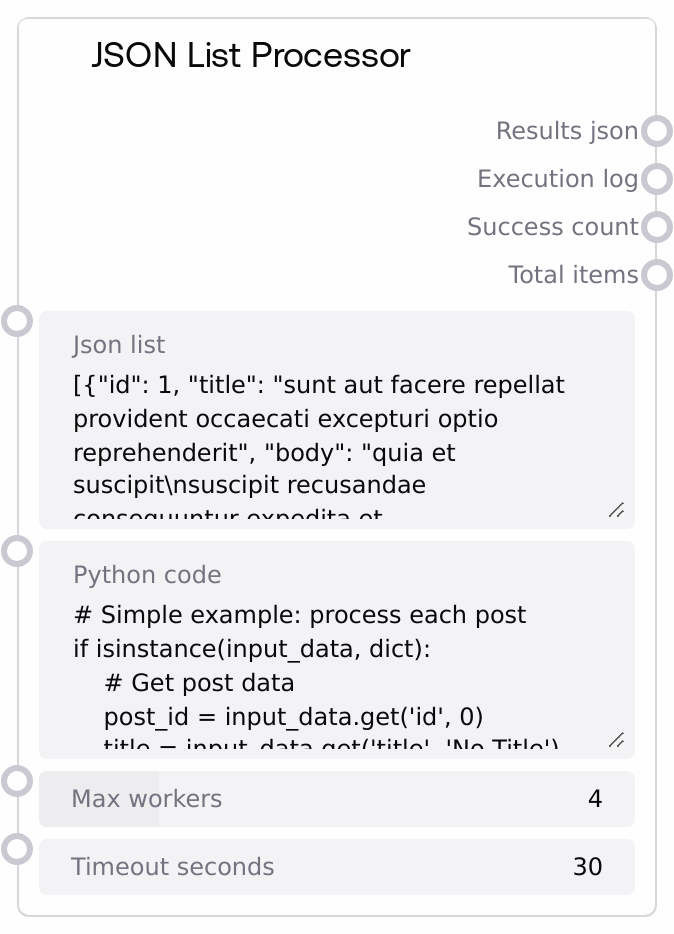
JSON List Processor
This node takes a JSON list/array as input and runs user-provided Python code on each item in parallel using a thread pool. It validates the code for safety, executes it in an isolated environment with logging and stdout/stderr capture, and aggregates all per-item results into a JSON string. The node reports how many items succeeded, how many failed, and provides a detailed execution log for debugging.
Usage
Use this node when you have a list of JSON objects and you want to apply the same custom transformation or analysis to each element concurrently. Typical scenarios include post-processing batched API responses, transforming records (for example posts, users, medical observations) into a different schema, or extracting summary metrics from each item. A common workflow is: (1) fetch data from an API or data source (for example with the "API Fetcher" node), (2) pass the JSON list/array string into "JSON List Processor" to run custom logic per item, and then (3) send "results_json" into downstream nodes that consume structured JSON (such as LLM prompt builders, database writers, or visualization nodes). Upstream, pair it with nodes that output JSON arrays as strings. Downstream, connect it to nodes that parse or store JSON, or to a single-item "Code Executor" node for further custom processing. Prefer simpler declarative nodes when you just need filtering or field selection; use this node when flexible Python logic and concurrency are required. Tune "max_workers" and "timeout_seconds" to balance speed and reliability in your pipeline.
| Field | Required | Type | Description | Example |
|---|
| json_list | True | STRING | A JSON-encoded list/array to process. Must be valid JSON and must decode to a list (not a single object). Each element is passed to your Python code as input_data. If the parsed value is not a list, processing is aborted. Large lists will all be scheduled but are subject to the global timeout window (timeout_seconds times number_of_items). | [{"id":1,"title":"First post","body":"Hello world","userId":10},{"id":2,"title":"Second post","body":"More content","userId":11}] |
| python_code | True | STRING | Python code that processes one item at a time. For each list element, the node sets input_data to that item, input_index to its 0-based index, and all_inputs to the full list. Your code should compute a result (or output) variable or use return to provide the output for that item. The environment restricts dangerous operations: imports of OS/system modules, exec and eval, file I/O, and similar patterns are blocked during validation. Code must be syntactically valid Python. | if isinstance(input_data, dict): price = float(input_data.get("price", 0)) qty = int(input_data.get("quantity", 0)) result = { "item_id": input_data.get("id"), "total_value": price * qty, "is_high_value": price * qty > 1000, "index": input_index } else: result = {"error": "Unexpected item type", "index": input_index} return result |
| max_workers | True | INT | Maximum number of concurrent worker threads used to process list items. Higher values can speed up processing for CPU-light operations, but may increase contention and logging noise. Must be between 1 and 16. All items are still processed; this only controls parallelism. | 8 |
| timeout_seconds | True | FLOAT | Maximum allowed execution time per item in seconds. If a single item’s code does not finish within this period, that item is marked as timed out and its result is set to null. The overall wait window for all items is approximately timeout_seconds times number_of_items. | 20.0 |
Outputs
| Field | Type | Description | Example |
|---|
| results_json | STRING | A JSON-formatted string representing a list of per-item results, in the same order as the input list. Each element is whatever your code returned or assigned to result or output for that item, or null if the item failed or timed out. If the results contain non-serializable objects, they are converted to strings with a warning appended to the execution log. | [{"post_id":1,"title_upper":"FIRST POST","title_length":10,"processed":true},{"post_id":2,"title_upper":"SECOND POST","title_length":11,"processed":true},null] |
| execution_log | STRING | Multiline text log summarizing processing of each item and overall statistics. Contains entries like "Item N: SUCCESS" plus any captured stdout or stderr, and error lines such as timeouts or execution errors. Ends with an aggregate summary of total, success, and failure counts. | Item 0: SUCCESS \| Output: computed total=1200 Item 1: SUCCESS Item 2: TIMEOUT after 20.0 seconds Processed 3 items. Success: 2, Failed: 1 |
| success_count | INT | Number of items that completed successfully, that is, whose code ran without raising an exception or timing out. This does not inspect the semantic content of results, only execution status. | 42 |
| total_items | INT | Total number of items in the parsed input list, including those that failed or timed out. Use this together with success_count to assess failure rates or to implement downstream branching. | 50 |
Important Notes
- Performance: The node uses a thread pool; for I/O-bound tasks you can increase max_workers for speed, but CPU-heavy code may not scale linearly and can slow other parts of the workflow.
- Limitations: The input must be a JSON list; a single object like "{...}" or invalid JSON will cause the node to return an empty result and an error message instead of partial processing.
- Behavior: User code is validated for dangerous patterns such as importing OS or system modules, using exec or eval, or opening files, and is rejected if such patterns are detected, even if the syntax is otherwise valid.
- Behavior: For each item, all print output and warnings (stdout and stderr) are captured and included in the per-item log entry, which can significantly increase log size for large lists.
- Behavior: Results that cannot be serialized to JSON are converted to strings; when this happens a warning line is appended to the execution_log to make the conversion explicit.
Troubleshooting
- Common Error 1: Messages like "Invalid JSON format: ..." or "Input must be a JSON list/array" indicate that json_list is not valid JSON or is not a list. Ensure it decodes to something like [{"id":1},{"id":2}] rather than a single object such as {"id":1}.
- Common Error 2: "Invalid Python code provided" means the code either has a syntax error or contains blocked patterns such as import os, exec(, or eval(. Simplify the code, remove unsafe imports, and test it in a basic Python environment for syntax before pasting it into the node.
- Common Error 3: Item-level timeouts logged as "Item N: TIMEOUT after X seconds" mean your per-item logic is too slow or blocked. Lower the workload per item, increase timeout_seconds, or reduce max_workers if external resources are being contended.
- Common Error 4: Many null entries in results_json with logs like "Item N: ERROR - ..." indicate exceptions are being raised in your Python code. Add defensive checks around input_data fields, print intermediate values for debugging (they will appear in execution_log), and confirm you always assign or return a result.