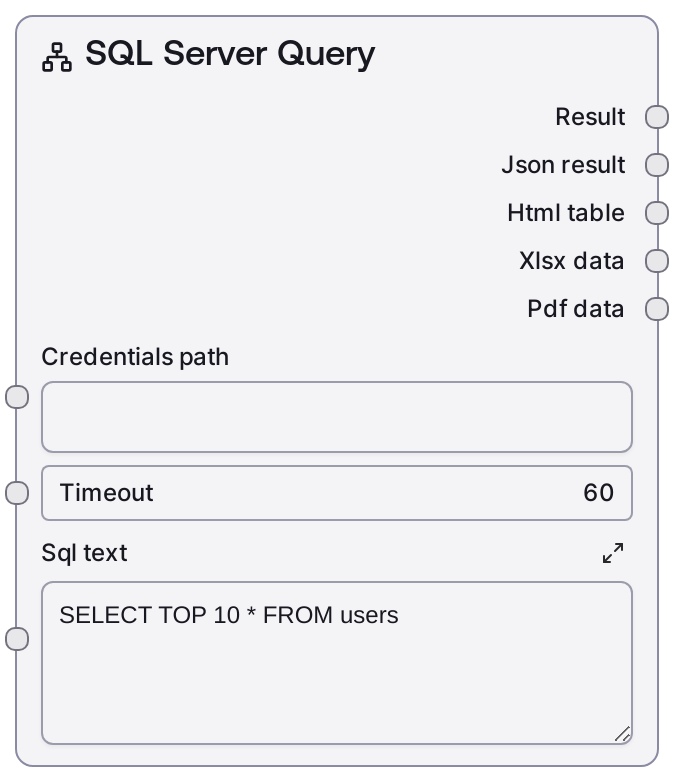
SQL Server Query
This node runs read-only SQL SELECT statements against a Microsoft SQL Server database configured via MSSQL credentials. It loads connection details from a credentials file, executes the query with a configurable timeout, and returns structured results suitable for downstream processing. It is built on the generic database base node, so its outputs are consistent with other SQL-oriented nodes in the same family.
Usage
Use this node whenever you need to read tabular data from a SQL Server database as part of a workflow—for analytics, reporting, enrichment, or feeding other nodes with database-backed context. Typically, you first configure an MSSQL credential (or construct a connection string elsewhere in your Salt environment), then provide the path to those credentials and a SELECT query. Upstream, this node is often driven by prompt-created SQL text, a query builder node, or static SQL in the workflow. Downstream, its outputs are commonly consumed by nodes that process JSON/tabular data, such as data transformation nodes, summarization/LLM nodes, or exporters (e.g., to CSV, spreadsheets, or APIs). It pairs naturally with related nodes like SaltMSSQLTableInfo (to inspect table structure before writing the query), SaltMSSQLListTables (to discover available tables), and SaltMSSQLExecute (to apply modifications after inspecting query results). For best results, keep queries well-scoped (use WHERE and TOP/LIMIT), avoid selecting unbounded large tables, and validate your SQL syntax against the target schema before integrating it into production workflows.
| Field | Required | Type | Description | Example |
|---|
| credentials_path | True | STRING | Filesystem path or key reference to the stored MSSQL credentials/connection configuration. The credentials must match the `mssql` template expected by the underlying database base node (typically including host, port, database, username, and password or a full connection URI). The path must be readable by the Salt execution environment. | /workspace/credentials/mssql_prod.json |
| timeout | True | INT | Maximum time allowed for the query to run, in seconds. If the query does not complete within this limit, it will be cancelled and an error returned. Use higher values for complex analytical queries and lower values for interactive or latency-sensitive workflows. | 60 |
| sql_text | True | STRING | SQL Server SELECT statement to execute. Must be a valid read-only query (no INSERT/UPDATE/DELETE/DDL). Multiline input is supported, and you can include JOINs, WHERE clauses, ORDER BY, and TOP/LIMIT constructs. Avoid including parameters that are not safely interpolated or that can introduce SQL injection; sanitize or parameterize user input upstream. | SELECT TOP 100 o.OrderID, o.OrderDate, c.CustomerName FROM dbo.Orders o JOIN dbo.Customers c ON o.CustomerID = c.CustomerID WHERE o.OrderDate >= '2024-01-01' ORDER BY o.OrderDate DESC; |
Outputs
| Field | Type | Description | Example |
|---|
| text_output | STRING | Human-readable textual summary or representation of the query result, suitable for direct display or feeding into language-model-based nodes. Often includes a short description of the result set and possibly a preview of rows. | Query returned 100 rows from dbo.Orders joined with dbo.Customers. Columns: OrderID, OrderDate, CustomerName, TotalAmount. First row: {"OrderID": 58291, "OrderDate": "2024-03-15T10:32:00", "CustomerName": "Contoso Retail"}. |
| json_results | STRING | JSON-serialized representation of the query result set (typically an array of row objects). This is the main machine-consumable output for downstream data transformation, filtering, or export nodes. | [{"OrderID": 58291, "OrderDate": "2024-03-15T10:32:00", "CustomerName": "Contoso Retail", "TotalAmount": 1299.5}, {"OrderID": 58292, "OrderDate": "2024-03-15T11:04:00", "CustomerName": "Northwind Traders", "TotalAmount": 245.0}] |
| columns_metadata | STRING | JSON-encoded metadata about the result columns, such as column names, types, and possibly size/scale information. Useful for schema-aware downstream processing or dynamic UI/table rendering. | {"columns": [{"name": "OrderID", "type": "int"}, {"name": "OrderDate", "type": "datetime"}, {"name": "CustomerName", "type": "nvarchar(255)"}, {"name": "TotalAmount", "type": "decimal(18,2)"}]} |
| raw_response | STRING | Additional raw or passthrough information from the underlying driver or database layer (often JSON). This can be used for debugging, logging, or advanced integrations that need low-level details. | {"rowCount": 100, "executionTimeMs": 245, "database": "SalesDB", "server": "sql-prod-01"} |
| error_output | STRING | JSON-encoded error information if the query fails. When execution succeeds, this is typically empty. Downstream nodes can inspect this field to implement error handling or alerts. | {"error": "SQL execution failed", "details": "Timeout expired after 60 seconds while executing query.", "code": "QUERY_TIMEOUT"} |
Important Notes
- Performance: Large unfiltered queries (e.g., SELECT * from big tables) can be slow and memory-intensive; always constrain result sets with WHERE and TOP/LIMIT where possible.
- Limitations: This node is intended for read-only SELECT queries; use "SaltMSSQLExecute" for INSERT, UPDATE, DELETE, or DDL statements to avoid unexpected behavior or permission issues.
- Behavior: The node relies on a credentials file and the "mssql" credential template; if these are misconfigured, the query will fail before any SQL is executed.
- Behavior: Timeouts are enforced at the node level; a long-running database operation that exceeds the configured timeout will be cancelled and surfaced as an error in the outputs.
Troubleshooting
- Connection or authentication failure: If you see an error indicating login failure or inability to connect, verify "credentials_path" points to a valid MSSQL credential file (host, port, database, username/password or URI) and that the database is reachable from the Salt environment.
- Query timeout exceeded: Errors mentioning timeout or cancelled queries usually mean the operation exceeded the "timeout" value; reduce query complexity, add filters/indexes, or increase the timeout input.
- SQL syntax or permission errors: Messages like "Incorrect syntax near" or "permission denied" indicate issues in "sql_text" or insufficient privileges; test the query directly against SQL Server, correct the syntax, or adjust database permissions.
- Empty or unexpected results: If the query runs but returns no rows or missing columns, double-check the target schema (e.g., dbo vs another schema), table names, and WHERE conditions, and consider using "SaltMSSQLTableInfo" or "SaltMSSQLListTables" to inspect the schema before adjusting the query.