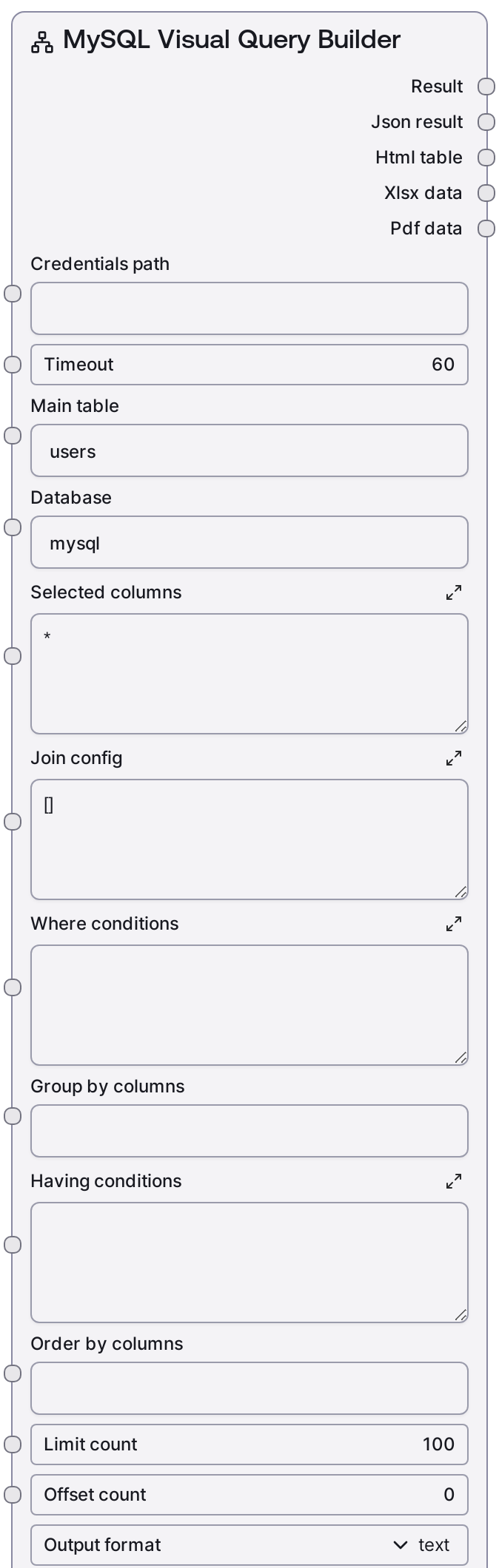
MySQL Visual Query Builder
This node lets you construct complex MySQL SELECT queries without writing SQL directly. You define the main table, columns, JOINs, filters, grouping, ordering, and pagination as structured inputs, and the node builds and executes the SQL against your MySQL database via the Salt data service. Results can be returned as readable text plus JSON, or as HTML, Excel, and PDF exports for downstream consumption.
Usage
Use this node when you need reusable, parameter-driven MySQL queries that can be configured by non-SQL users, or when you want to standardize report-style queries. A common workflow is: (1) validate access using SaltMySQLTestConnection and, if needed, construct a URI with SaltMySQLConnectionString; (2) discover databases and tables with SaltMySQLListDatabases and SaltMySQLListTables; (3) inspect columns or get join ideas with SaltMySQLTableInfo and SaltMySQLQueryBuilder; and (4) configure this node with the chosen main_table, database, selected_columns, and join_config. Then refine the dataset using where_conditions, group_by_columns, having_conditions, order_by_columns, limit_count, and offset_count. Choose output_format based on how the data will be used: text for quick inspection and JSON-driven pipelines, html for embedding a table in dashboards, xlsx for analysts working in spreadsheets, pdf for fixed-format reports, or all for multi-format exports. Downstream, wire the outputs into file-save/export nodes, notification/report delivery steps, or additional analytic nodes that consume JSON, HTML, XLSX, or PDF.
| Field | Required | Type | Description | Example |
|---|
| timeout | True | INT | Maximum number of seconds to wait for the MySQL query to complete through the Salt data service. Increase for complex analytical queries, but very large values may tie up resources. | 60 |
| main_table | True | STRING | Name of the primary table to select from. This becomes the FROM clause target, optionally qualified by the database name. | users |
| database | True | STRING | Database/schema that contains the main_table. Used to build fully-qualified table names like database.main_table in the generated SQL. | customer_analytics |
| selected_columns | True | STRING | Columns or expressions for the SELECT clause, as a comma-separated string. Use * to select all columns, or specify qualified names and expressions as supported by MySQL. | users.id, users.email, orders.order_date, orders.total_amount |
| join_config | True | STRING | JSON array of JOIN definitions. Each item must be an object with type (INNER, LEFT, RIGHT, FULL, or CROSS), table (joined table name), on (join condition), and optional database (schema for the joined table). If database is omitted for a join, this implementation defaults it to "mysql". | [{"type": "LEFT", "table": "orders", "database": "customer_analytics", "on": "users.id = orders.user_id"}, {"type": "INNER", "table": "order_items", "database": "customer_analytics", "on": "orders.id = order_items.order_id"}] |
| where_conditions | True | STRING | Conditions for the WHERE clause, without the WHERE keyword. May contain multiple predicates combined with AND/OR and must be valid MySQL syntax. No automatic escaping or parameterization is applied. | users.signup_date >= '2024-01-01' AND users.status = 'active' |
| group_by_columns | True | STRING | Comma-separated list of columns or expressions to use in GROUP BY. Leave empty to avoid grouping. Must align with any aggregates used in selected_columns and having_conditions. | users.country, DATE(orders.order_date) |
| having_conditions | True | STRING | Conditions for the HAVING clause, without the HAVING keyword. Used to filter grouped results by aggregated values. Must be valid MySQL syntax. | SUM(orders.total_amount) > 1000 |
| order_by_columns | True | STRING | ORDER BY expressions as a comma-separated string, with optional ASC or DESC on each term. Leave blank to skip explicit ordering. | users.country ASC, orders.order_date DESC |
| limit_count | True | INT | LIMIT value that caps the maximum number of rows returned. Must be between 1 and 10000. Helps prevent accidental full-table scans from producing huge result sets. | 500 |
| offset_count | True | INT | OFFSET value that skips the first N rows in the result set, for pagination or incremental browsing. Must be between 0 and 10000. | 0 |
| output_format | True | CHOICE[text, html, xlsx, pdf, all] | Controls how results are returned. text yields a human-readable summary plus JSON. html yields an HTML table. xlsx yields an Excel workbook. pdf yields a PDF document. all uses the node's helper to produce multiple formats at once. | html |
Outputs
| Field | Type | Description | Example |
|---|
| text_output | STRING | Human-readable text describing the query results, including row counts and per-row key-value pairs. Primarily populated for text and all output formats. | Visual Query Results (250 rows): ================================================== Row 1: users.id: 10293 users.email: alice@example.com orders.order_date: 2024-02-03 10:23:15 orders.total_amount: 159.99 Row 2: users.id: 10411 users.email: bob@example.com orders.order_date: 2024-02-03 11:08:42 orders.total_amount: 89.50 ... |
| json_output | STRING | JSON-encoded string containing the raw query result as returned by the data service. Typically includes a data array of rows and optional row_count or other metadata. | {"data": [{"users.id": 10293, "users.email": "alice@example.com", "orders.order_date": "2024-02-03T10:23:15", "orders.total_amount": 159.99}, {"users.id": 10411, "users.email": "bob@example.com", "orders.order_date": "2024-02-03T11:08:42", "orders.total_amount": 89.5}], "row_count": 250} |
| html_output | STRING | HTML markup that renders the result set as a table, often wrapped with a title that includes the database and main table. Non-empty when output_format is html and may also be present when all is selected. | Visual Query: customer_analytics.users| users.id | users.email | orders.order_date | orders.total_amount |
|---|
| 10293 | alice@example.com | 2024-02-03 10:23:15 | 159.99 |
|
| xlsx_output | BYTES | Binary XLSX data representing the query results as an Excel workbook. Intended to be saved or streamed by a downstream file or export node. Present when output_format is xlsx (and potentially for all). | Binary XLSX data representing a worksheet named "Visual Query: customer_analytics.users" with one row per result and matching columns. |
| pdf_output | BYTES | Binary PDF data rendering the query results as a paginated table-based report. Used in reporting or document-generation pipelines. Present when output_format is pdf (and potentially for all). | Binary PDF data producing a multi-page table report titled "Visual Query: customer_analytics.users" with headers and tabular data. |
Important Notes
- Performance: Even with limit_count capped between 1 and 10000, complex joins, wide tables, or missing indexes can make queries slow. Start with narrow filters and moderate limits in production flows.
- Limitations: where_conditions, group_by_columns, having_conditions, and order_by_columns are inserted directly into the SQL. They must be syntactically valid and should not be built from untrusted user input without additional validation.
- Behavior: join_config is strictly parsed as JSON and must be a list of dictionaries; each entry must specify type, table, and on. Any parsing or validation error stops execution before contacting the database and returns a descriptive error message.
- Behavior: For non-text formats such as html, xlsx, and pdf, the text_output field may be empty. Downstream nodes should consume json_output, html_output, xlsx_output, or pdf_output based on the selected output_format.
- Limitations: Only join types INNER, LEFT, RIGHT, FULL, and CROSS are accepted. Other labels (for example, LEFT OUTER) are rejected and will not be auto-corrected.
Troubleshooting
- Invalid join_config JSON: If you see an error mentioning invalid JSON in join configuration, ensure join_config is a well-formed JSON array with double-quoted keys and strings, no comments, and no trailing commas.
- Join structure errors: Messages like "Join 0 must be a dictionary" or "Join 1 missing required field: on" mean at least one join definition is incorrectly structured. Verify each item is an object with type, table, and on fields, and optional database.
- Unsupported join type: An error referencing an invalid join type indicates that a join type is not one of INNER, LEFT, RIGHT, FULL, or CROSS. Update the join_config entries to use only the supported types.
- SQL or schema errors: If the underlying service reports SQL syntax errors or unknown columns/tables, double-check selected_columns, where_conditions, group_by_columns, having_conditions, and join_config to ensure column names and expressions are valid.
- No data returned: If results are consistently empty or text_output shows that no data was returned, temporarily loosen or remove where_conditions and having_conditions, reduce joins, or run a simpler query to confirm that matching rows exist.