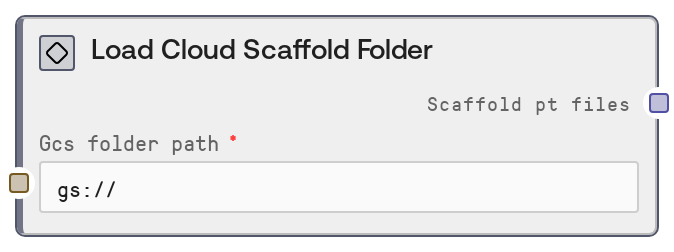
Load Cloud Scaffold Folder
LoadCloudScaffoldFolderNode (an alias of LoadGCSScaffoldFolderNode) takes a cloud folder path (gs:// or s3://) that contains precomputed scaffold .pt files and converts it into a structured reference object. The node does not read, list, or validate the files; it normalizes the path, detects the cloud provider, and emits a standardized descriptor used by downstream GPU services to load the data directly. This is optimized for large scaffold folders used in RFDiffusion scaffold-guided protein design.
Usage
Use this node when you already have secondary structure and adjacency .pt scaffold files generated and stored in a cloud bucket, and you want to feed them into scaffold-guided protein design workflows that rely on RFDiffusion-style conditioning. Typical workflow position: Upstream, there is usually no computational upstream node; instead, this node takes a user-supplied cloud folder path. The .pt files are often generated beforehand by batch pipelines, RFDiffusion's make_secstruc_adj.py, or by the Make Secstruc Adj node running in a separate environment and then uploaded to GCS or S3. In this node, you configure the gs:// or s3:// folder path. Downstream, you connect the scaffold_pt_files output to nodes that configure or run RFDiffusion with scaffold-guided conditioning (any node expecting SCAFFOLD_PT_FILES, such as an RFDiffusion Scaffold Guided Config node). Integration patterns include cloud-optimized workflows where large scaffold libraries remain in cloud storage and are loaded only by GPU services, and cross-cloud support where gs:// and s3:// are both supported via the same reference structure. Best practices: keep folder naming consistent with scaffold_name_ss.pt and scaffold_name_adj.pt pairs, use buckets that are network-close to GPU services, and ensure your compute environment has permissions to access the bucket.
| Field | Required | Type | Description | Example |
|---|
| gcs_folder_path | True | STRING | Cloud folder path containing precomputed scaffold .pt files. Must begin with gs:// for Google Cloud Storage or s3:// for Amazon S3; other URL schemes such as file:// or http:// are rejected. The node trims whitespace and automatically appends a trailing slash if missing. The specified folder should contain pairs of files for each scaffold, following the pattern scaffold_name_ss.pt and scaffold_name_adj.pt, compatible with RFDiffusion's make_secstruc_adj.py output. | gs://protein-scaffolds/rfdiffusion/scaffolds_v1; s3://biotech-prod-scaffolds/human_kinase_panel/ |
Outputs
| Field | Type | Description | Example |
|---|
| scaffold_pt_files | SCAFFOLD_PT_FILES | A structured reference object that describes a cloud folder containing scaffold .pt files. It includes a type discriminator (cloud_path), the provider (gcs or s3), and both a generic cloud_folder_path and a backward-compatible gcs_folder_path key. Downstream GPU services use this object to locate and load scaffold .pt files directly from cloud storage, without Salt loading them into memory. | {'type': 'cloud_path', 'provider': 'gcs', 'cloud_folder_path': 'gs://protein-scaffolds/rfdiffusion/scaffolds_v1/', 'gcs_folder_path': 'gs://protein-scaffolds/rfdiffusion/scaffolds_v1/'} |
Important Notes
- Performance: The node does not list or load any files from cloud storage; it only constructs a small reference dictionary, so execution time is effectively negligible even for very large folders.
- Limitations: Only gs:// and s3:// paths are supported. Any other scheme or bare path (for example, /local/path, file:///..., http://...) will cause a ValueError; the path must clearly indicate GCS or S3.
- Behavior: If the input path does not end with a slash, the node automatically appends / before emitting the reference. This ensures downstream services can reliably treat the path as a folder rather than a file.
- Behavior: The output always includes both cloud_folder_path and gcs_folder_path. The latter exists purely for backward compatibility with older GPU services and may still be populated even when the provider is s3.
Troubleshooting
- Invalid cloud path format: If you encounter an error stating 'Invalid cloud path format. Expected gs://bucket/path or s3://bucket/path', verify that your input begins with gs:// or s3:// and that you are not using file://, http://, or a local filesystem path.
- Downstream node cannot find scaffold files: When downstream execution fails with missing or not found scaffold .pt files, first confirm that the bucket/folder actually contains matching _ss.pt and _adj.pt files, and then check that your GPU environment has permissions and correct region access to the bucket.
- Unexpected provider selection: If your logs show provider: gcs when you expect S3 (or vice versa), double-check that the input path's scheme is correct (gs:// vs s3://); the provider is inferred solely from this prefix.
- Inconsistent path formatting: If external scripts or monitoring tools expect a path without a trailing slash, remember this node normalizes by adding /. Update those external components to handle the normalized folder path so that references match exactly.