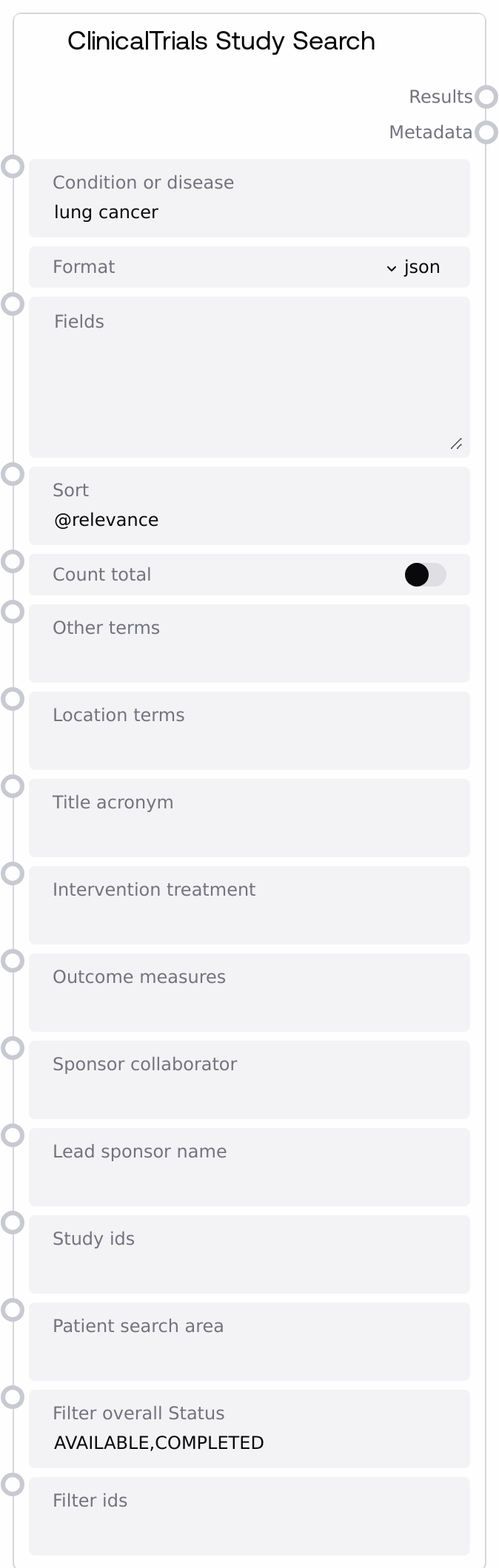
ClinicalTrials Study Search
This node sends a search request to the ClinicalTrials.gov v2 /studies endpoint using a primary condition or disease plus optional filters such as location, sponsors, outcomes, and study IDs. It can return structured JSON results (as a JSON string of the studies array) or raw CSV/XML along with a compact metadata summary (for example, total_studies, query, and api_version or content_length). The node builds on a shared ClinicalTrials base, inheriting common configuration while focusing specifically on study-level search.
Usage
Use this node to search for clinical studies on ClinicalTrials.gov when you have a target condition or disease and need to refine results by geography, sponsors, outcomes, or study status. In a typical workflow, an upstream text-processing or configuration node determines the condition_or_disease (for example, extracted from user input such as “metastatic melanoma”) and any preferred filters (for example, only recruiting studies in a specific region). You then configure this node with those parameters, choose format="json" for structured downstream processing or "csv"/"xml" when integrating with tools that expect tabular or XML input, and run the query. Downstream, connect the results output to JSON/CSV/XML parsing and transformation nodes, analytics components, or UI nodes that display trial lists, and feed the metadata output to logging, monitoring, or UI summary elements that show counts and query details. This node is often used alongside other ClinicalTrials nodes that explore fields or retrieve detailed records, and with generic data transformation nodes that convert the returned strings into tables or objects.
| Field | Required | Type | Description | Example |
|---|
| condition_or_disease | True | STRING | Primary clinical condition or disease term used as the main search query. Should be a clear medical term or phrase that ClinicalTrials.gov can match to studies. | metastatic non-small cell lung cancer |
| format | True | STRING | Desired response format from the API. Common values: "json" (parsed and returned as a JSON-formatted string), "csv" (raw CSV text), or "xml" (raw XML text). Using unsupported values can lead to unusable responses or API errors. | json |
| fields | False | STRING | Comma-separated list of specific study fields to include in the response. Leaving this empty uses the API defaults. Narrowing to only needed fields can simplify downstream processing. | NCTId,BriefTitle,Condition,OverallStatus,LocationCountry |
| sort | False | STRING | Sorting instruction passed as the sort parameter. Defaults to "@relevance" to rank by relevance to the query. Other options follow the ClinicalTrials.gov v2 sort syntax (for example, "@studyStartDate desc"). | @studyStartDate desc |
| count_total | False | BOOLEAN | When true, includes countTotal in the request so the API returns the total number of matching studies. Reflected as total_studies in the metadata. May slightly increase latency for large result sets. | True |
| other_terms | False | STRING | Additional free-text search terms beyond the main condition_or_disease, mapped to query.term. Use to refine results by population descriptors, comorbidities, or other relevant keywords. | elderly OR geriatric |
| location_terms | False | STRING | Location-related query terms, mapped to query.locn. Can include countries, states, cities, or regions to constrain where trials are conducted. | United States; California; San Diego |
| title_acronym | False | STRING | Text to match in study titles or acronyms, mapped to query.titles. Helpful when the user knows part of the study title or a trial acronym. | KEYNOTE |
| intervention_treatment | False | STRING | Intervention or treatment search terms, mapped to query.incr. Use to focus on studies involving specific drugs, devices, or procedures. | pembrolizumab |
| outcome_measures | False | STRING | Outcome-related search terms, mapped to query.outc. Use to find studies measuring specific endpoints like survival, response rates, or quality of life. | overall survival OR progression-free survival |
| sponsor_collaborator | False | STRING | Sponsor or collaborator search terms, mapped to query.spons. Useful for restricting results to studies supported by particular institutions or companies. | National Cancer Institute |
| lead_sponsor_name | False | STRING | Lead sponsor name, mapped to query.lead. Use when trials must be led by a specific organization. | Pfizer |
| study_ids | False | STRING | Specific study identifiers, mapped to query.id. Accepts a single NCT ID or a comma-separated list, allowing retrieval of a known set of trials. | NCT04812345,NCT04967890 |
| patient_search_area | False | STRING | Patient-centric search area parameter, mapped to query.patient. Typically encodes a geographic search area around a patient location (for example, zip code and radius) according to API conventions. | 94103,50 |
| filter_overallStatus | False | STRING | Filter on overall study status, mapped to filter.overallStatus. Comma-separated list of statuses such as AVAILABLE, COMPLETED, RECRUITING. Defaults to "AVAILABLE,COMPLETED" if not changed. | RECRUITING,ACTIVE_NOT_RECRUITING |
| filter_ids | False | STRING | ID-based filter mapped to filter.ids. Restricts results to a set of identifiers following the API’s filtering rules, which can differ from simple query.id usage. | NCT04812345,NCT04967890 |
Outputs
| Field | Type | Description | Example |
|---|
| results | STRING | Main set of study search results from the /studies endpoint. For format="json", this is a JSON-formatted string representing the studies array; for csv or xml formats, this is raw CSV or XML text that can be passed to downstream parsers. | {"studies":[{"protocolSection":{"identificationModule":{"nctId":"NCT04812345","briefTitle":"Pembrolizumab in Metastatic NSCLC"},"conditionsModule":{"conditions":["Non-Small Cell Lung Cancer"]},"statusModule":{"overallStatus":"RECRUITING"}}}]} |
| metadata | STRING | Metadata about the response and query. For json format, typically includes total_studies, query, and api_version. For csv and xml formats, it includes format, content_length, and the original query string. Always returned as a JSON-formatted string for easy downstream parsing. | {"total_studies":237,"query":"metastatic non-small cell lung cancer","api_version":"2.0"} |
Important Notes
- Performance: Setting count_total to true asks the API to compute the full number of matching studies, which can increase response time for very broad queries; disable it when only a subset of results is needed quickly.
- Limitations: The sort and filter parameters are passed directly to ClinicalTrials.gov; invalid values or unsupported combinations may yield empty results or API-side errors even though the node itself runs without raising an exception.
- Behavior: When format is "json", the node parses the response, extracts the studies list and key metadata, and then re-serializes them as JSON strings; for "csv" or "xml", it returns the raw text payload without attempting to parse it.
- Behavior: On network, JSON decoding, or unexpected errors, the node returns small JSON error messages as strings in both results and metadata instead of raising, so downstream nodes should check for an error field before processing.
- Integration: This node relies on a shared ClinicalTrials base configuration (including the base API URL and core query construction); ensure that any global ClinicalTrials settings in your environment are configured correctly so this and related nodes behave consistently.
Troubleshooting
- Common Error 1: Both outputs contain a JSON string with an "error" field like "Network error". This indicates the HTTP request failed due to timeout or connectivity issues. Check outbound network access to ClinicalTrials.gov, verify DNS resolution, and ensure no firewall or proxy is blocking the request.
- Common Error 2: Results is empty while you expect matches, or metadata suggests the query may differ from what you intended. Overly restrictive filters such as filter_overallStatus or location_terms are a common cause; gradually remove or relax filters and confirm that condition_or_disease is spelled correctly.
- Common Error 3: Downstream nodes fail when attempting to treat results as structured data. Remember that this node always outputs strings; insert a JSON, CSV, or XML parsing node (depending on format) before trying to access fields or columns.
- Common Error 4: Using format="csv" or "xml" while downstream consumers expect JSON causes parse or schema errors. Switch to format="json" for JSON-based pipelines, or adjust the downstream nodes to parse CSV or XML appropriately before further processing.