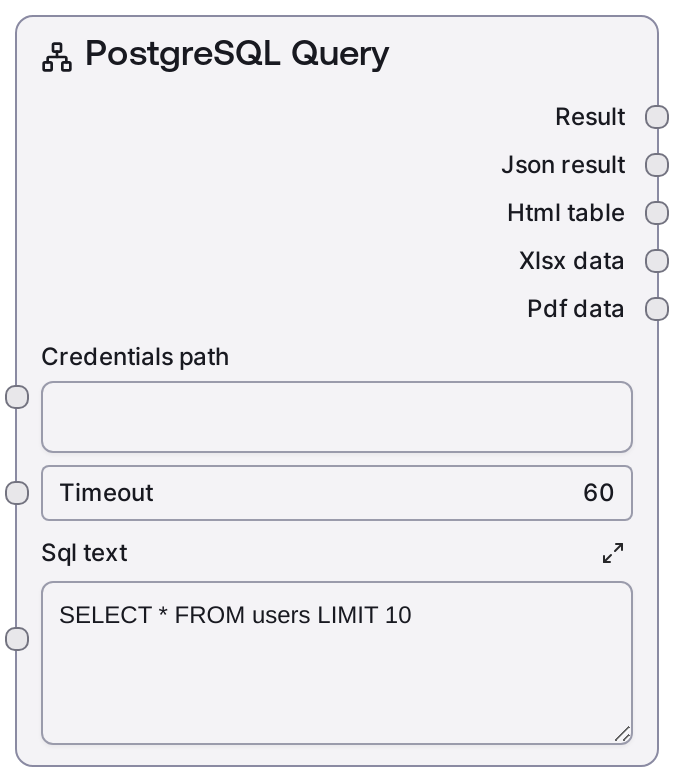
PostgreSQL Query
This node runs read-only PostgreSQL SELECT queries against a database configured via Salt credentials. It sends the SQL to the Salt data service, executes it on the target PostgreSQL instance, and wraps the response into both human-readable text and structured JSON. It is intended strictly for data retrieval, while data-modifying statements should be handled by separate execute nodes.
Usage
Use this node whenever you need to pull tabular data from a PostgreSQL database as part of a Salt workflow. Typical scenarios include fetching analytics data, retrieving user or transaction records, or preparing dataset slices for downstream analysis, enrichment, or visualization. It usually appears early in a pipeline after credential setup, with upstream configuration often done by generic credential or configuration nodes, and downstream consumers including transformation, LLM analysis, visualization, or export nodes. A common pattern is: (1) explore the database using nodes like SaltPostgresListTables, SaltPostgresTableInfo, or SaltPostgresQueryBuilder, (2) craft a SELECT query, then (3) execute that query with SaltPostgresQuery and pass the resulting text summary and JSON to analytics, charting, or reporting nodes. For reliability, keep queries read-only, constrain result sizes with LIMIT/OFFSET or filters, and ensure that any consuming nodes expect tabular JSON (rows/columns) or free-form text summaries as appropriate.
| Field | Required | Type | Description | Example |
|---|
| credentials_path | True | STRING | Path or identifier used by Salt to load PostgreSQL credentials. This typically points to a stored credential bundle that includes host, port, database name, username, and password or connection URI. It must correspond to a credential created using the "postgres" template in your environment. | salt://credentials/prod/postgres_analytics.json |
| timeout | False | INT | Maximum time in seconds to wait for the PostgreSQL query to complete before failing. Use higher values for complex analytical queries and lower ones for quick lookups. Must be a positive integer; extremely low values may cause premature timeouts on normal queries. | 30 |
| sql_text | True | STRING | SQL SELECT statement to execute against the PostgreSQL database. Must be a valid, read-only query (no INSERT, UPDATE, DELETE, or DDL). Multiline SQL is supported. For performance and safety, filter with WHERE clauses and use LIMIT to control result size. | SELECT id, email, created_at FROM users WHERE created_at >= '2024-01-01' ORDER BY created_at DESC LIMIT 100 |
Outputs
| Field | Type | Description | Example |
|---|
| text | STRING | A human-readable summary of the query results. This may include row counts, column names, and a preview of the data in a text-friendly format, suitable for LLM consumption or logging. | PostgreSQL Query Results - Returned 100 rows from table users with columns: id, email, created_at, status. Sample rows: 1 \| alice@example.com \| 2024-01-02 10:15:33 \| active; 2 \| bob@example.com \| 2024-01-03 09:01:10 \| inactive; ... |
| json | JSON | Structured JSON representation of the query response. Usually contains column metadata and an array of rows, enabling precise downstream processing, joins, and transformations. | {'columns': [{'name': 'id', 'type': 'integer'}, {'name': 'email', 'type': 'text'}, {'name': 'created_at', 'type': 'timestamp'}, {'name': 'status', 'type': 'text'}], 'rows': [[1, 'alice@example.com', '2024-01-02T10:15:33Z', 'active'], [2, 'bob@example.com', '2024-01-03T09:01:10Z', 'inactive']], 'row_count': 2} |
Important Notes
- Performance: Large unbounded queries (missing WHERE/LIMIT) can lead to slow responses or timeouts; always filter and limit rows when possible.
- Performance: The node relies on an external data service; overall latency includes both network overhead and database execution time, so consider increasing the timeout for heavy analytical queries.
- Limitations: Designed for read-only SELECT operations. DML or DDL statements (INSERT, UPDATE, DELETE, CREATE, DROP, etc.) should be run with nodes like SaltPostgresExecute instead.
- Behavior: Credentials are resolved from the provided credentials_path using the "postgres" credential template; if misconfigured, the node will fail before executing any SQL.
- Behavior: The JSON output schema (columns + rows) is stable, but exact field names inside the JSON may depend on the underlying data service; always inspect structure before hard-coding field paths.
Troubleshooting
- Connection or authentication error: If you see errors like "failed to connect" or "authentication failed", verify that credentials_path points to a valid PostgreSQL credential with the correct host, port, database, username, and password, and that the database is reachable from the Salt environment.
- Timeout exceeded: When errors mention a timeout, either increase the timeout value or optimize your SQL (add WHERE filters, indexes, or LIMIT). Avoid running full-table scans on very large tables.
- Syntax error in SQL: Messages such as "syntax error at or near" indicate invalid SQL. Check for missing commas, incorrect table or column names, or unsupported PostgreSQL functions, and test the statement directly against the database if needed.
- Empty or unexpected results: If the node runs successfully but returns zero rows or missing fields, validate that the query points to the correct schema/table, that filtering conditions are correct (especially date/time and case sensitivity), and that the credentials have access to the intended schema.