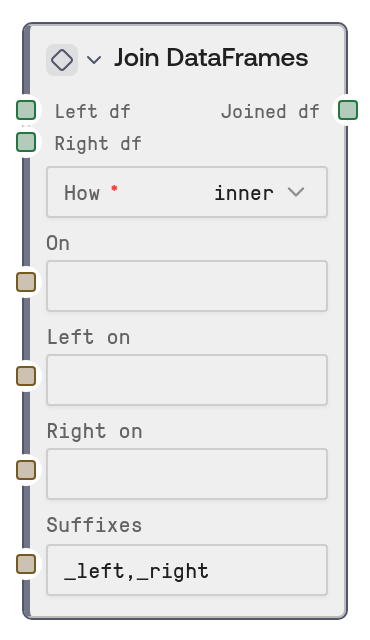
Join DataFrames
Join DataFrames merges two DATAFRAME inputs into a single DATAFRAME using SQL-style join behavior. It supports shared-column joins, different left/right key column names, configurable suffixes for overlapping columns, and cross joins when no key relationship is needed.
Usage
Use this node when you need to combine two tabular datasets by matching rows on one or more key columns. Common scenarios include joining customer records with orders by customer_id, merging product metadata into transaction logs by sku, or combining model results with reference labels by sample_id. It is typically placed after data-loading nodes such as CSV to DataFrame, Excel to DataFrame, JSON to DataFrame, or Parquet to DataFrame, and before output or analysis nodes such as DataFrame to CSV, DataFrame to HTML, Compare DataFrames, or DataFrame Columns to List. Use on when both DataFrames share the same key column names; use left_on and right_on when the key columns differ between the two datasets. For best results, inspect or standardize column names before joining, choose the smallest join type that preserves the rows you need, and use explicit suffixes so overlapping columns remain easy to interpret downstream.
| Field | Required | Type | Description | Example |
|---|
| left_df | True | DATAFRAME | The left DataFrame in the join operation. For `left` joins, all rows from this DataFrame are preserved; for `inner` joins, only rows with matching keys are retained. | A customer table with columns: customer_id, customer_name, region |
| right_df | True | DATAFRAME | The right DataFrame in the join operation. For `right` joins, all rows from this DataFrame are preserved; matching columns are combined with the left DataFrame based on the configured join keys. | An orders table with columns: order_id, customer_id, order_total, order_date |
| how | True | inner \| left \| right \| outer \| cross | The join strategy to apply. `inner` keeps only matching rows, `left` keeps all left rows, `right` keeps all right rows, `outer` keeps all rows from both sides, and `cross` creates every possible row combination. | left |
| on | False | STRING | Comma-separated column name or names to join on when the key columns have the same names in both DataFrames. Leave empty if using `left_on` and `right_on`. Not allowed for cross joins. | customer_id |
| left_on | False | STRING | Comma-separated key column name or names from the left DataFrame. Use together with `right_on` when the join keys have different names. The number of columns must match `right_on`. | customer_id,region_code |
| right_on | False | STRING | Comma-separated key column name or names from the right DataFrame. Use together with `left_on` when the join keys have different names. The number of columns must match `left_on`. | buyer_id,shipping_region |
| suffixes | False | STRING | Two comma-separated suffixes applied to overlapping non-key column names from the left and right DataFrames. Must contain exactly two values. | _customers,_orders |
Outputs
| Field | Type | Description | Example |
|---|
| joined_df | DATAFRAME | The merged DataFrame produced by the selected join operation. It contains rows and columns from both inputs, with overlapping non-key columns renamed using the configured suffixes. | A joined table with columns: customer_id, customer_name, region, order_id, order_total, order_date |
Important Notes
- Join keys are required except for cross joins: Provide either
on or both left_on and right_on unless how is set to cross.
- Cross joins can grow very quickly: A cross join returns every combination of rows, so 10,000 left rows and 5,000 right rows would produce 50,000,000 rows.
- Suffixes must be exactly two values: The
suffixes input must contain two comma-separated suffixes, such as _left,_right; otherwise the node raises an error.
- Column names must match exactly: Join column names are case-sensitive and whitespace-sensitive after comma splitting, so ensure your DataFrame columns are clean and consistent.
Troubleshooting
Either 'on' or both 'left_on' and 'right_on' must be provided: Add a shared key column to on, or provide matching key columns in both left_on and right_on. For a Cartesian product, set how to cross and leave all key fields empty.left_on and right_on must have the same number of columns: Make sure both fields contain the same number of comma-separated key columns, such as customer_id,region and buyer_id,shipping_region.Cross join cannot be combined with on/left_on/right_on: Clear the on, left_on, and right_on fields when using how = cross.- Unexpected duplicate or renamed columns: If both DataFrames contain non-key columns with the same names, configure
suffixes with meaningful labels like _customers,_orders so downstream nodes can identify each source.