Table Output
Usage
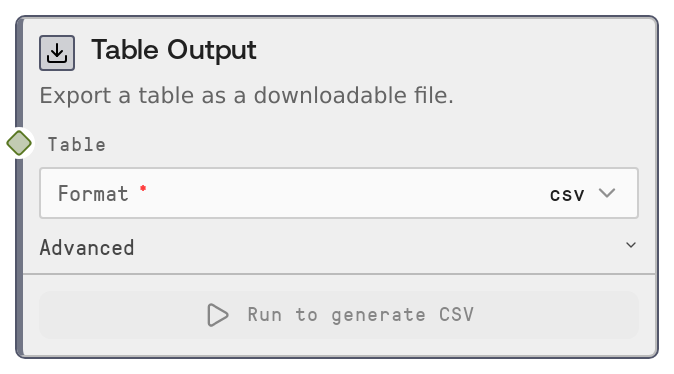
Use the Table Output node at the end of a table-processing pipeline to produce a downloadable file for reporting, sharing, or feeding into external systems. A common pattern is: load data with Table Read CSV (SaltTableFromCSV) or Table Read JSON (SaltTableFromJSON), transform it using nodes like SaltTableFilter, SaltTableSort, SaltTableSelectColumns, SaltTableJoin, SaltTableGroupBy, SaltTableFillNull, or SaltTableCastType, then attach SaltTableOutput to the final TABLE output to materialize the result.
Choose csv when you need maximum compatibility with spreadsheets and BI tools, and efficient line-based text files. Choose xlsx when you want a polished Excel file with bold, frozen headers and auto-sized columns ready for business users. Choose json when another system or script will consume row-wise structured data. Choose parquet for large analytical datasets or integration with data lakes and data warehouses. Choose html to share a nicely formatted table in a browser-friendly page. Choose markdown when the result will be pasted into documentation, tickets, or wikis.
Place this node as a terminal node: it is designed to write a file and register an asset, not to feed other nodes. It will appear in the run outputs with metadata (row count description, extension, asset id) and a download link. For workflows that need both further programmatic use and a file export, branch your table: one branch goes on to additional table nodes, the other ends at Table Output.
Inputs
| Field | Required | Type | Description | Example |
|---|---|---|---|---|
| table | True | TABLE | The table to export as a file. Accepts Salt TABLE objects and DATAFRAME types; DATAFRAME inputs are internally normalized into a TableData structure before export. The table may include any mix of numeric, text, datetime, and null values. Very large tables are supported but will increase export time and file size, especially for rich formats like xlsx and html. | A TABLE produced by SaltTableJoin containing 125430 rows and 18 columns of joined orders and customers. |
| format | True | ['csv', 'xlsx', 'json', 'parquet', 'html', 'markdown'] | Desired output file format. This controls both the serialization and extension. csv: UTF-8 text with comma-separated columns and no index; xlsx: an Excel workbook with a single sheet, bold header row, frozen header, and auto-sized columns; json: pretty-printed list of row objects (records orientation); parquet: columnar binary format optimized for analytics, no index; html: a full HTML5 page containing a styled, responsive table; markdown: GitHub-style markdown table. | xlsx |
| filename | False | STRING | Optional base filename without extension for the exported file. If empty or only whitespace, the node falls back to a default name like table_output_ | q4_sales_summary |
| sheet_name | False | STRING | Sheet name to use when format is xlsx. Ignored for all other formats. Must be a valid Excel worksheet name (typically up to 31 characters and without characters such as : \\ / ? * [ ]). If not set, the node uses Sheet1 by default. | Sales_Report_Q4 |
Outputs
| Field | Type | Description | Example |
|---|---|---|---|
| ui.salt_output | LIST of FILE_DESCRIPTOR | UI-level description of the exported file, used by the Salt platform to render download links. Each descriptor holds the final filename, a subfolder relative to the global output directory, and a type flag marking it as an output file. This is not a standard data pin output but part of the node's returned UI metadata. | [{"filename": "q4_sales_summary.xlsx", "subfolder": "a7b2f3a9-2b7c-4f4c-bb14-1cc7c0f1d233", "type": "output"}] |
| ui.salt_metadata | LIST of METADATA_OBJECT | Metadata objects describing the exported asset for the Salt UI and asset management: internal salt_id, asset UUID, human-readable description indicating row count and format, a salt_asset flag, and the file extension. Used for asset listing, audit trails, and browsing, not as data input to other nodes. | [{"salt_id": 7, "salt_reference_uuid": "a7b2f3a9-2b7c-4f4c-bb14-1cc7c0f1d233", "salt_description": "Exported 125430 rows as XLSX", "salt_asset": true, "salt_file_extension": "xlsx"}] |
Important Notes
- Performance: Exporting very large tables to xlsx, html, or markdown can be significantly slower and more memory-heavy than csv or parquet; prefer csv or parquet for multi-hundred-thousand-row datasets.
- Limitations: Excel exports require an Excel writer backend (such as openpyxl) in the runtime. If that dependency is missing, xlsx exports will fail even though other formats succeed.
- Behavior: This node is marked as an OUTPUT_NODE and intentionally has no standard downstream outputs. It terminates the pipeline by writing a file and returning only UI and asset metadata.
- Behavior: The final file path includes an internally generated asset UUID subfolder, so reruns or multiple Table Output nodes with the same filename will not overwrite each other.
- Limitations: html and markdown exports are optimized for human consumption. They are less suitable as machine-ingested formats due to styling and table markup, especially for very wide or large tables.
Troubleshooting
- XLSX export fails with a module or engine error: This usually means the Excel writer dependency (for example openpyxl) is not installed or available. Switch the format to csv or parquet, or ask an administrator to enable the Excel backend.
- Export is slow or times out on big tables: Rich formats (xlsx, html, markdown) do more work per cell and can be slow on large tables. Use parquet or csv instead, or insert a SaltTableSample node before this node to downsample for exploratory runs.
- Output file name is table_output_
instead of the name you expected : The filename field may be empty or whitespace. Set a non-empty filename such as customer_churn_snapshot without the extension; the node will append .csv, .xlsx, .json, etc. automatically. - HTML export opens but styling or sticky headers seem missing: Some environments (for example, previewers that sanitize HTML) may strip inline styles. Download the file and open it in a modern browser directly to see the full styled table, including sticky headers.
- Parquet export cannot be opened by an external tool: Ensure the external tool supports the Parquet version and compression used. If interoperability is an issue, prefer csv or xlsx for that consumer.