Table Fill Nulls
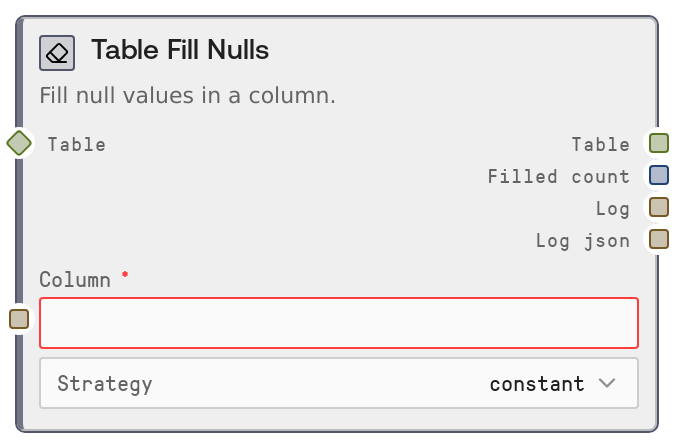
Usage
Use Table Fill Nulls whenever you have missing values in a specific column and need a consistent way to handle them before downstream processing. Typical scenarios include preparing CSV-imported datasets, cleaning analytics tables, or making features usable for ML models.
Position this node after a table creation or import node such as SaltTableFromCSV, SaltTableFromJSON, or another transforming node like SaltTableFilter, SaltTableSort, or SaltTableGroupBy. It outputs a cleaned table that can then be passed to nodes like SaltTableJoin, SaltTableCastType, SaltChart, or SaltTableOutput.
Common patterns: - Use strategy = "constant" to use a default like "Unknown" for text columns or 0 for numeric columns. - Use "forward_fill" or "backward_fill" on time-ordered data (for example daily metrics) to propagate last known values. - Use "mean" or "median" to impute numeric columns such as prices, scores, or counts. - Chain multiple Table Fill Nulls nodes to clean several columns one by one (for example fill country, then age, then income).
Best practices: - Ensure the column name matches exactly; otherwise the node will fail with a clear error listing available columns. - Only use mean/median on numeric columns; non-numeric columns will throw an error. - When using constant, choose a value that makes sense analytically (for example "N/A", 0, or a clear sentinel) and be aware that it will be auto-cast for numeric columns when possible.
Inputs
| Field | Required | Type | Description | Example |
|---|---|---|---|---|
| table | True | TABLE | Input tabular data containing the column with nulls to fill. Accepts TABLE or DATAFRAME types and converts internally as needed. The table must already have clearly labeled columns; rows may contain null/NaN/None values. | A TABLE representing customer records with columns: ["customer_id", "country", "age", "lifetime_value"], where some rows have null in "country" and "age". |
| column | True | STRING | Name of the column whose null values will be filled. Must exactly match one of the table's column names; otherwise the node raises an error listing all available columns. | country |
| strategy | True | STRING | Strategy used to replace nulls in the selected column. Allowed values: "constant" (use a specific value), "forward_fill" (copy down the last non-null value), "backward_fill" (copy up the next non-null value), "mean" (fill with column mean, numeric only), "median" (fill with column median, numeric only). | forward_fill |
| fill_value | False | STRING | Value used when strategy is "constant". Provided as a string, but will be auto-cast to the column's data type when possible (for example "0" becomes numeric 0.0 for numeric columns). Ignored for other strategies. | Unknown |
Outputs
| Field | Type | Description | Example |
|---|---|---|---|
| table | TABLE | The output table with the specified column's null values filled according to the chosen strategy. All original columns and rows are preserved; only that column's values are modified and metadata is carried through. | A TABLE where the "country" column has no null values; previously null entries are now "Unknown" or have been forward-filled from the last known value, depending on the strategy used. |
| filled_count | INT | Number of null values that were actually replaced in the target column. This is the difference between the null count before and after the operation and may be 0 if the column had no nulls. | 42 |
| log | STRING | Human-readable summary of the operation, including column name, strategy, and value (for constant). Useful for quick inspection in logs or debug panels. | Filled 42 nulls in [country] using constant (value: Unknown) |
| log_json | STRING | Structured JSON log string describing the operation, including node name, input and output row counts, parameters (column, strategy, fill_value), and filled_count. Intended for programmatic auditing and monitoring. | {"node":"SaltTableFillNull","input_rows":1000,"output_rows":1000,"parameters":{"column":"country","strategy":"constant","fill_value":"Unknown"},"filled_count":42} |
Important Notes
- Performance: The node operates on a single column and processes in-memory; performance is generally good even for large tables, but extremely large datasets may be constrained by available memory.
- Limitations: The "mean" and "median" strategies require the target column to be numeric; using them on non-numeric columns will raise an explicit error instead of silently failing.
- Behavior: For the "constant" strategy, the fill_value is provided as a string but is auto-cast for numeric columns when possible; invalid casts fall back to the original string, which may cause type mixing in some workflows.
- Behavior: Forward and backward fill rely on the existing row order; ensure your table is sorted appropriately (for example by timestamp) before using these strategies to avoid misleading fills.
- Behavior: Only the specified column is modified; row counts do not change and no rows are dropped, making this safe to use before joins or aggregations.
Troubleshooting
- Column 'X' not found. Available: ...: This occurs when the column input does not match any column in the table. Double-check spelling, case, and whitespace, and choose one of the listed available columns.
- 'mean' strategy requires a numeric column. 'X' is not numeric.: You selected strategy = "mean" (or "median") on a non-numeric column. Switch to a different strategy (for example "constant") or first convert the column using SaltTableCastType to a numeric type.
- Unexpected mixed types after constant fill: When using strategy = "constant" on a numeric column with a non-numeric fill_value (for example "N/A"), the node attempts to cast but may fall back to the string. Use a numeric-compatible fill_value (for example "0") or cast the column to string first.
- Filled count is 0 when I expect changes: This indicates there were no null values detected in the target column. Confirm that the missing entries are actually null/NaN/None and not placeholder strings like "N/A" or an empty string; you may need a preprocessing step to convert placeholder values to true nulls before filling.