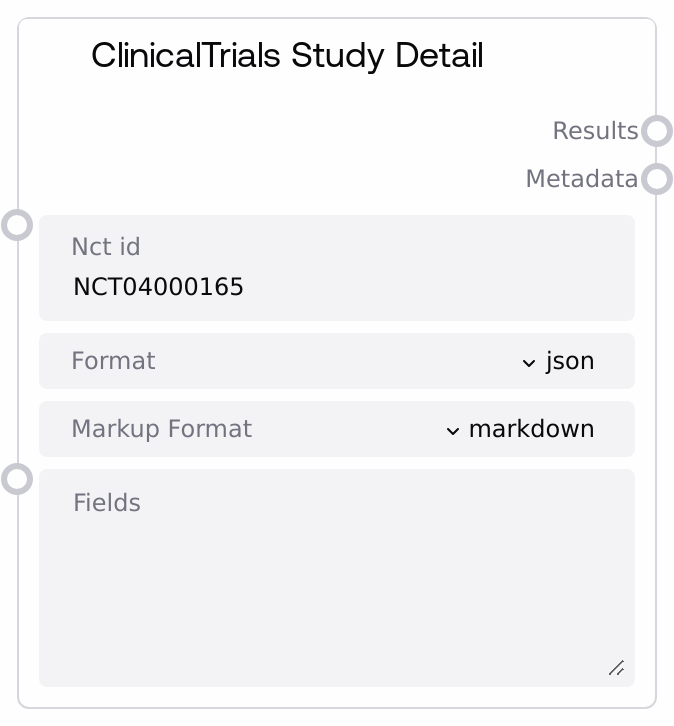
ClinicalTrials Study Detail
This node queries ClinicalTrials.gov for a specific study using its NCT identifier and returns the study details in a chosen format. It supports optional field selection and configurable markup formatting of the response. The node is built on a shared ClinicalTrials base, handling API interaction, response parsing, and metadata extraction for you.
Usage
Use this node when you need detailed, study-level information from ClinicalTrials.gov for a known NCT ID. Typical use cases include building clinical evidence summaries, surfacing key eligibility criteria, extracting endpoints, or preparing structured data for downstream analytics or LLM reasoning. It usually sits early in a pipeline: you might first identify or select an NCT ID via a search node (for example, a ClinicalTrials search or listing node), then feed that NCT ID into this node to pull full study details. Downstream, its results output can be passed to nodes that summarize clinical trials, compare multiple studies, or generate human-readable reports, while the metadata output can feed logging, auditing, or routing logic. Integrate it with other ClinicalTrials nodes that search or filter studies for upstream discovery, and with text-processing or report-generation nodes downstream. For best results, specify only the fields you truly need when building data pipelines, and use markupFormat to tailor the output to either LLM consumption (markdown) or legacy systems.
| Field | Required | Type | Description | Example |
|---|
| nct_id | True | STRING | The ClinicalTrials.gov NCT identifier of the study to retrieve. Must be a valid NCT ID in the form 'NCT' followed by 8 digits. If the ID does not exist or is mistyped, the underlying ClinicalTrials API will return an error or empty result. | NCT04000165 |
| format | True | STRING | Output format requested from the ClinicalTrials service. Supported values are 'json' and 'csv'. 'json' is recommended for downstream structured processing and LLMs; 'csv' is better suited if you plan to export and analyze the data in spreadsheets or tabular data tools. | json |
| markupFormat | True | STRING | Controls how the textual study detail is marked up. 'markdown' returns content formatted for modern text viewers and LLMs (headings, bullet lists, and other markdown constructs), while 'legacy' preserves a simpler, older-style formatting suitable for existing internal tools. | markdown |
| fields | False | STRING | Optional list of specific fields to return from the study record. Typically a comma- or space-separated list of ClinicalTrials.gov field names, depending on the base node’s implementation. Leave empty to return the default or full set. Supplying a subset can reduce payload size and focus on key attributes such as status, conditions, interventions, and primary outcomes. | StudyTitle, OverallStatus, Condition, InterventionName, PrimaryOutcomeMeasure |
Outputs
| Field | Type | Description | Example |
|---|
| results | STRING | The study detail response body from ClinicalTrials.gov, formatted according to the selected `format` and `markupFormat`. For `format='json'`, this will typically be a JSON string containing the study record or records; for `format='csv'`, a CSV string with header and row or rows. Downstream nodes can parse this string as JSON or CSV, or feed the markdown-formatted text directly into LLMs for summarization and analysis. | { "Study": { "NCTId": "NCT04000165", "BriefTitle": "A Study of Drug X in Patients With Condition Y", "OverallStatus": "Recruiting", "Condition": ["Condition Y"], "Intervention": [{"InterventionType": "Drug", "InterventionName": "Drug X"}], "PrimaryOutcomeMeasure": [{"Measure": "Change in Symptom Score at Week 12"}] } } |
| metadata | STRING | Supplementary metadata about the API call and response, serialized as a string, commonly JSON. This may include request parameters such as the resolved NCT ID and fields, timestamps, pagination or count information from ClinicalTrials.gov, and status indicators. Use this for logging, debugging, analytics, or making routing decisions in your workflow. | { "nct_id": "NCT04000165", "format": "json", "markupFormat": "markdown", "record_count": 1, "source": "ClinicalTrials.gov", "retrieved_at": "2026-04-27T10:15:00Z" } |
Important Notes
- Performance: Large studies with extensive outcome, eligibility, and protocol sections can result in sizable JSON or CSV payloads; consider restricting
fields for high-throughput or latency-sensitive pipelines.
- Limitations: The node depends on the availability and data quality of ClinicalTrials.gov; if a study is withdrawn, hidden, or not yet fully indexed, details may be incomplete or unavailable.
- Behavior: If
fields is left empty, the base ClinicalTrials implementation may request a broad or default field set, which can increase response size; specifying fields generally yields leaner, more focused responses.
- Behavior: The node returns both
results and metadata as strings; downstream nodes are responsible for parsing JSON or CSV as needed before structured operations.
Troubleshooting
- Invalid or unknown NCT ID: If you see an empty
results string or an indication in metadata that no studies were found, verify the NCT ID format (for example, 'NCT04000165') and ensure the study actually exists on ClinicalTrials.gov.
- Unsupported format value: If the node errors due to an invalid
format, confirm that format is set to either 'json' or 'csv'. Any other value will not be accepted by the underlying implementation.
- Unexpected empty or missing fields: If certain expected attributes are missing from
results, check the fields input. Remove overly restrictive field filters or include the exact field names required according to ClinicalTrials.gov documentation.
- Downstream parsing failures: If a downstream node fails to parse
results as JSON or CSV, ensure that the format used here matches what the downstream node expects, and that you are not passing markdown-formatted or legacy-formatted text where raw machine-readable JSON or CSV is required.