SQL Server Execute
Usage
Use SaltMSSQLExecute when your workflow needs to modify data or change schema in a SQL Server database, not when you need to read data. Typical scenarios include inserting audit logs from upstream events, updating order or job statuses after processing, deleting historical or temporary records, or applying schema changes such as creating tables or indexes as part of environment setup. Place this node after a step that provides a valid MSSQL credentials_path (for example, SaltMSSQLConnectionString or another credentials-provider node) and before any control-flow, logging, or monitoring nodes that react to success/failure or number of affected rows.
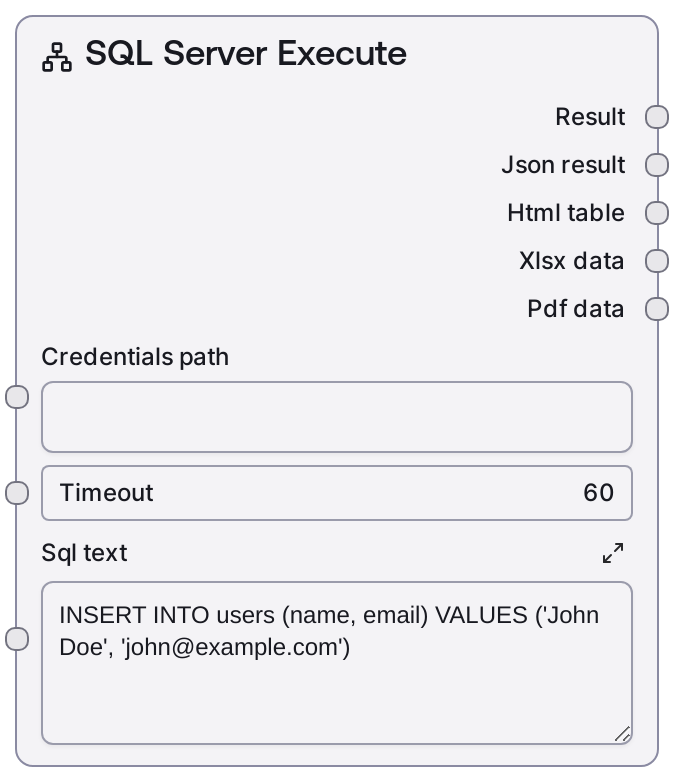
A common workflow pattern is: (1) Build or select a connection string with SaltMSSQLConnectionString and store or reference it as credentials_path. (2) Feed credentials_path, an appropriate timeout, and your T-SQL command into SaltMSSQLExecute via sql_text. (3) Use the textual output for logs or user-facing messages and the structured JSON output to drive conditional branches (for example, only proceed if rows_affected > 0). To verify the impact of your changes or to fetch resulting data, follow this node with SaltMSSQLQuery. For schema-aware or metadata-driven automation, first inspect the database with SaltMSSQLListTables or SaltMSSQLTableInfo, then generate T-SQL and execute it with SaltMSSQLExecute.
Best practices include testing SQL statements in a non-production environment before running them in a live workflow, limiting each execution to a clear, well-scoped command, and choosing timeouts that match expected execution cost. When building sql_text dynamically, validate and sanitize all external input upstream to reduce the risk of SQL injection and unintended modifications.
Inputs
| Field | Required | Type | Description | Example |
|---|---|---|---|---|
| credentials_path | True | STRING | Path or URI to the stored MSSQL credentials or connection configuration that this node can load. It must encode the SQL Server host, port, database, and authentication details in a format supported by the MSSQL connector and reference an account with sufficient permissions for the intended DML/DDL operations. | file:///workspace/secure-config/mssql_bi_prod.json |
| timeout | True | INT | Maximum number of seconds to wait for the SQL command to complete before aborting. If the command does not finish within this limit, the node cancels execution and reports a timeout error in its outputs. Shorter values are suitable for small updates; longer values may be necessary for heavy maintenance or large batch operations. | 90 |
| sql_text | True | STRING | The T-SQL statement to execute against SQL Server. This should be a non-SELECT command such as INSERT, UPDATE, DELETE, MERGE, or DDL (CREATE TABLE, ALTER TABLE, DROP TABLE, CREATE INDEX, etc.). The statement must be syntactically valid for the target database. Any result sets from SELECT clauses are ignored; this node focuses on side effects and execution status. | UPDATE dbo.orders SET status = 'COMPLETED', completed_at = SYSDATETIME() WHERE status = 'PROCESSING' AND completed_at IS NULL; |
Outputs
| Field | Type | Description | Example |
|---|---|---|---|
| TEXT | STRING | A human-readable summary of the execution result. It typically indicates whether the command succeeded or failed and, if available, the number of affected rows or a short description of the operation. This is useful for logs, run reports, or user-facing status messages. | MSSQL EXECUTE succeeded: UPDATE dbo.orders ...; 327 rows affected. |
| JSON | JSON | Structured metadata describing the outcome of the SQL execution. While the exact structure depends on the underlying database layer, it commonly includes a success flag, the type of statement, number of affected rows, execution duration, and any error information if the command failed. Downstream nodes can inspect this object to make branching or retry decisions. | {'success': True, 'statement_type': 'UPDATE', 'rows_affected': 327, 'duration_ms': 1432, 'error': None, 'message': 'Command completed successfully.'} |
Important Notes
- Performance: Large batch modifications or heavy DDL can be slow and may hold locks on tables or indexes. Consider splitting big jobs into smaller batches, running them during off-peak hours, and configuring a timeout that balances robustness and responsiveness.
- Limitations: This node is not designed to return row sets from SELECT queries. Use SaltMSSQLQuery for read operations and reserve SaltMSSQLExecute for data-changing or schema-changing commands.
- Behavior: The precise fields in the JSON output can vary depending on the underlying DatabaseBaseNode and MSSQL driver. Always test and inspect a sample output before building strict downstream parsing or validation logic.
- Transactions: Transaction behavior (auto-commit vs. explicit transactions) is determined by the connection and driver configuration, not directly by this node. If you require atomic multi-statement workflows, manage transactions at the database or connection level.
- Security: Avoid concatenating untrusted input directly into sql_text. Validate, sanitize, or parameterize values upstream and keep credentials only in secure configurations referenced by credentials_path, never embedded directly in SQL statements.
Troubleshooting
- Authentication or connection errors: If the node reports login failures, unreachable host, or invalid connection parameters, verify that credentials_path points to a valid MSSQL configuration, confirm that the server address and port are correct, and ensure network access (firewalls, VPN, security groups) from the runtime environment to the database.
- Timeout exceeded: When executions regularly hit the timeout, optimize the SQL (add or adjust indexes, reduce the scope with more selective WHERE clauses, or process data in smaller batches) or increase the timeout to a realistic value. For known long-running maintenance tasks, consider re-architecting them into multiple steps.
- Zero rows affected unexpectedly: If rows_affected is 0 but changes were expected, review conditions in the WHERE clause or JOIN logic. Use SaltMSSQLQuery to run a diagnostic SELECT with the same filters to see which rows, if any, match before rerunning the modifying command.
- Permission or syntax errors: Error messages about insufficient privileges or invalid T-SQL will appear in both TEXT and JSON outputs. Confirm that the database user defined in credentials_path has the required DML/DDL rights and correct any syntax issues (for example, incorrect schema names, typos, or missing commas) before retrying.
- Locking or deadlocks: If SQL Server reports blocking or deadlocks, reduce transaction size, shorten the duration of operations, ensure appropriate indexing, and consider adjusting isolation levels or scheduling conflicting workloads at different times.