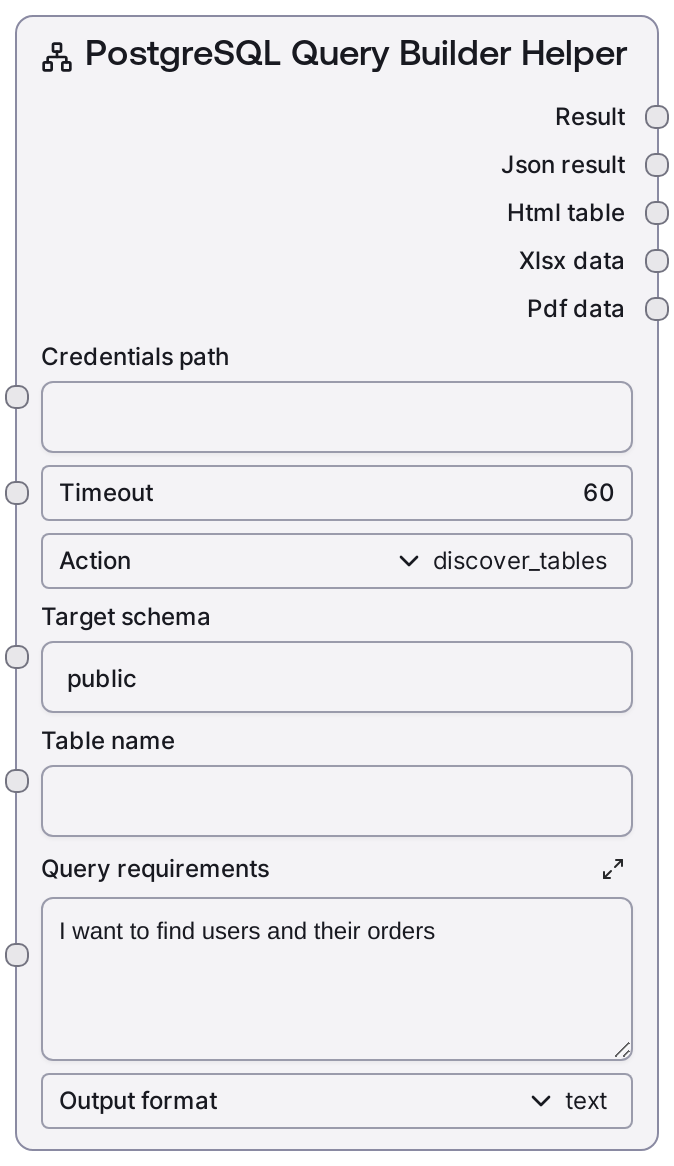
PostgreSQL Query Builder Helper
This node helps you explore a PostgreSQL database structure and design queries without writing full SQL up front. It can list tables in a schema, show detailed columns for a specific table, suggest JOIN clauses based on foreign key relationships, and provide high-level query patterns from a natural-language description. Results can be returned as plain text with JSON plus optional HTML, Excel, or PDF exports, making it a versatile entry point for database-driven workflows.
Usage
Use this node early in a database workflow when you need to understand or document your PostgreSQL schema before executing queries. Typical sequence: (1) Set action = discover_tables and target_schema = public (or your schema) to list available tables; (2) Switch action = get_table_columns and provide table_name to inspect column details; (3) Use action = suggest_joins with the same table_name to get JOIN suggestions derived from foreign key relationships; (4) Select action = build_query and describe your data needs in query_requirements to receive generic query templates and guidance, which you can refine and pass into downstream nodes like SaltPostgresQuery, SaltPostgresExecute, or SaltPostgresVisualQuery. Place this node after your credential/connection setup and before any nodes that run or visualize SQL. Prefer output_format = text during exploration for quick iteration, then switch to html, xlsx, pdf, or all when you need a shareable report or artifact of your schema and join design.
| Field | Required | Type | Description | Example |
|---|
| action | True | CHOICE[discover_tables\|get_table_columns\|suggest_joins\|build_query] | Determines what helper operation to run. discover_tables lists tables in target_schema. get_table_columns returns column details for table_name in target_schema. suggest_joins inspects foreign key relationships that involve table_name. build_query returns high-level query patterns and guidance from query_requirements. | suggest_joins |
| target_schema | True | STRING | PostgreSQL schema to explore. Used as the default context for table discovery, column lookup, and join suggestions. Typically public, but set this to your application schema if objects live elsewhere. | sales_reporting |
| table_name | False | STRING | Name of the table to inspect or use as the focal point for join suggestions. Required when action is get_table_columns or suggest_joins, ignored for discover_tables, and optional context for build_query. Must exist in target_schema for metadata and join discovery to work. | orders |
| query_requirements | True | STRING | Free-text description of what data you want to retrieve, used primarily when action = build_query. The implementation returns general SQL patterns and guidance rather than a fully executable query, so describing tables, joins, filters, and groupings improves the usefulness of the suggestions. | I need a report of users and their total order value over the last 90 days, grouped by user and sorted by highest revenue. |
| output_format | True | CHOICE[text\|html\|xlsx\|pdf\|all] | Controls how the helper result is packaged. text returns a human-readable string plus JSON payload. html wraps the text in basic HTML markup. xlsx creates a simple Excel file containing the textual result. pdf produces a basic PDF. all returns text and JSON; for this helper node, non-text formats may remain empty. | html |
Outputs
| Field | Type | Description | Example |
|---|
| text | STRING | Human-readable description of the operation result. For table discovery, this may be a list of tables; for column inspection, formatted column details; for join suggestions, a list of suggested JOIN clauses; and for query building, multi-line guidance and example SQL patterns. | Join Suggestions for sales_reporting.orders: JOIN users ON orders.user_id = users.id JOIN order_items ON orders.id = order_items.order_id |
| json | STRING | JSON-encoded payload describing the helper result. For example, suggest_joins returns { "suggestions": [ ... ] }, and build_query includes both the suggestions list and the original requirements. This string can be parsed by downstream nodes for automation or UI rendering. | {"suggestions": ["JOIN users ON orders.user_id = users.id", "JOIN order_items ON orders.id = order_items.order_id"]} |
| html | STRING | Optional HTML representation of the result when output_format = html. Contains a simple h3 title and pre-formatted block with the formatted text, suitable for dashboards or rich chat responses that support HTML rendering. | Join Suggestions: sales_reporting.ordersJOIN users ON orders.user_id = users.id JOIN order_items ON orders.id = order_items.order_id |
| xlsx | BYTES | Binary Excel payload when output_format = xlsx. The node wraps the textual result in a one-column table before encoding. Use downstream file or email nodes to save or distribute this file. | Binary XLSX data representing a sheet with a single Result column containing the helper text. |
| pdf | BYTES | Binary PDF payload when output_format = pdf. Contains a basic representation of the textual result as a PDF document, useful for exporting schema exploration or join design notes. | Binary PDF data representing a simple report of join suggestions or schema details. |
Important Notes
- Performance: suggest_joins runs a metadata query over information_schema to detect foreign keys; on large databases this may be slow, so increase timeout or restrict target_schema if you experience delays.
- Limitations: build_query intentionally returns generic SQL patterns and descriptive guidance, not schema-specific, executable SQL; you must adapt the suggestions to your actual table and column names.
- Limitations: Join suggestions rely solely on declared foreign key constraints; if your relationships are only implied by naming conventions or not enforced in the database, they will not appear in the results.
- Behavior: When output_format = all, this helper node still primarily returns text and JSON; binary formats (HTML/XLSX/PDF) may be empty, unlike data-returning nodes that fully populate all formats.
- Behavior: If action is get_table_columns or suggest_joins and table_name is empty, the node raises a validation error and returns an error payload instead of silently proceeding.
Troubleshooting
- Missing table name: Errors like "Table name is required for column discovery" or "Table name is required for join suggestions" indicate table_name was left blank while using get_table_columns or suggest_joins; set table_name to a valid table in target_schema.
- No join suggestions found: If the text output says "No foreign key relationships found for table ...", your table may not have foreign keys in that schema. Confirm constraints in the database or adjust target_schema and rerun.
- Timeout or slow responses: Long-running metadata queries, especially for suggest_joins on large schemas, can hit the timeout limit. Reduce the size of the schema being scanned or increase the timeout parameter in your workflow configuration.
- Empty non-text outputs: If html, xlsx, or pdf outputs are empty while using output_format = all, remember that this node primarily targets text/JSON; explicitly choose html, xlsx, or pdf to force generation of those formats.