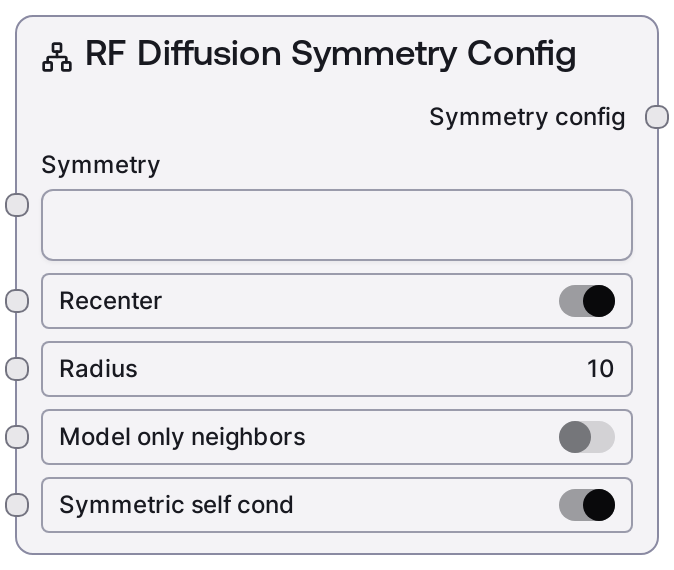
RF Diffusion Symmetry Config
This node creates a symmetry configuration object for RF Diffusion-based protein generation. It turns user-facing symmetry and geometric options into a structured configuration while validating that the symmetry specification is supported. The resulting config controls how symmetric subunits are arranged in space and whether symmetry is enforced during the diffusion process.
Usage
Use this node whenever you want RF Diffusion to design symmetric protein assemblies (e.g., cyclic oligomers, dihedral complexes, or polyhedral cages). Place it upstream of the RF Diffusion node and connect its symmetry_config output to the RF Diffusion node’s symmetry_config input. Typical scenarios: (1) De novo symmetric oligomer design: choose a symmetry such as c3 and a suitable radius, then run RF Diffusion with unconditional contigs; (2) Symmetric design conditioned on an input PDB: combine this node with RF Diffusion Contigmap Config and optionally RF Diffusion Scaffold Guided Config to simultaneously control symmetry and sequence/structure constraints. It is commonly used together with the suite of RF Diffusion helper nodes: RF Diffusion Contigmap Config, RF Diffusion Denoiser Config, RF Diffusion Potentials Config, and RF Diffusion Scaffold Guided Config. Prefer using this node instead of manually building symmetry dictionaries, as it enforces allowed formats and consistent field names.
| Field | Required | Type | Description | Example |
|---|
| recenter | True | BOOLEAN | Recenter the designed symmetric complex so its geometric center lies at the origin of the coordinate system. This is useful for normalized coordinates and more consistent visualization or docking. True enables recentering; false leaves the complex in its native frame. | True |
| radius | True | INT | Distance from the symmetry center (in Å) where symmetric subunits are placed. Must be at least 1. Larger values spread subunits further from the axis or center, yielding larger rings or shells; very small values can cause steric clashes between subunits. | 25 |
| model_only_neighbors | True | BOOLEAN | If true, only neighboring subunits of the asymmetric unit are explicitly modeled rather than the full symmetric assembly. This can reduce computational cost when you only care about local interactions around one unit; set to false to consider the entire assembly. | False |
| symmetric_self_cond | True | BOOLEAN | If true, symmetry is enforced via symmetric self-conditioning during intermediate diffusion steps, encouraging consistent symmetry throughout sampling. Set to false to relax intermediate symmetry enforcement, which may increase diversity at the cost of symmetry quality. | True |
| symmetry | False | STRING | Type of symmetry to apply. Valid entries are: empty string for no explicit symmetry; cyclic symmetry as 'cn' (e.g. 'c2', 'c3', 'c6'); dihedral symmetry as 'dn' (e.g. 'd2', 'd5'); or one of 'tetrahedral', 'octahedral', 'icosahedral' for polyhedral symmetries. Any other value causes a validation error. | c3 |
Outputs
| Field | Type | Description | Example |
|---|
| symmetry_config | RFDIFFUSION_SYMMETRY_CONFIG | A dictionary-like symmetry configuration containing the validated symmetry type and flags (recenter, radius, model_only_neighbors, symmetric_self_cond). This object is intended to be connected directly to the RF Diffusion node’s `symmetry_config` input, where it governs symmetric layout and conditioning during protein design. | {'recenter': True, 'radius': 25, 'model_only_neighbors': False, 'symmetric_self_cond': True, 'symmetry': 'c3'} |
Important Notes
- Strict symmetry validation: The node checks that
symmetry is either empty, matches cn/dn (e.g. 'c2', 'd5'), or is exactly 'tetrahedral', 'octahedral', or 'icosahedral'. Any other string raises a clear ValueError before RF Diffusion is invoked.
- Empty symmetry behavior: If
symmetry is left empty or whitespace, it is converted to a null/None value internally, effectively disabling explicit symmetry while preserving other options such as recentering and neighbor modeling.
- Radius tuning: Very small
radius values can produce heavily clashing assemblies, while extremely large values may yield unrealistic, over-extended complexes. For many ring-like oligomers and cages, moderate radii (e.g. 10–40 Å) are a good starting range.
- Neighbor-only trade-offs: Enabling
model_only_neighbors can significantly reduce compute and memory usage, but the model no longer sees the full assembly, which may matter for designs where long-range inter-subunit contacts are functionally important.
Troubleshooting
- Invalid symmetry format error: If you see an error like
Expectedsymmetryto be '', cn/dn (e.g. c2, d5), or one of tetrahedral/octahedral/icosahedral but got ..., correct the symmetry input to a supported value such as 'c3', 'd2', 'tetrahedral', or leave it empty.
- Output appears non-symmetric: Confirm that
symmetry is set to a valid value and that this node’s symmetry_config output is connected to the RF Diffusion node’s symmetry_config input. Also check for stray spaces (e.g. 'c3 '), then re-run the workflow.
- Clashing subunits: If the designed complex has strong steric clashes between repeats, gradually increase
radius and re-run. Consider disabling model_only_neighbors so the model can account for long-range packing of the entire assembly.
- Workflow stops before diffusion: Validation issues in this node prevent RF Diffusion from running. Inspect the error message; it typically indicates an unsupported
symmetry string or, more rarely, a non-integer or out-of-range radius.