Web Research Agent
Usage
Use the Web Research Agent when you need citation-backed, structured research on a topic instead of a simple Q&A response. Common use cases include market or competitor research, technical literature overviews, policy or regulatory summaries, comparative analyses, and data-oriented outputs like CSV/JSON that can be post-processed. Place this node after any step that formulates or refines the research question (for example, a form-processing node, a prior LLM planning node, or a user input collection node) and before nodes that consume the report (e.g., formatting, visualization, email generation, or database ingestion).
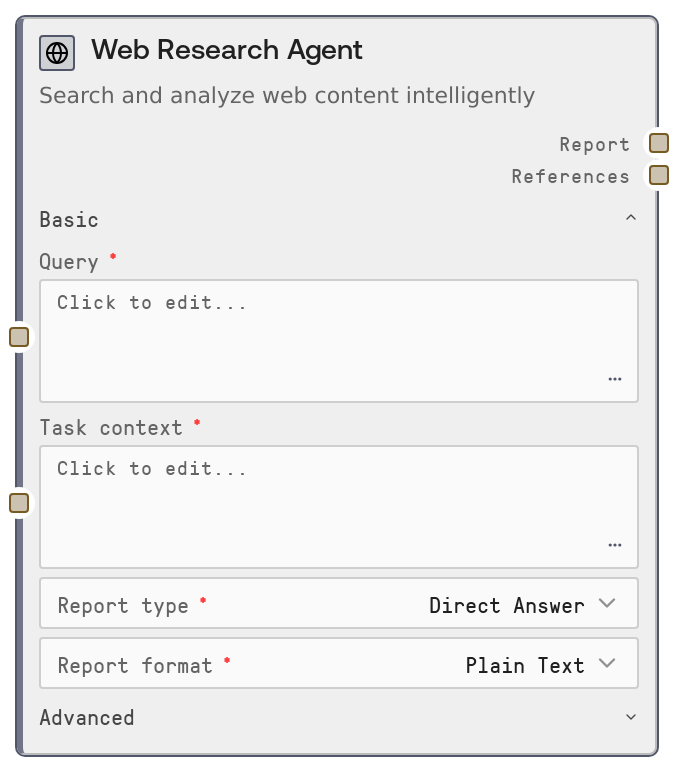
Configure the basic section first: enter a clear query, choose a report_type (e.g., overview, comparison, step-by-step guide—options are defined in the platform’s report_types list) and a report_format (narrative, bullet list, table-like, JSON, CSV, etc., as supported by report_formats). In the advanced section, optionally constrain or enrich sources by specifying source_urls (comma-separated URLs), toggling whether to combine them with general web search, and/or providing a local_documents_path to a folder of internal files you want included. Select suitable embed_model, fast_llm_model, smart_llm_model, and strategic_llm_model to balance cost vs. quality.
Typical upstream nodes:
- Input collection or form-parsing nodes that build the query and task_context.
- Workflow planners that decide what report_type and report_format to use.
Typical downstream nodes:
- Text processing nodes that reformat or shorten the report for emails, slide decks, or knowledge bases.
- Parsing/transformation nodes that interpret references for structured storage (e.g., extracting URLs, titles, and citation metadata).
Best practices:
- Provide a focused, specific query and use task_context for detailed constraints or background (e.g., target audience, domain, tone, or existing data).
- Use source_urls when you must restrict research to authoritative domains (e.g., company docs, regulator sites) and toggle combine_source_urls_with_web depending on whether external context is allowed.
- For internal or confidential analyses, favor local_documents_path so the agent can ground its output in your private corpus while optionally still augmenting with web resources.
Inputs
| Field | Required | Type | Description | Example |
|---|---|---|---|---|
| query | True | STRING | Main research question or topic, ideally a clear, specific prompt describing what you want investigated. Supports multi-line text. This is the base search query used by the research backend. | What are the key privacy regulations affecting healthcare SaaS products operating in both the EU and US? |
| report_type | True | ENUM (keys of report_types) | High-level style or structure of the research deliverable. Options come from the platform-defined report_types map; each type has its own prompt template and tooltip. Use this to choose between e.g. overview, comparative analysis, implementation guide, risk assessment, etc. | comparative_analysis |
| report_format | True | ENUM (keys of report_formats) | Desired output format of the report. Backed by the report_formats map, which defines formatting instructions. Common patterns include narrative text, bullet points, markdown tables, or machine-readable formats like JSON or CSV for downstream processing. | markdown_table |
| task_context | True | STRING | Additional context appended to the query via a context prompt template. Use this for constraints such as target audience, writing style, domain-specific assumptions, or extra data (e.g. form submissions) that should guide the research and report. | The audience is a non-technical executive team at a mid-size US healthcare SaaS company. Focus on strategic implications, not implementation details. |
| embed_model | True | ENUM (embedding models) | Embedding model identifier used by the research service for retrieving relevant context. The node prefixes this as `openai: | text-embedding-3-small |
| fast_llm_model | True | ENUM (LLM models) | LLM model for fast operations like quick summaries and intermediate expansions. Passed to the service as `openai: | gpt-4o-mini |
| smart_llm_model | True | ENUM (LLM models) | Primary LLM for core reasoning and report writing. Used for generating the main research report and handling complex reasoning steps. Choose a higher-quality model when accuracy, nuance, and synthesis depth are critical. | gpt-4o-2024-08-06 |
| strategic_llm_model | True | ENUM (LLM models) | LLM model for strategic planning aspects of the research—such as designing research plans, prioritizing sources, or outlining strategies. Use a more capable reasoning model if your use case relies heavily on planning and high-level decision support. | o1-preview |
| source_urls | True | STRING | Optional list of specific sources to restrict or focus the research on. No link traversal is performed beyond these URLs. Accepts a single URL or multiple, comma-separated. If left blank, the research relies on general web search (plus local documents if provided). | https://www.hhs.gov/hipaa/, https://gdpr.eu/, https://www.edpb.europa.eu/ |
| combine_source_urls_with_web | True | BOOLEAN | If true, the research service will gather resources using the default web search in addition to the specified `source_urls`. If false and `source_urls` are provided, research is primarily constrained to those static sources (subject to how the backend interprets `report_source`). | true |
| local_documents_path | True | STRING | Filesystem path to a folder of local documents to include as part of the research corpus. When set, the node adds `DOC_PATH` to the config, and the service treats the source as hybrid (local + web, depending on other flags). Use this to ground research in internal reports, knowledge bases, or customer data extracts. | /mnt/team-docs/compliance/2025_q1_regulatory_updates |
| combine_local_documents_with_web | True | BOOLEAN | Controls whether default web search results are combined with local documents and/or static URLs. If you provide `source_urls` but set this false, the node marks the source as static; when local documents are present, the final `report_source` is considered hybrid. Use this to keep research strictly internal or allow external augmentation. | false |
Outputs
| Field | Type | Description | Example |
|---|---|---|---|
| report | STRING | The main research report text generated by the GPT Researcher service. Its structure and style follow the selected `report_type` and `report_format`, and it is grounded in the retrieved sources. Downstream nodes can render this as-is for users, further summarize it, convert it to slides, or store it in a knowledge base. | ## Executive Summary This report compares HIPAA (US) and GDPR (EU) requirements for healthcare SaaS providers, focusing on data handling, consent, and breach notification... ### 1. Scope and Applicability - HIPAA applies to covered entities and business associates handling PHI in the US... - GDPR applies to controllers and processors handling personal data of individuals in the EU... ### 2. Key Obligations - Data minimization (GDPR Art. 5) vs. HIPAA's minimum necessary standard... (continued...) |
| references | STRING | A serialized references payload returned by the research service, typically a JSON-formatted string containing citations, URLs, titles, and possibly relevance scores or snippets. This is intended for downstream parsing to build reference lists, link cards in UIs, or structured storage of supporting evidence. | { "references": [ { "title": "Summary of the HIPAA Privacy Rule", "url": "https://www.hhs.gov/hipaa/for-professionals/privacy/laws-regulations/index.html", "source_type": "web", "snippet": "The HIPAA Privacy Rule establishes national standards to protect individuals' medical records..." }, { "title": "General Data Protection Regulation (GDPR)", "url": "https://gdpr.eu/what-is-gdpr/", "source_type": "web", "snippet": "The General Data Protection Regulation (GDPR) is the toughest privacy and security law in the world..." } ] } |
Important Notes
- Performance: The node performs an HTTP POST to an external GPT Researcher service with a default timeout of 180 seconds; complex or broad queries can approach this limit, so avoid extremely open-ended prompts in latency-sensitive workflows.
- Limitations:
source_urlsdo not trigger deep crawling or page traversal; only the specified pages are considered, so ensure you include all key URLs you care about. - Limitations: The quality and structure of outputs depend heavily on the predefined
report_typesandreport_formats; unsupported custom types or formats cannot be introduced directly through this node. - Behavior:
report_sourceis set programmatically (web, static, or hybrid) based onsource_urls,combine_*flags, andlocal_documents_path, which affects how the backend fetches and weights sources; misconfigured combinations can unintentionally broaden or narrow the research scope. - Behavior: The node assumes the external service returns JSON with
reportandreferenceskeys; if this contract changes upstream, workflows may fail until updated. - Performance: Using large or premium LLM models for
smart_llm_modelandstrategic_llm_modelmay increase cost and latency; reserve these for high-value research steps, and consider lighter models for prototyping.
Troubleshooting
- Request to GPT Researcher service failed: If you see an exception mentioning this message (often with an HTTP status code and error detail), the external service may be unavailable or misconfigured. Check network connectivity, confirm the GPT Researcher endpoint is healthy in platform settings, and verify that your account has access.
- Error decoding JSON response: This indicates the service returned invalid or non-JSON content. It can happen if the backend throws an HTML error page or a plain-text error. Inspect service logs, validate that the endpoint URL in ENDPOINTS["gpt_researcher_query"] is correct, and retry with a simpler query to rule out payload-specific issues.
- Empty or low-quality report: If the report is vague or missing key details, refine the
queryand add richertask_context(target audience, domain constraints, examples). Also ensuresource_urlsandlocal_documents_pathactually point to relevant and accessible content. - Missing or sparse references: When
referenceslack enough sources, confirm thatcombine_source_urls_with_webis configured as intended, and that the specified URLs are publicly reachable. If using only local documents, verify thatlocal_documents_pathis correct and that the service has permission to read those files. - Timeouts or long runtimes: For consistently slow runs, narrow the scope of
query, reduce the number ofsource_urls, or switch to faster models forfast_llm_modeland possiblysmart_llm_model. Consider splitting very large research tasks into multiple more focused WebResearchAgent calls in your workflow.