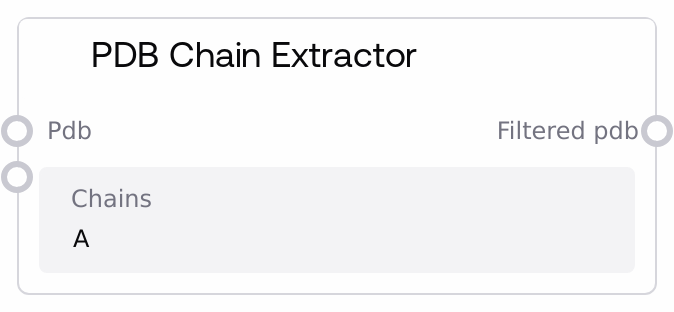
This node filters PDB structures by chain ID, producing new PDBs that only contain the requested chains while preserving headers and metadata. It accepts one or more PDB structures (as a PDB-typed dictionary) and a comma-separated list of chain IDs, then removes all ATOM/HETATM records not belonging to those chains. It validates chain IDs, reports when requested chains are missing, and returns the filtered PDB dictionary with Salt metadata attached for downstream workflow compatibility.
Usage
Use the PDB Chain Extractor when you need to isolate specific chains from complex or multimeric PDB structures before further analysis or modeling. Typical scenarios include: (1) extracting a single monomer from a homo-oligomer, (2) keeping only receptor or ligand chains from a protein complex, or (3) trimming down large PDBs to just the chains relevant for AlphaFold, RFdiffusion, or ProteinMPNN workflows. In a typical pipeline, this node sits downstream of structure-loading or structure-generation nodes and upstream of sequence extraction, modeling, or visualization steps. For example, you might use LoadPDBNode or a modeling node to provide the PDB input, then run PDBChainExtractorNode to keep only chain A, and then pass its output into PDBToFastaNode (for sequence extraction), PDBVisualizationNode (for focused visualization), PdbFixerNode (sequence corrections on a single chain), or SaveToZipNode / SaveToBucketNode for exporting narrowed-down structures. Integration patterns: this node accepts a PDB dictionary (possibly a batch) from nodes like BatchPDBNode or PDBCombinerNode and produces a filtered PDB dictionary with the same keys but reduced content. Best practice is to specify chain IDs as a clean comma-separated list (e.g. "A,B" or "A, B") and ensure that they exist in the input structures; otherwise the node will raise informative errors. Use it early in the workflow to reduce downstream computational load by removing irrelevant chains.
| Field | Required | Type | Description | Example |
|---|
| pdb | True | PDB | Dictionary-like PDB input where keys are PDB identifiers (for example structure names) and values are PDB-formatted strings. This can be a single structure, such as {"1ABC": "ATOM ..."}, or a batch created by nodes like BatchPDBNode or PDBCombinerNode. Each PDB string must be valid PDB text containing standard record types (HEADER, ATOM, HETATM, and others). Empty or whitespace-only PDB contents are skipped; if all entries are empty, processing fails. | {"1ABC": "HEADER TEST PROTEIN\nATOM 1 N MET A 1 ...\nATOM 2 CA MET A 1 ...\nATOM 3 N GLY B 1 ...\nEND"} |
| chains | True | STRING | Comma-separated list of chain IDs to extract from each PDB structure. Valid chain IDs must be single alphanumeric characters (for example A–Z or 0–9) and are case-insensitive; internal spaces around commas are ignored. Examples: "A", "A,B", "A, B", "A, B". At least one valid ID is required. If no requested chains are found in a given PDB, the node raises an error that lists which chains are actually present. | A,B |
Outputs
| Field | Type | Description | Example |
|---|
| filtered_pdb | PDB | Dictionary of filtered PDB structures containing only the requested chains for each input PDB ID. Keys mirror the input PDB IDs, values are PDB strings where only ATOM and HETATM records for the specified chains are retained; relevant header and metadata records (such as HEADER, TITLE, REMARK, SEQRES, CRYST1) and MODEL lines are preserved, and an END record is appended. The output carries Salt metadata (folder_name, file_name, seed, config) to integrate cleanly with saving and export nodes. | {"1ABC": "HEADER TEST PROTEIN\nATOM 1 N MET A 1 ...\nATOM 2 CA MET A 1 ...\nEND"} |
Important Notes
- Performance: Filtering is performed line-by-line on plain-text PDB content; even large single structures are typically fast, but very large batches or extremely long PDBs can increase runtime linearly with file size.
- Limitations: Only standard PDB records are parsed; chain IDs are taken from the chain ID column of ATOM and HETATM lines. Non-standard formats or misaligned columns may lead to chains not being recognized.
- Limitations: Chain IDs must be single alphanumeric characters. Multi-character IDs or special symbols are rejected with a validation error, even if they appear in the raw PDB text.
- Behavior: If a requested chain is missing from a PDB, the node does not silently continue. It computes the set of available chains and raises a ValueError listing both the requested chains and the available ones for that PDB.
- Behavior: Non-structural records like HEADER, TITLE, REMARK, SEQRES, and geometry records are preserved verbatim from the input, so metadata may still reference chains that were removed; only coordinate records are strictly filtered.
Troubleshooting
- Invalid chain ID: Error messages mentioning an invalid chain such as 'AB' indicate that you passed multi-character or non-alphanumeric chain IDs. Fix this by providing only single alphanumeric characters separated by commas, such as "A,B".
- Chains parameter cannot be empty: This occurs when you leave the chains field blank or only provide spaces. Enter at least one chain ID, for example "A" or "A,B".
- No atoms found for chains in a given PDB: Messages like "No atoms found for chains ['A', 'B'] in PDB '1ABC'. Available chains: C, D" mean the requested chains do not exist in the input PDB. Inspect the PDB to determine actual chain IDs, then update the chains input accordingly.
- No valid PDB structures could be processed: All input entries were empty or failed validation. Ensure the upstream node passes a non-empty PDB dictionary, and verify that you connected the correct output, such as the structure.pdb output from LoadPDBNode, BatchPDBNode, or PDBCombinerNode.
- Type mismatch on 'pdb' input: If you connect a plain STRING output instead of a PDB-typed output, the node may not execute correctly. Make sure you feed it from nodes that produce PDB type outputs, such as LoadPDBNode, BatchPDBNode, or PDBCombinerNode.