OpenFDA NDC Directory
Usage
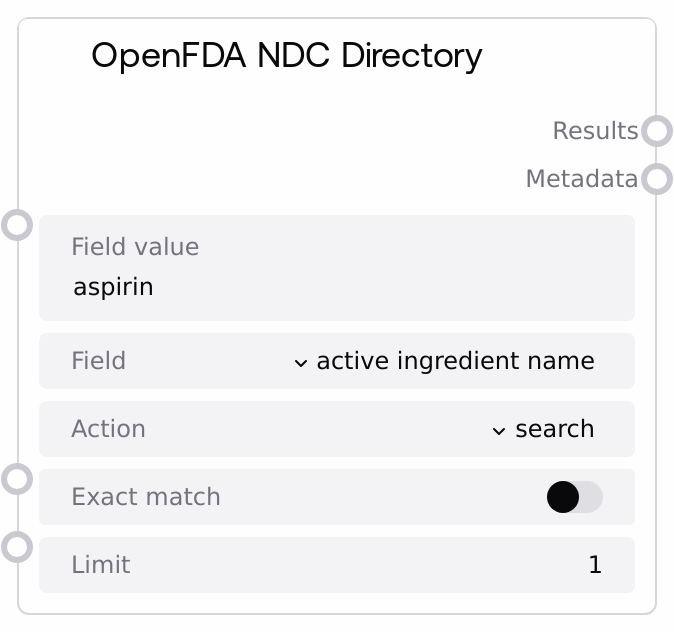
Use this node when you need authoritative FDA NDC Directory data to resolve or enrich drug product information. Typical situations include mapping brand names to active ingredients, inspecting dosage forms and routes, checking packaging descriptions, or computing counts of products by a given attribute. Place it after nodes that produce a drug-related query string (for example, from user input, database values, or NLP extraction) and before nodes that parse JSON, filter or transform results, or present information to users.
Example workflow: (1) A user or upstream node supplies a drug name like "aspirin". (2) Configure field to "brand name" or "generic name", set field_value to the supplied drug name, pick action = "search" to retrieve matching products, set exact_match to false for more tolerant matching, and choose a reasonable limit such as 25. (3) Pass the results output into a JSON parsing node to extract fields like product_ndc, active_ingredients, dosage_form, and route, then feed that into visualization or summarization nodes.
This node complements OpenFDADProductLabelNode, which focuses on drug label text rather than NDC product directory data. Use the NDC node when you care about product identification, ingredients, forms, routes, and packaging; use the label node when you need narrative sections like warnings or adverse reactions.
Inputs
| Field | Required | Type | Description | Example |
|---|---|---|---|---|
| field_value | True | STRING | Text value to search for in the chosen NDC field. It is inserted into the OpenFDA query as the value for the selected field. It may be a full or partial string unless `exact_match` is true. Do not include quotation marks; the node adds them when constructing the API URL. | aspirin |
| field | True | CHOICE | Which NDC Directory field to query. The node exposes user-friendly labels mapped to OpenFDA fields: "active ingredient name" (active_ingredients.name), "active ingredient strength" (active_ingredients.strength), "brand name" (brand_name), "generic name" (generic_name), "dosage form" (dosage_form), "route" (route), and "packaging description" (packaging.description). The selection determines which underlying OpenFDA field `field_value` is matched against. | brand name |
| action | True | CHOICE | Specifies whether to fetch full records or aggregated counts. Use "search" to retrieve detailed NDC records matching the query. Use "count" to get aggregated counts grouped by the selected field. Internally this becomes the `search` or `count` parameter in the OpenFDA request. | search |
| exact_match | True | BOOLEAN | If true, the node queries the `.exact` subfield (for example, brand_name.exact), requesting exact term matches from OpenFDA. This is useful when you need strict, normalized matching. If false, OpenFDA uses more flexible text search behavior, which is generally better for user-entered or noisy text. | false |
| limit | True | INT | Maximum number of items to return. For "search" actions this controls how many NDC records are returned; for "count" it limits the number of aggregation buckets. Must be at least 1. Larger values increase payload size and latency and may be constrained by OpenFDA. | 25 |
Outputs
| Field | Type | Description | Example |
|---|---|---|---|
| results | STRING | JSON-stringified `results` array from the OpenFDA NDC endpoint. For "search", this is a list of product objects containing fields like `product_ndc`, `brand_name`, `generic_name`, `active_ingredients` (with `name` and `strength`), `dosage_form`, `route`, and `packaging`. For "count", it is typically a list of objects with `term` and `count` fields representing aggregated counts. | [{"product_ndc": "12345-6789", "brand_name": "ASPIRIN", "generic_name": "ASPIRIN", "dosage_form": "TABLET", "route": ["ORAL"], "active_ingredients": [{"name": "ASPIRIN", "strength": "325 MG"}], "packaging": [{"description": "Bottle of 100 tablets"}]}] |
| metadata | STRING | JSON-stringified `meta` object from the OpenFDA response. This usually includes the disclaimer, license URL, last update date, and a `results` sub-object with pagination details such as `skip`, `limit`, and `total`. Use this to understand how many records match your query and how the response was constrained. | {"disclaimer": "open.fda.gov disclaimer text", "license": "https://open.fda.gov/license/", "last_updated": "2024-01-15", "results": {"skip": 0, "limit": 25, "total": 134}} |
Important Notes
- Performance: Each run issues a live HTTPS request to the OpenFDA API with a 30-second timeout; high
limitvalues or many rapid calls can increase latency and may approach external rate limits. - Limitations: Data is limited to what OpenFDA publishes in the NDC Directory; some products or attributes (such as specific packaging details) may be missing, incomplete, or updated on a delay relative to other drug data sources.
- Behavior: When
exact_matchis true, the query uses the.exactvariant of the field, which often returns fewer but more precise matches. Slight differences in spelling or formatting infield_valuecan lead to zero results. - Behavior: If you choose or pass a field value that is not recognized in the internal mapping, it is sent directly as the field name to OpenFDA. Invalid or misspelled field names may cause errors or empty results.
- Performance: OpenFDA enforces its own rate and size limits. For workloads that perform many lookups, consider caching common queries or batching operations upstream to reduce repeated external calls.
Troubleshooting
- HTTP or API error: If the node reports an HTTP error or fails to retrieve data, verify that OpenFDA is reachable, that
fieldis set to one of the supported mapped labels, and thatlimitis within a modest range (for example, 1–100). Try simplifying the query or reducinglimit. - Empty
results: If theresultsoutput is an empty array, check for typos infield_value, try turning offexact_match, or experiment with a differentfield(for example,generic nameinstead ofbrand name). Many user-entered terms do not exactly match stored FDA text. - Downstream JSON parse failures: When nodes downstream fail with messages like "invalid JSON" or cannot access fields, confirm that they first parse the
resultsandmetadatastrings as JSON. This node outputs strings, not pre-parsed objects. - Unexpected aggregate output: If you receive only
termandcountobjects instead of full NDC records, check thatactionis set to "search" rather than "count". Use "count" only when you explicitly want aggregated statistics. - Mismatch between
totaland returned rows: If metadata shows atotallarger than the length ofresults, this is expected:totalis the total number of matching records on OpenFDA, whilelimitand pagination control how many were returned. Increaselimitif you need more results, subject to API constraints.