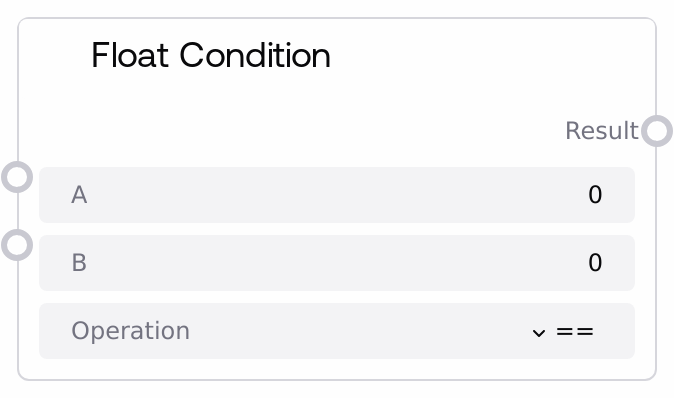
Float Condition
This node compares two floating point numbers using a selected comparison operator and returns the result as a boolean. It supports standard relational operations such as equality, inequality, and ordering across a wide numeric range, and is designed for simple, robust numeric condition checks.
Usage
Use the Float Condition node when you need to determine how two numeric values relate to each other and then control subsequent steps based on that relationship. Common use cases include checking whether a metric (such as validation loss, confidence score, or similarity value) exceeds a threshold, verifying that a parameter stays within safe bounds, or triggering a branch of execution when a value crosses a specific limit. In a typical pipeline, you feed float outputs from computation or measurement nodes into inputs a and b, select the appropriate operation, and route the result output into logic nodes like SaltBoolOperationNode (to combine this check with other conditions), SaltToBoolNode (for normalizing other kinds of values to booleans before or after comparison), or IfConditionSelector (to forward different inputs or behaviors based on the boolean). Prefer this node whenever you need straightforward numeric comparisons instead of composing custom expressions, and ensure your values are within the defined range to avoid clipping or misleading results.
| Field | Required | Type | Description | Example |
|---|
| a | True | FLOAT | The first float operand for the comparison. Valid range is -999999999999.0 to 999999999999.0. Typically this is a dynamic value such as a current metric, parameter, or measurement. | 0.845 |
| b | True | FLOAT | The second float operand for the comparison, usually a threshold, reference value, or bound. It shares the same valid range as `a` and is often configured as a constant in the workflow. | 0.9 |
| operation | True | STRING | The comparison operator applied to `a` and `b`. Must be one of: "==" (equal), "!=" (not equal), "<" (less than), ">" (greater than), "<=" (less than or equal), or ">=" (greater than or equal). Any other value is treated as unknown and causes the node to return False. | >= |
Outputs
| Field | Type | Description | Example |
|---|
| result | BOOLEAN | The boolean outcome of applying the chosen operation to `a` and `b`. Downstream nodes can use this value for branching, gating, combining with other conditions, or driving any conditional behavior. | True |
Important Notes
- Performance: The node performs only a simple scalar comparison and has negligible performance overhead, making it suitable for frequent use in complex logical graphs.
- Limitations: Inputs
a and b are restricted to the range -999999999999.0 to 999999999999.0; extremely large or tiny magnitudes should be normalized or scaled before they reach this node.
- Behavior: If
operation is not one of the supported operators, the node logs a warning internally and returns False instead of raising an exception, so the workflow continues but the condition fails.
- Behavior: Unexpected runtime errors (for example, if non-numeric types reach the node) are caught; the node logs an error and safely returns False, preventing the entire pipeline from crashing.
Troubleshooting
- Condition Always False: If
result never becomes True even when it should, verify that operation is exactly one of "==", "!=", "<", ">", "<=", ">=" with no typos or extra spaces; unknown operators cause the node to default to False.
- Unexpected False Due to Types: If upstream nodes output strings or complex objects instead of plain floats, the comparison can fail internally and the node will log an error and return False. Ensure that
a and b are proper float values, not string-formatted numbers.
- Range-Related Issues: When working with very large magnitudes, results may be unreliable if values exceed the configured range. Check that both
a and b fall within -999999999999.0 to 999999999999.0 and rescale upstream if needed.
- Float Equality Surprises: Direct equality checks on floats using "==" can be sensitive to small rounding differences. For tolerance-based equality, compute |a - b| in an upstream node and then use "<" or "<=" with a small epsilon value through this node.