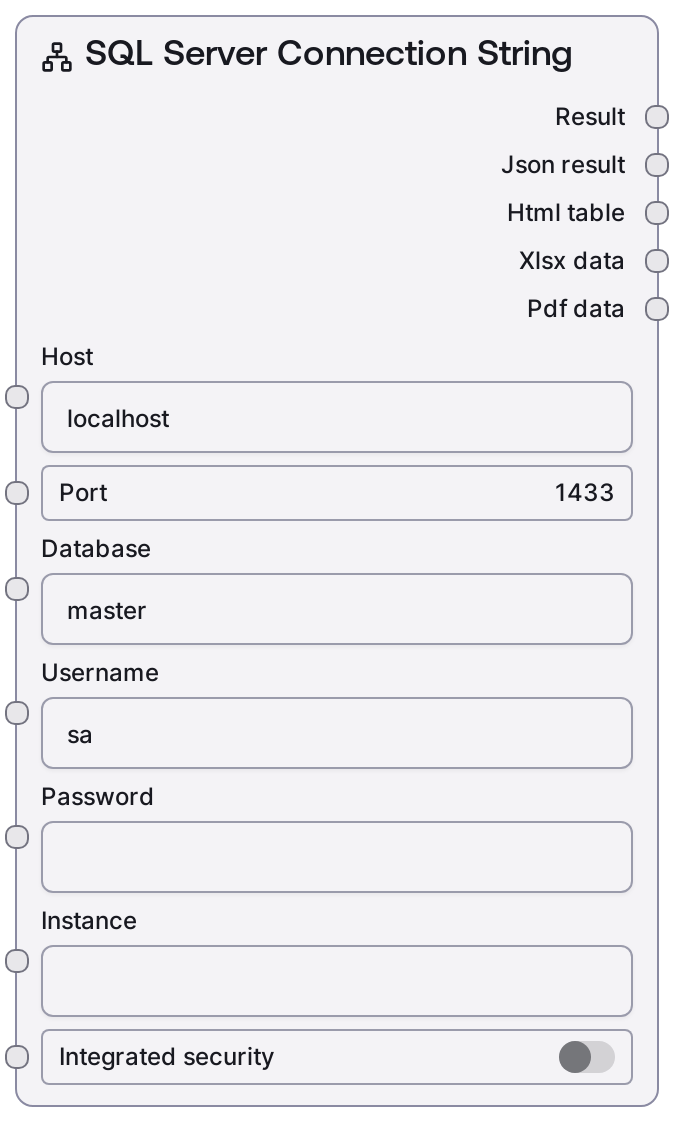
SQL Server Connection String
This node constructs a properly formatted MSSQL database connection string from individual fields like host, port, database, username/password, optional instance, and Windows Integrated Security. It standardizes how connection details are passed to downstream MSSQL nodes so you do not need to handcraft URIs. The output is a single connection string or credentials-style reference suitable for executing queries or other SQL Server operations.
Usage
Use this node whenever you need to connect to a Microsoft SQL Server from a Salt workflow and other nodes expect a single connection string or credentials_path-like URI. A typical pattern is: place this node near the start of your data pipeline, configure host, port, database, and either SQL authentication (username/password) or enable integrated_security for Windows authentication, then wire its output into nodes such as "SaltMSSQLExecute", "SaltMSSQLQuery", or other MSSQL-aware nodes. In analytics workflows, you might first construct the connection here, then run a query node, pass results into transformation or LLM nodes, and finally store or visualize the processed data. For reliability, keep this node’s configuration centralized and reuse it across multiple query/execute branches instead of duplicating credentials, and when using integrated security, ensure your runtime environment is correctly configured with appropriate OS-level credentials.
| Field | Required | Type | Description | Example |
|---|
| host | True | STRING | DNS name or IP address of the SQL Server instance. This can be a local server (e.g. localhost) or a remote host name/FQDN. Must be reachable from the Salt runtime network. | sql-prod-01.internal.corp |
| port | True | INT | TCP port the SQL Server listens on. Default MSSQL port is 1433; use a custom port if your server is configured differently. Valid range is 1-65535. | 1433 |
| database | True | STRING | Name of the target database to connect to on the server. This is the default schema context for queries and commands. | SalesAnalytics |
| username | True | STRING | SQL Server login username when using SQL authentication. Commonly a dedicated application or service account. Typically unused if integrated_security is enabled. | etl_service_user |
| password | True | PASSWORD | Password corresponding to the SQL Server login. Only used for SQL authentication; for Windows Integrated Security, this is usually left empty. Never reuse personal passwords and avoid exposing this value in shared screenshots or exports. | |
| instance | False | STRING | Optional SQL Server named instance. Use when connecting to a non-default instance on the host. Leave empty for the default instance. | MSSQLSERVER_DEV |
| integrated_security | True | BOOLEAN | Whether to use Windows Integrated Security (trusted connection) instead of SQL username/password authentication. When true, the environment's Windows identity must have access to the database; username and password may be ignored depending on driver and configuration. | True |
Outputs
| Field | Type | Description | Example |
|---|
| connection_string | STRING | A fully composed MSSQL connection URI or connection string that encodes host, port, database, and authentication settings. This is fed into downstream MSSQL nodes to establish a database session. | mssql://etl_service_user:@sql-prod-01.internal.corp:1433/SalesAnalytics?instance=MSSQLSERVER_DEV&integratedSecurity=true |
Important Notes
- Performance: The node itself only assembles a string, so it is fast; however, incorrect connection details can lead to long connection timeouts in downstream database nodes.
- Limitations: It assumes a standard MSSQL URI format; highly customized or driver-specific connection strings may require a custom node or manual construction elsewhere.
- Behavior: When integrated_security is enabled, many drivers will ignore username and password, relying entirely on the Windows context of the Salt runtime process.
- Security: Treat the resulting connection string as sensitive. Avoid hardcoding real passwords, and prefer secure secret management to provide credentials to this node.
Troubleshooting
- Common Error 1: "Login failed for user" - Check that username/password are correct, the login is enabled on the SQL Server, and integrated_security is set appropriately (false if you intend to use SQL authentication).
- Common Error 2: "Cannot open database requested by the login" - Verify that the database name exists on the server and that the login has permission to access it; also ensure you are connecting to the correct server/instance.
- Common Error 3: Network-related or instance-specific errors (e.g. connection timeouts) - Confirm that host and port are reachable (firewalls, VPN, DNS), that SQL Server is listening on the specified port, and that the instance name (if provided) is correct.