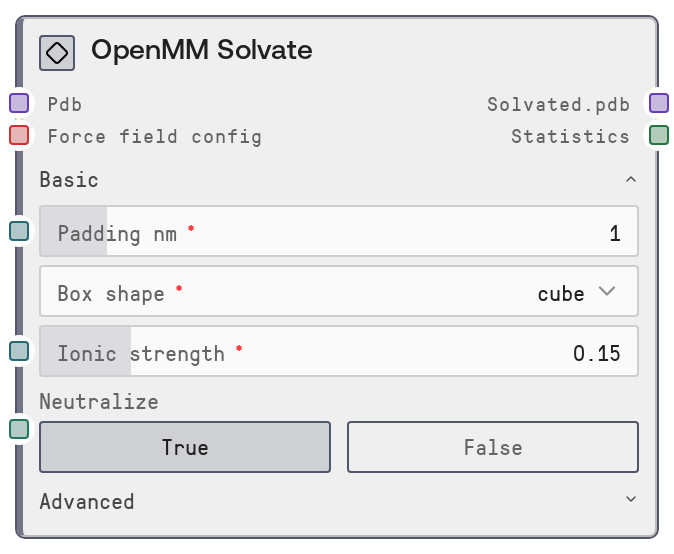
OpenMM Solvate
This node wraps a raw biomolecular PDB structure in an explicit solvent box and optionally adds counterions and salt at a target ionic strength. It derives the correct water geometry from the selected water model and uses the provided force field configuration to ensure parameter compatibility. The output is a solvated PDB plus a statistics table summarizing atom counts and box dimensions, ready for energy minimization and MD simulation.
Usage
Use this node whenever you have a protein or biomolecular PDB that lacks an explicit solvent box and you plan to run energy minimization or molecular dynamics. Typically, you first configure the force field with OpenMM ForceField Config, then feed that configuration and one or more PDBs into OpenMM Solvate. The solvated output PDBs then feed into OpenMM Energy Minimize, followed by OpenMM Simulate for production dynamics. Common use cases include: preparing AlphaFold or PDB structures for MD; setting up systems at physiological salt (0.15 M); testing different box shapes (cube vs dodecahedron) to reduce system size; and customizing ion types for channel or ion-binding studies. In a typical pipeline, upstream nodes are structure generators/importers that output PDB mappings (for example, AlphaFold prediction nodes), followed by OpenMM ForceField Config to define force field and water model; downstream consumers are OpenMM Energy Minimize for relaxation and OpenMM Simulate for trajectories and analysis. For robust workflows, keep neutralize enabled, choose a compatible water model via the force-field config node, and start with moderate padding (1.0–1.2 nm) to avoid self-interactions while keeping system size manageable.
| Field | Required | Type | Description | Example |
|---|
| pdb | True | PDB | Dictionary-like collection of one or more PDB structures to solvate, keyed by an identifier (such as a model name). Each value must be a valid PDB-formatted string representing a biomolecular structure without an existing explicit solvent box or ions (or where you intend to regenerate them). At least one entry is required. | {'af_model_1': 'ATOM 1 N MET A 1 11.104 13.207 10.223 1.00 52.04 N\\nATOM 2 CA MET A 1 12.345 12.745 10.812 1.00 51.23 C\\n...\\nEND'} |
| force_field_config | True | OPENMM_FORCE_FIELD_CONFIG | Configuration object produced by the OpenMM ForceField Config node, containing `force_field` and `water_model` keys. The node automatically derives the appropriate water geometry (such as TIP3P, TIP4P, SPC/E) from the water model string and will reject unknown or unsupported water models. | {'force_field': 'amber19-all.xml', 'water_model': 'amber19/tip3pfb.xml'} |
| padding_nm | True | FLOAT | Minimum distance in nanometers between any solute atom and the edge of the periodic box. Larger padding increases the number of water molecules and computational cost but reduces interactions with periodic images. Must be between 0.5 and 5.0 nm; values around 1.0–1.2 nm are common for proteins. | 1.0 |
| box_shape | True | ['cube', 'dodecahedron', 'octahedron'] | Shape of the periodic simulation box. `cube` creates a simple cubic box; `dodecahedron` and `octahedron` are more compact shapes that can reduce the number of solvent molecules by roughly 25–30 percent for approximately spherical solutes, improving performance while maintaining accuracy. | dodecahedron |
| ionic_strength | True | FLOAT | Target bulk salt concentration in mol/L (M). This controls how many positive and negative ions are added to the solvent, in addition to any counterions added for neutralization. Valid range is 0.0–1.0 M. A value of 0.15 M is typical for physiological ionic strength; 0.0 means no added bulk salt (only neutralization if enabled). | 0.15 |
| neutralize | True | BOOLEAN | Whether to add counterions to neutralize the net charge of the solute system. When true, the node ensures an overall neutral box even if `ionic_strength` is 0. Strongly recommended for most simulations to avoid artifacts from charged periodic boxes. | True |
| positive_ion | False | ['Na+', 'K+', 'Li+', 'Cs+', 'Rb+'] | Type of cation to use for both neutralization and bulk ionic strength. Defaults to Na+, the standard monovalent ion for physiological conditions. Other ions such as K+ are suitable for potassium channel studies or when matching a specific experimental buffer. | Na+ |
| negative_ion | False | ['Cl-', 'Br-', 'F-', 'I-'] | Type of anion to use for neutralization and salt. Defaults to Cl-, which is widely used in biomolecular simulations. Alternative halides like Br- or I- may be used when studying halide-binding sites or specific experimental conditions. | Cl- |
Outputs
| Field | Type | Description | Example |
|---|
| solvated.pdb | PDB | Dictionary mapping each input PDB ID to its corresponding solvated PDB string. Each output structure includes the original solute, explicit water molecules, and any added ions in a periodic box defined by the requested padding and shape. This is the canonical input for subsequent minimization and simulation nodes. | {'af_model_1': 'ATOM 1 N MET A 1 11.104 13.207 10.223 1.00 52.04 N\\n...\\nATOM 45001 O HOH W 999 45.873 37.292 52.118 1.00 0.00 O\\nATOM 45002 NA NA X 1001 39.221 32.908 47.553 1.00 0.00 Na\\n...\\nEND'} |
| statistics | DATAFRAME | Tabular summary of solvation results for each input structure. At minimum, contains columns: `pdb_id` (matching the keys of the input/output maps), `num_atoms` (total atoms in the solvated system, including water and ions), and `box_size_nm` (box dimensions or characteristic size in nanometers, as returned by the backend). Downstream nodes can use this for quality checks, system size filtering, or automated resource planning. | [{'pdb_id': 'af_model_1', 'num_atoms': 45231, 'box_size_nm': [7.8, 7.8, 7.8]}, {'pdb_id': 'af_model_2', 'num_atoms': 38950, 'box_size_nm': [7.2, 7.5, 7.3]}] |
Important Notes
- Performance: Increasing
padding_nm and choosing a cubic box can dramatically increase atom count; prefer dodecahedron or octahedron boxes and keep padding near 1.0–1.2 nm to control simulation cost.
- Limitations: The node requires a water model that maps to a known geometry; if the water model in
force_field_config is not in the supported mapping, the node will raise an error instead of guessing.
- Behavior: The node processes all PDBs in the input dictionary independently but in a single call, returning per-structure solvated PDBs and statistics; failures caused by incompatible settings affect the entire batch.
- Behavior: Neutralization (
neutralize) and bulk salt (ionic_strength) are applied together but independently; setting ionic_strength to 0.0 still allows neutralization if neutralize is true.
- Performance: The node delegates work to an external OpenMM service with a fixed timeout (five minutes per structure); very large systems or extreme box settings can cause timeouts in heavily loaded environments.
Troubleshooting
- Unknown water model error: If you see an error indicating an unknown water model and inability to derive water geometry, verify that the water model selected in OpenMM ForceField Config is one of the supported models (for example,
amber19/tip3pfb.xml or charmm36/water.xml) and that the force field–water model combination is valid.
- Empty PDB input: The error message about an empty PDB dictionary means that the upstream node did not produce any PDB entries or the connection is miswired. Ensure the previous node outputs a PDB map and that it is connected to the
pdb input.
- Oversized systems or timeouts: If solvations are timing out, reduce
padding_nm, switch from cube to dodecahedron or octahedron, and/or decrease ionic_strength. For very large oligomers or complexes, consider trimming non-essential regions before solvation.
- Unexpected charge or ion composition: If the resulting system has more or fewer ions than expected, double-check both the solute net charge (for example, protonation states in the input PDB) and your
ionic_strength and neutralize settings. Set ionic_strength to 0.0 and keep neutralize enabled if you want only counterions with no added bulk salt.