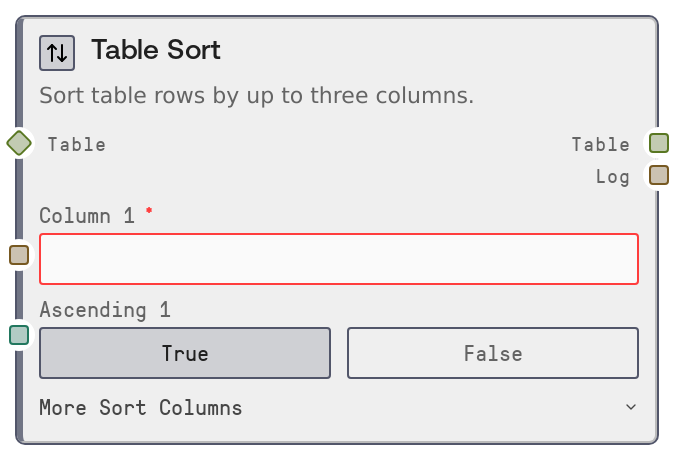
Table Sort
Table Sort orders rows in a table by one, two, or three columns, each with its own ascending or descending direction. It performs a stable sort so rows with equal sort keys keep their original relative order, and null values in sort columns are always placed at the end. This makes it suitable for rankings, time-ordered data, and deterministic reporting.
Usage
Use Table Sort when you need deterministic ordering of tabular data before further analysis, display, or export. Typical scenarios include sorting transactions by date and amount, ranking prediction results by score and secondary keys, or organizing event logs by timestamp and severity. Upstream, it commonly consumes tables from nodes like "SaltTableFromCSV", "SaltTableFromJSON", "SaltTableFilter", "SaltTableJoin", and "SaltTableSelectColumns". Downstream, the sorted output is often sent to "SaltDisplayTable" for inspection, to "SaltTableGroupBy" for grouped summaries, or to export nodes such as "SaltTableToCSV" and "SaltTableToJSON". As a best practice, confirm exact column names using a display or info node before configuring the sort, and use secondary and tertiary keys (for example, ["score" desc, "timestamp" desc, "user_id" asc]) to make ordering fully deterministic when many rows share the same primary value.
| Field | Required | Type | Description | Example |
|---|
| table | True | TABLE | The table to sort. Must be a TABLE object (or compatible DATAFRAME) with named columns. All referenced sort columns must exist in this table. | A TABLE of orders with columns: ["order_id", "customer_id", "order_date", "order_total", "status"]. |
| column_1 | True | STRING | Primary sort column name. This column defines the main ordering of rows. The value is trimmed of whitespace and must exactly match an existing column name. | order_date |
| ascending_1 | True | BOOLEAN | Sort direction for the primary column. Use true for ascending (earliest/smallest values first) and false for descending (latest/largest values first). | false |
| column_2 | False | STRING | Secondary sort column used to break ties when multiple rows have the same value in the primary sort column. If empty or only whitespace, no secondary sort is applied. | order_total |
| ascending_2 | False | BOOLEAN | Sort direction for the secondary column. Only applied if column_2 is provided and non-empty. | false |
| column_3 | False | STRING | Tertiary sort column to break remaining ties after primary and secondary sorts. If empty or only whitespace, no tertiary sort is applied. | customer_id |
| ascending_3 | False | BOOLEAN | Sort direction for the tertiary column. Only applied if column_3 is provided and non-empty. | true |
Outputs
| Field | Type | Description | Example |
|---|
| table | TABLE | The sorted table containing the same rows and columns as the input, but reordered according to the configured sort columns and directions. Null values in sort columns are always moved to the end of the result. | A TABLE of orders sorted by ["order_date" desc, "order_total" desc, "customer_id" asc], preserving all input rows and schema. |
| log | STRING | A human-readable summary of the sort operation, listing the sort columns, their directions, and the total number of rows processed. | Sorted by [order_date] desc, [order_total] desc, [customer_id] asc: 18,452 rows |
Important Notes
- Performance: Sorting cost increases with both row count and number of sort columns; very large tables may take noticeable time, though an efficient stable mergesort is used under the hood.
- Limitations: Any non-empty sort column input (column_1, column_2, column_3) must match an existing column name; otherwise the node raises an error and lists available columns.
- Behavior: The sort is stable, so rows that are equal on all configured sort keys maintain their original relative order from the input table.
- Behavior: Null or missing values in the sort columns are always placed last in the output, regardless of ascending or descending direction.
- Behavior: If all three column inputs are empty or whitespace after trimming, the node raises an error because at least one sort column is required.
Troubleshooting
- Error: Column 'X' not found. Available: ...: The specified column name does not exist in the table. Inspect the table with a display or info node, then copy the exact column name (including case and spelling) into the sort configuration.
- Error: At least one sort column is required.: All column fields are empty or only whitespace. Provide at least a valid
column_1 value before running the node.
- Sorted output does not match expectations: Check that the ascending/descending flags are set correctly and that the columns are in the intended priority order. Remember that column_2 and column_3 only break ties from earlier columns and nulls are always last.
- Rows with null sort keys all appear at the bottom: This is expected behavior because nulls are forced to the end. If you want them ordered differently, first clean or replace nulls using "SaltTableFillNull" before applying Table Sort.