Input
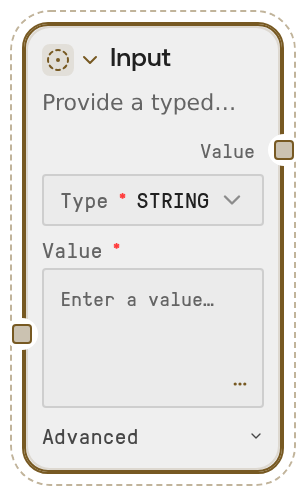
Input creates a typed value for a workflow and outputs it as the selected runtime type. It supports primitive and structured data types, parses values accordingly, and can expose the value for external override through API requests, web forms, or agent tools.
Usage
Use Input when a workflow needs a configurable parameter such as a prompt, threshold, count, toggle, list of options, or JSON object. It is typically placed near the start of a workflow and connected into downstream nodes that consume strings, numbers, booleans, lists, or dictionaries. Pair it with Dynamic Text to compose prompts from multiple inputs, and use Output at the end of the workflow to return generated text, JSON, images, files, or archives. For published workflows, enable Allow external override when callers should supply the value at run time; leave it off when the value should remain fixed inside the workflow. Prefer this node over Salt Input (Legacy) for new typed workflow parameters.
Inputs
| Field | Required | Type | Description | Example |
|---|---|---|---|---|
| input_type | True | STRING, FLOAT, INT, BOOLEAN, LIST, or DICT | Selects the runtime type produced by the node. The `default_value` is converted to this type during execution. `LIST` must be a JSON array and `DICT` must be a JSON object. | DICT |
| default_value | True | STRING | The editor value used when the workflow runs. If external override is enabled, this value acts as the fallback. Numeric types must contain valid numeric text, booleans are parsed from boolean-like values, and LIST/DICT values must be valid JSON. | {"species":"human","max_results":25,"include_synonyms":true} |
| exposed | True | BOOLEAN | Controls whether the value can be supplied from outside the workflow. When enabled, API requests, web forms, or agent tools may override the fallback value. When disabled, the node behaves as a fixed internal value. | True |
| description | False | STRING | Human- or agent-facing description of what this input represents. This helps published workflow callers understand what value to provide. | A JSON object containing the organism name, maximum number of genes to return, and whether synonyms should be included. |
Outputs
| Field | Type | Description | Example |
|---|---|---|---|
| value | WILDCARD | The parsed value produced using the selected input type. Downstream nodes receive a string, integer, float, boolean, list, or dictionary depending on `input_type`. | {'species': 'human', 'max_results': 25, 'include_synonyms': True} |
Important Notes
- Type conversion: The output type is determined by
input_type, not by how the value looks in the editor. For example,INTconverts the text to an integer, whileDICTparses it as a JSON object. - External overrides: When Allow external override is disabled, the input is treated as locked for published/API/agent usage and is not advertised as a fillable parameter.
- Structured values:
LISTandDICTrequire valid JSON when entered as text. Use double quotes for JSON strings and ensure the root value is an array forLISTor an object forDICT. - No asset inputs: This node is for typed values only. It does not handle images, masks, or files; use the legacy input node only when an older workflow requires those asset-style inputs.
Troubleshooting
INT SaltInput requires a valueorFLOAT SaltInput requires a value: The value is blank or whitespace. Enter a valid number such as25forINTor0.85forFLOAT.LIST SaltInput value must be valid JSON: The list value is not valid JSON. Use a proper JSON array such as["BRCA1", "TP53", "EGFR"].DICT SaltInput value must be a JSON object: The parsed JSON is not an object. ForDICT, use an object such as{"organism":"human","limit":10}rather than a list or plain string.- External caller value is ignored: Check that Allow external override is enabled. If it is disabled, the workflow uses the on-node value as a fixed constant.