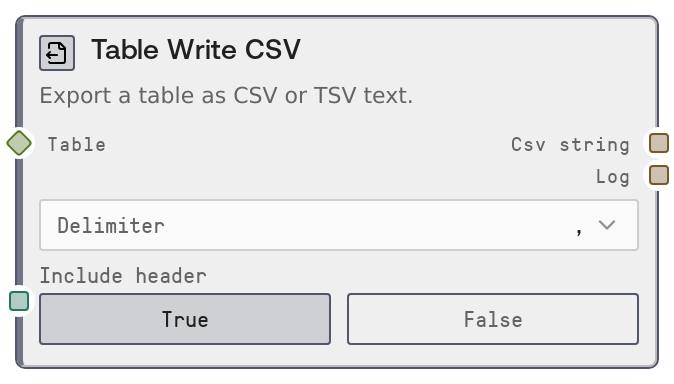
Table Write CSV
This node serializes a TABLE (or compatible DATAFRAME) into a CSV or TSV string. You can choose the delimiter and whether to include a header row with column names. It is primarily used to hand off tabular data to external systems or to save it as a file via other Salt nodes.
Usage
Use this node whenever you need to turn an in-memory table into plain-text CSV or TSV for storage, download, or integration with tools that expect delimited text. It typically appears downstream of table-producing or transforming nodes like SaltTableFromCSV, SaltTableFromJSON, SaltTableFilter, SaltTableSort, SaltTableSelectColumns, or SaltTableJoin. A common pattern is: import or transform data with table nodes, then use SaltTableToCSV to serialize, then send csv_string into a node that writes files (for example SaltOutput) or posts content to an external API. Choose the delimiter comma for standard CSV or Tab when the data itself frequently contains commas or when target tools require TSV. Enable include_header when you want column names on the first row (recommended for data interchange), or disable it if you need headerless output for legacy systems. This node works well in pipelines where CSV must be generated for BI tools, spreadsheet uploads, or as inputs to scripting or ETL stages outside Salt.
| Field | Required | Type | Description | Example |
|---|
| table | True | TABLE | The table data to export. Accepts TABLE objects or DATAFRAME-like structures convertible to TABLE. Must be a rectangular dataset with named columns and zero or more rows; column types will be converted to text as part of CSV generation. | A TABLE with columns: [customer_id, email, signup_date], 1500 rows of customer records. |
| delimiter | True | COMBO | Column separator for the output text. Supported options are comma for standard CSV, or Tab for tab-separated values (TSV). Tab is converted to a real tab character in the output. | Tab |
| include_header | True | BOOLEAN | Whether to include column names as the first row of the output. When true, the first line contains the table's column names; when false, only data rows are written. | true |
Outputs
| Field | Type | Description | Example |
|---|
| csv_string | STRING | The generated CSV or TSV text containing all rows in the input table, separated by the chosen delimiter. No index column is included; only data columns plus an optional header row. | customer_id,email,signup_date\n101,jane.doe@example.com,2024-01-15\n102,john.smith@example.com,2024-01-16\n |
| log | STRING | A simple export summary message describing the operation, including the number of rows written. Useful for debugging and monitoring in workflows. | Exported 1500 rows to CSV |
Important Notes
- Performance: Export runs in-memory by converting the table to a dataframe-like structure before serialization; very large tables may consume significant RAM during export.
- Limitations: Only supports comma and tab as delimiters; custom delimiters or detailed quoting and escape options are not exposed as parameters.
- Behavior: The node always omits any index column; only the table's data columns are written, with an optional header row controlled by include_header.
- Behavior: When delimiter is set to Tab the node uses an actual tab character in the output, which may not display visibly in plain-text previews but is interpreted correctly by spreadsheet tools.
Troubleshooting
- Empty or unexpected output: If csv_string is empty or shorter than expected, check that the upstream node actually produced a non-empty TABLE and that no prior filter step removed all rows.
- Malformed columns in target tool: If a spreadsheet or external system shows all data in one column, verify that you selected the correct delimiter (for example, use Tab when the target expects TSV, or comma for standard CSV).
- Missing column names: If the first row appears as data instead of headers, make sure include_header is set to true; if it is already true, verify the input TABLE has valid column names defined.
- Encoding issues downstream: If non-ASCII characters look garbled in a downstream system, ensure that system reads the text as UTF-8, which is the typical encoding expectation for this node's output.