API Fetcher
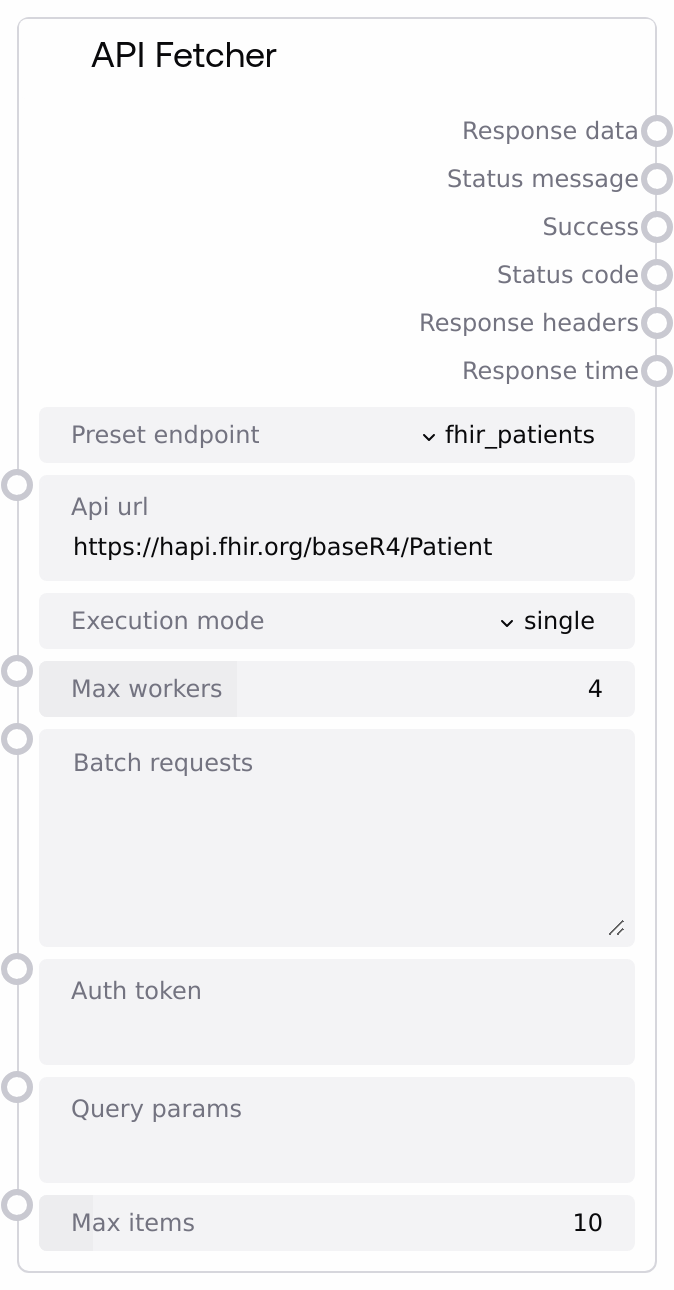
Usage
Use the API Fetcher when you need to pull structured or semi-structured data from HTTP APIs into a Salt workflow, especially for healthcare scenarios.
Typical use cases: - Fetching FHIR resources (patients, observations, medications, conditions, diagnostic reports) from public or sandbox FHIR servers for downstream analysis, summarization, or visualization. - Pulling public health data like COVID statistics for dashboards or reports. - Retrieving standardized medical code information (e.g., ICD-10) and clinical trial metadata as context for LLM reasoning or validation steps. - Making a series of similar API calls (e.g., multiple URLs or parameter sets) concurrently to reduce overall latency.
Workflow position: - Upstream: Often follows nodes that construct parameters, such as a text/input node specifying search terms or a small code/execution node that builds query JSON; can also follow decision nodes that choose which preset endpoint to use. - Core step: This node is the primary data-ingestion step that calls external services. - Downstream: Commonly feeds into JSON processing or transformation nodes (e.g., JSON List Processor, Code Executor) for parsing, filtering, and reshaping, or into LLM nodes for summarization and reasoning over the fetched content.
Integration patterns: - Single mode (execution_mode = "single"): Use when you need one API call per workflow run, such as "get all patients matching name X, max 20". Provide query_params as JSON, and connect response_data to a JSON-processing node. - Parallel mode (execution_mode = "parallel"): Use when you have many similar calls (for example, multiple URLs or parameter sets). Supply batch_requests as a JSON array of objects with url and optional params, and tune max_workers to balance throughput and rate limits.
Best practices: - Prefer preset endpoints for common healthcare APIs to reduce configuration errors; switch to custom only when you need arbitrary URLs. - Always format query_params and batch_requests as valid JSON strings; invalid JSON will cause warnings or errors. - Use max_items to cap the size of large JSON arrays, preventing downstream nodes from being overwhelmed. - For sensitive data or HIPAA-related workflows, ensure that auth_token is stored and passed securely and that you only call compliant endpoints.
Inputs
| Field | Required | Type | Description | Example |
|---|---|---|---|---|
| preset_endpoint | True | STRING (enum) | Selects a predefined healthcare-related API base URL or allows a fully custom URL. Options include custom, fhir_patients, fhir_observations, fhir_medications, fhir_conditions, fhir_diagnostic_reports, covid_tracker, drug_interaction_checker, medical_codes_icd10, and clinical_trials. When set to custom, the node uses api_url directly; otherwise it uses the built-in URL for that preset. | fhir_patients |
| api_url | True | STRING | The full URL to call when preset_endpoint is custom. For non-custom presets this is ignored and the internal preset URL is used instead. Must be a valid HTTP or HTTPS URL; only GET requests are performed in the simplified interface. | https://hapi.fhir.org/baseR4/Patient |
| execution_mode | True | STRING (enum) | Controls whether the node executes one request or many in parallel. single runs a single GET request (using the chosen preset or custom URL); parallel expects batch_requests and runs multiple GET requests concurrently using a worker pool. | parallel |
| max_workers | False | INT | Number of concurrent worker threads used in parallel mode. Must be between 1 and 10. Higher values increase throughput but also increase load on the target API and risk hitting rate limits or timeouts. | 4 |
| batch_requests | False | STRING | JSON array describing the batch of requests when execution_mode is parallel. Each element should be an object with at least a url field and optionally a params field containing a JSON object of query parameters. The value must be a valid JSON string; if not, execution will fail. | [{"url": "https://hapi.fhir.org/baseR4/Patient", "params": {"name": "Smith", "_count": 5}}, {"url": "https://clinicaltrials.gov/api/v2/studies", "params": {"condition": "diabetes"}}] |
| auth_token | False | STRING | Optional authentication token sent as an HTTP Authorization: Bearer | |
| query_params | False | STRING | JSON object of query parameters applied to the URL for single mode and used as a default in parallel mode when an individual batch item does not provide its own params. The value must be a JSON-encoded object (for example, { "name": "John" }), not URL-encoded text. | {"name": "John", "_count": 10} |
| max_items | False | INT | Maximum number of items to keep when the response body is a JSON array in single-request mode. If the API returns more items than this, the list is truncated to max_items. Must be between 1 and 100. | 10 |
Outputs
| Field | Type | Description | Example |
|---|---|---|---|
| response_data | STRING | The processed response body as a string. For JSON responses, this is pretty-printed JSON (possibly truncated to max_items items in single mode or aggregated into a JSON array of per-request results in parallel mode). For XML and plain text, the raw body is returned. In case of errors, this may be an empty string. | {"resourceType": "Bundle", "total": 10} |
| status_message | STRING | Human-readable message summarizing the result. For successful calls, it describes how many items were fetched or how many parallel requests succeeded or failed. For errors, it contains a diagnostic message, such as an HTTP or network error description. | Executed 5 requests in parallel. Success: 4, Failed: 1 |
| success | BOOLEAN | Indicates whether the operation was considered successful. In single mode this is true only if the HTTP request completed successfully. In parallel mode this is true if at least one of the batched requests succeeded. | True |
| status_code | INT | HTTP status code for the request. In single mode this is the actual HTTP status from the API. In parallel mode, a generic 200 is returned when the batch completes (with per-request details embedded in response_data and response_headers), or 0 on overall failure. | 200 |
| response_headers | STRING | HTTP response headers serialized as a JSON object string. In parallel mode, this is a JSON object containing an execution_log array with per-request success or error messages rather than raw headers. | {"Content-Type": "application/fhir+json; charset=utf-8"} |
| response_time | FLOAT | Total time in seconds spent performing the request or batch of requests, from before the first request is sent until all results (or timeouts) are collected. | 1.42 |
Important Notes
- Performance: Parallel mode uses a thread pool and can significantly reduce total latency for many small requests; however, high max_workers values can overload target APIs or hit rate limits.
- Performance: Each request has built-in retry logic (including for certain HTTP 5xx and network errors), which can increase total execution time when endpoints are slow or unstable.
- Limitations: The simplified public interface only performs GET requests; POST, PUT, PATCH and complex auth flows (full OAuth2, SMART on FHIR) are not exposed via the standard inputs.
- Limitations: query_params and batch_requests must be valid JSON strings; malformed JSON results in warnings or errors and may prevent requests from being sent.
- Behavior: Responses are auto-typed (JSON vs XML vs plain text) using simple heuristics; if the body is not valid JSON despite starting with { or [, it is returned as raw text with a note in status_message.
- Behavior: In parallel mode, response_data is a JSON array of per-request data, and response_headers typically contains an execution_log summarizing per-request outcomes rather than actual HTTP headers.
Troubleshooting
- Invalid query params JSON: If status_message mentions invalid query parameters format, ensure query_params is a valid JSON object string (for example, {"name": "John"}) and not single-quoted or URL-encoded.
- Batch requests error: When you see Batch requests must be a JSON array or Invalid batch requests JSON format, check that batch_requests is a JSON array string of objects and that it has no trailing commas or comments.
- HTTP or network failures: Errors like HTTP error 500 or Network error in status_message or empty response_data with success=false usually indicate API-side issues or connectivity problems; try reducing max_workers, verifying the URL, and checking the external API’s availability and rate limits.
- Unexpected data format: If status_message says Successfully fetched data (invalid JSON format) or mentions a processing error, the response body may not be valid JSON. Treat response_data as plain text or XML, or adjust downstream JSON parsers to handle this.
- Timeouts in parallel mode: Messages like Request X: TIMEOUT after 30 seconds in the execution log indicate slow endpoints; reduce the number of parallel requests, split the batch, or verify that the external API can respond within the default timeout.