Neo4J Test Connection
Usage
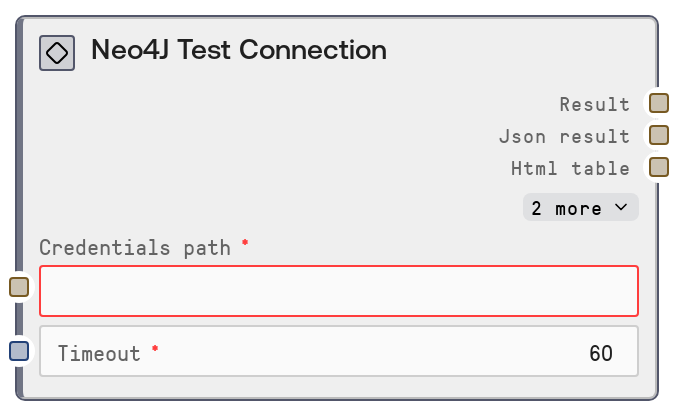
Use the Neo4J Test Connection node whenever you configure or change Neo4J credentials, environment settings, or networking (for example, VPN or firewall rules) and want to confirm that the database is reachable. It typically appears early in a workflow, right after credential setup nodes or configuration steps, before query nodes like Neo4J Query, Neo4J Write, or exploration tools like Neo4J Graph Explorer. The node relies on a credentials file referenced by credentials_path and uses a shared timeout parameter to avoid hanging calls. Upstream, you will usually have configuration or secret-management nodes that provide the path to the credentials file. Downstream, nodes such as Neo4J Database Info, Neo4J Node Labels, or Neo4J Schema Info consume the same credentials, so a successful test here gives you confidence they will work. A common pattern is: (1) prepare or select a credentials file, (2) run Neo4J Test Connection, (3) if the test passes, proceed to Neo4J Query, Neo4J Write, or Neo4J Graph Explorer. If it fails, inspect the JSON output for error messages and fix credentials, host/port, or security settings before continuing.
Inputs
| Field | Required | Type | Description | Example |
|---|---|---|---|---|
| credentials_path | True | STRING | Filesystem path or reference to the stored Neo4J credentials configuration. The file is expected to contain the connection details (host, port, protocol, username, password, and possibly database name) in the format required by the shared database service used by Neo4J nodes. The path must point to an accessible file; if the file is missing or malformed, the connection test will fail. | /workspace/credentials/neo4j_prod.json |
| timeout | True | INT | Maximum time in seconds to wait for the Neo4J test request to complete. If the database is slow or unreachable and the response does not arrive within this window, the node will return a timeout error in its JSON output. Choose a value large enough for your network latency but small enough to fail fast when the database is down. | 30 |
Outputs
| Field | Type | Description | Example |
|---|---|---|---|
| text | STRING | Human-readable summary of the connection test, including whether it succeeded and any high-level status information. This is suitable for displaying in logs, UI panels, or notifications so users can quickly see if the database is reachable. | Neo4J Connection Test Status: SUCCESS Message: Connection to Neo4J at bolt://neo4j.internal:7687 succeeded. |
| json | STRING | JSON-encoded string containing the detailed result from the `/test-connection` endpoint. Typically includes fields like `status`, `message`, and optionally diagnostics such as error type, HTTP status, or latency. Downstream nodes or scripts can parse this JSON for automated checks, branching logic, or monitoring. | {"status": "success", "message": "Connection OK", "host": "neo4j.internal", "port": 7687, "protocol": "bolt", "latency_ms": 42} |
| html | STRING | HTML-formatted representation of the test result, often as a simple status block or table. This is mainly intended for visualization in HTML-capable viewers or dashboards. It can be empty if HTML formatting is not needed in a given context. | Neo4J Connection TestStatus: SUCCESS Message: Connection to bolt://neo4j.internal:7687 succeeded. |
| file | STRING | Path or identifier of an exported file associated with the result, if any. For a simple connection test this is often empty, but in some environments it may point to a log or report file generated by the underlying database service. | |
| extra | STRING | Additional structured or unstructured data returned by the shared database service, JSON-encoded as a string. This may contain extended diagnostics, warnings, or environment metadata that can be useful for debugging connection problems. | {"diagnostics": {"driver_version": "5.20.0", "ssl_enabled": true}, "warnings": []} |
Important Notes
- Performance: The node performs a single lightweight round-trip to the Neo4J service; it is inexpensive but still subject to network latency and the configured timeout.
- Limitations: A successful test only verifies connectivity and authentication, not that specific queries, procedures, or graph algorithms are correctly configured or performant.
- Behavior: The node depends entirely on the
credentials_pathfile and shared database configuration; any mismatch between this file and your actual Neo4J deployment (host, port, protocol, SSL) will cause failures. - Behavior: All detailed results and errors are wrapped in formatted text plus JSON, so automated logic should always parse the JSON output rather than relying solely on the text summary.
Troubleshooting
- Connection timeout or host unreachable: If the JSON output shows a timeout or network error, verify that the host and port in the credentials file are correct, that the Neo4J server is running, and that firewalls or VPN settings allow outgoing connections.
- Authentication failed: If the response indicates authentication errors, update the username and password in the credentials file and ensure the user has permission to access the target database.
- SSL or encryption issues: If errors mention TLS, SSL, certificates, or trust configuration, ensure that the protocol and encryption options in your credentials match the server configuration and certificate trust settings.
- Malformed credentials file: If the node fails when loading credentials, inspect the file at
credentials_pathfor JSON syntax errors, missing fields, or incorrect structure expected by the Neo4J service integration, then fix and re-run the test.