PostgreSQL Visual Query Builder
Usage
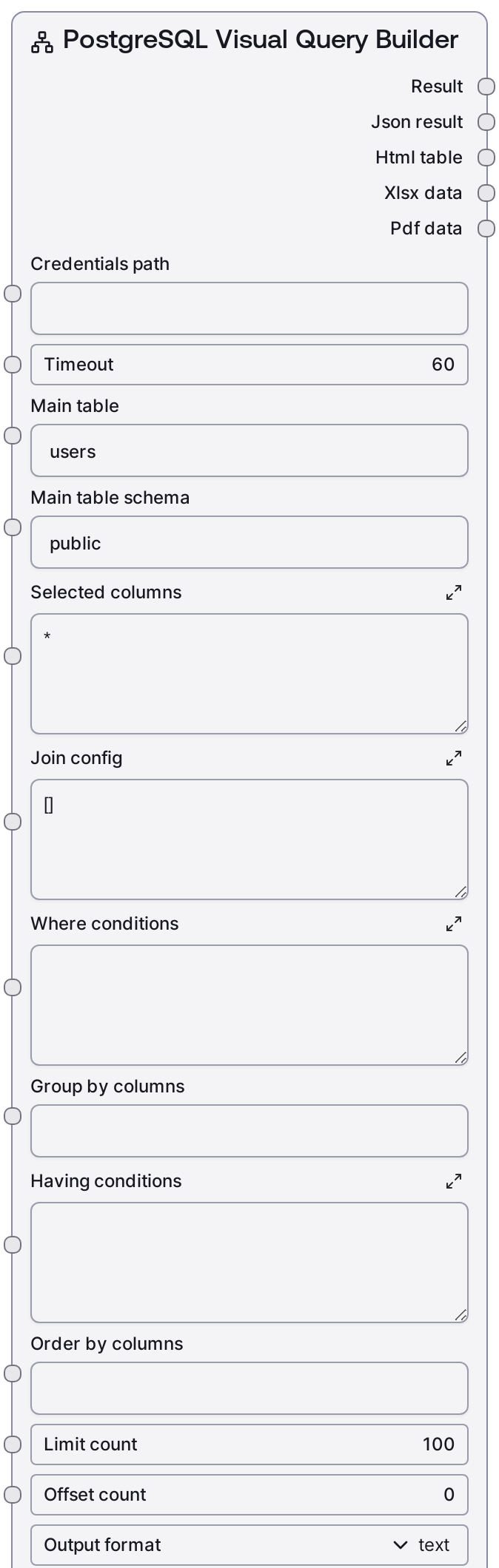
Use this node when you want to query a PostgreSQL database but prefer to describe the structure of the query instead of writing SQL directly. Typical workflows place a credential or connection node upstream (for example a Salt credential node configured with the "postgres" template, providing credentials_path), then feed into this node to build operational reports, analytics extracts, or ad‑hoc data explorations. Downstream nodes often consume the JSON output for automation, or the HTML/XLSX/PDF outputs for user-facing reporting, email delivery, or storage.
Specific use cases include business reporting (querying a main fact table such as orders and joining dimension tables like users or products using join_config), data export with pagination (using limit_count and offset_count, then exporting to XLSX or PDF), and self-service analytics for less SQL-savvy users.
In a typical pipeline: upstream you might use SaltPostgresListTables and SaltPostgresTableInfo to discover schemas and columns, then configure this node. Downstream, nodes that handle JSON, HTML, or binary file data can send results to dashboards, email tasks, storage, or further processing. For write operations (INSERT/UPDATE/DELETE), pair this node with SaltPostgresExecute instead of using it directly.
Inputs
| Field | Required | Type | Description | Example |
|---|---|---|---|---|
| timeout | True | INT | Maximum time in seconds to wait for the remote query request to complete. If the query execution exceeds this timeout, the node will fail with an error. Increase this for complex queries or large joins, but keep within any service-level limits. | 60 |
| main_table | True | STRING | Name of the primary table in the FROM clause. This is the central table your query selects from before applying joins. Must be a valid table name in the specified schema. | users |
| main_table_schema | True | STRING | Schema that contains the main table. Used to qualify the table as schema.table. Keep as public for the default PostgreSQL schema or change to match your database layout. | public |
| selected_columns | True | STRING | Comma-separated list of columns to include in the SELECT clause, or * to select all columns. You can use qualified names or aliases, such as users.id, users.email, orders.total_amount. If left blank or only whitespace, it defaults to *. | users.id, users.email, orders.total_amount, orders.created_at |
| join_config | True | STRING | JSON array describing JOIN clauses. Each element must be an object with type (one of INNER, LEFT, RIGHT, FULL, CROSS), table (join table name), and on (join condition). Optional schema defaults to public if omitted. The node validates that this is a list of objects with required fields and raises descriptive errors on invalid JSON or structure. | [{"type": "INNER", "table": "orders", "schema": "public", "on": "users.id = orders.user_id"}, {"type": "LEFT", "table": "payments", "on": "orders.id = payments.order_id"}] |
| where_conditions | True | STRING | Raw SQL condition expression appended after WHERE. Do not include the WHERE keyword itself. You can combine multiple predicates with AND or OR, for example users.is_active = true AND orders.created_at >= '2024-01-01'. If this is empty or whitespace, no WHERE clause is added. | users.is_active = true AND orders.created_at >= '2024-01-01' |
| group_by_columns | True | STRING | Comma-separated list of columns used in the GROUP BY clause. Leave this empty if you do not need aggregation. Ensure that this aligns with aggregate expressions in your SELECT and with any HAVING conditions. | users.id, users.country |
| having_conditions | True | STRING | Raw SQL predicate appended after HAVING. Used together with GROUP BY to filter aggregated results, for example COUNT(orders.id) >= 3. Leave blank for no HAVING clause. | COUNT(orders.id) >= 3 |
| order_by_columns | True | STRING | Comma-separated list of columns or expressions used in the ORDER BY clause. You may append ASC or DESC to specify direction, such as orders.created_at DESC, users.country ASC. If blank, no ORDER BY clause is added and row order is database-dependent. | orders.created_at DESC, users.country ASC |
| limit_count | True | INT | Maximum number of rows to return, translated into a LIMIT clause. Must be between 1 and 10000. Use smaller values for interactive exploration to reduce load and response time; increase only when you are confident the query is efficient. | 500 |
| offset_count | True | INT | Number of rows to skip before returning results, translated into an OFFSET clause. Must be between 0 and 10000. Use this with limit_count for simple pagination across a larger result set. | 0 |
| output_format | True | CHOICE[text, html, xlsx, pdf, all] | Controls how the query results are formatted and which outputs are populated. text returns a human-readable text summary plus JSON; html returns an HTML table; xlsx returns an Excel workbook; pdf returns a PDF report; all produces the default multi-format export bundle. | all |
Outputs
| Field | Type | Description | Example | ||||||||
|---|---|---|---|---|---|---|---|---|---|---|---|
| text_output | STRING | Human-readable summary of the query results, often including row counts and formatted rows. It is populated when output_format is text or all, and may be an empty string for other formats. | Visual Query Results (120 rows): ================================================== Row 1: id: 101 email: alice@example.com total_amount: 249.99 created_at: 2024-03-10 11:34:22 Row 2: id: 102 email: bob@example.com total_amount: 89.5 created_at: 2024-03-10 11:40:05 ... | ||||||||
| json_output | STRING | JSON-serialized representation of the raw query result as returned by the PostgreSQL service. Typically includes a data array of row objects and may include metadata such as row_count. This is the primary output for downstream programmatic processing. | {"data": [{"id": 101, "email": "alice@example.com", "total_amount": 249.99, "created_at": "2024-03-10T11:34:22"}, {"id": 102, "email": "bob@example.com", "total_amount": 89.5, "created_at": "2024-03-10T11:40:05"}], "row_count": 120} | ||||||||
| html_output | STRING | HTML markup containing a formatted table of the query results, usually with a title or heading. Populated when output_format is html or a mode that includes HTML; otherwise an empty string. | Visual Query: public.users
| ||||||||
| xlsx_output | BYTES | Binary XLSX data representing the query results as an Excel workbook. Only populated when output_format is xlsx or a mode that includes XLSX. It can be saved to storage or passed into file-handling or export nodes. | |||||||||
| pdf_output | BYTES | Binary PDF data representing the query results as a formatted report. Only populated when output_format is pdf or a mode that includes PDF. Suitable for sending as an attachment or archiving. |
Important Notes
- Performance: Large joins or missing WHERE conditions can generate very large result sets. Always start with conservative limit_count values and add selective where_conditions to keep execution time and memory usage under control.
- Limitations: The node builds SQL directly from your string parameters. It does not sanitize or deeply validate the SQL expressions you provide for where_conditions, group_by_columns, having_conditions, or order_by_columns, so you must ensure they are syntactically correct and safe.
- Behavior: join_config is strictly validated. The node requires it to be valid JSON representing a list of objects, each with type, table, and on. Unsupported join types or malformed structures will raise a clear error before any query is executed.
- Behavior: Which outputs are populated depends on output_format. For example, when set to html, only the JSON and HTML outputs are meaningful and the text, XLSX, and PDF outputs are empty strings or placeholders. Downstream nodes must handle this appropriately.
- Limitations: This node is designed for SELECT-style queries through the query service endpoint. It is not intended for data modification operations such as INSERT, UPDATE, or DELETE; use SaltPostgresExecute for those cases.
Troubleshooting
- Invalid JSON in join_config: If you receive an error like "Visual query execution failed: Invalid JSON in join configuration", check that join_config is valid JSON (double quotes around keys and strings, no trailing commas) and that the top-level value is a list of objects.
- Missing join fields: Errors such as "Join 0 missing required field: type" indicate that one of the join objects is missing a required key (type, table, or on). Update the relevant object in join_config to include all required fields.
- Unsupported join type: If you see "Invalid join type" mentioning an unsupported value, your type is not in the supported set (INNER, LEFT, RIGHT, FULL, CROSS). Change it to a valid join type such as LEFT or INNER.
- SQL syntax errors: Errors returned from the PostgreSQL service (for example, "syntax error at or near 'WHERE'") usually come from malformed where_conditions, having_conditions, or order_by_columns. Simplify these clauses and test incrementally until the query runs correctly.
- Empty or missing non-text outputs: If html_output, xlsx_output, or pdf_output are empty, verify that output_format is set to a compatible value (html, xlsx, pdf, or all). Also ensure the query returns rows; an empty result set may produce structurally valid but content-light exports.