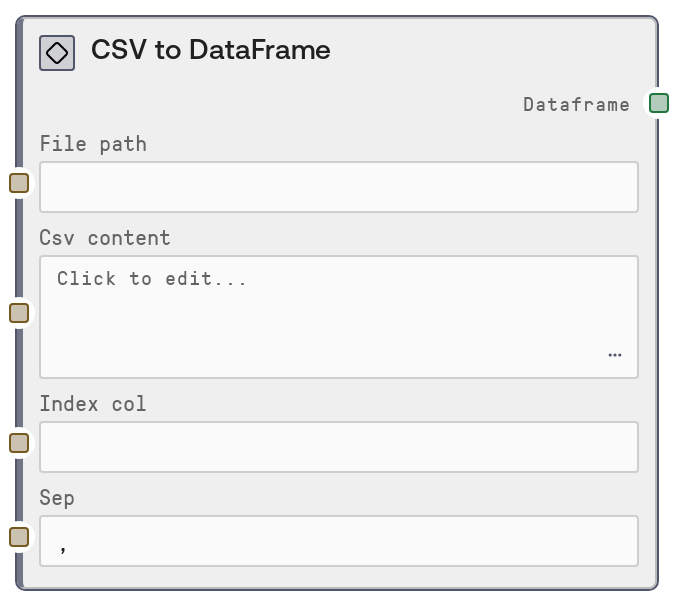
CSV to DataFrame
This node converts CSV data into a DATAFRAME object. You can either point it to a CSV file path or paste CSV content directly as text. It supports custom field delimiters and an optional index column, making it a flexible entry point for tabular data workflows.
Usage
Use this node when you need to ingest CSV-based tabular data into a SaltAI workflow as a DataFrame. Place it early in your pipeline as the source of DATAFRAME data, then connect its output to downstream table-processing nodes such as ConcatenateDataFramesNode, DataFrameToHTMLNode, filtering or aggregation nodes, or visualization nodes. If your data is stored on disk (for example, uploaded via a File node), use the file_path input and leave csv_content blank. If you are working with quickly pasted data (for example, copied from a spreadsheet or web table), leave file_path empty and use csv_content. Configure sep when dealing with non-comma delimiters such as semicolons or tabs, and set index_col to a column name like "id" or "sample_id" when you want that column to serve as the DataFrame index for later joins, sorts, and lookups. CSV To DataFrame fits naturally into SALT/Table/DataFrame workflows and is a common upstream source for nodes that accept DATAFRAME or TABLE inputs.
| Field | Required | Type | Description | Example |
|---|
| file_path | False | STRING | Absolute or workspace-relative path to a CSV file. Use this when your data is stored on disk or provided by an upstream file-handling node. Leave empty if you instead provide csv_content. Must not be used together with csv_content; only one source is allowed. | /workspace/uploads/customer_churn_2024_q1.csv |
| csv_content | False | STRING | Raw CSV text content. Use this for small datasets that you paste directly or generate in a previous node as text. Must not be provided if file_path is set. The first line should normally contain column headers, and rows should follow the delimiter defined by sep. | customer_id,status,monthly_revenue C001,active,120.5 C002,cancelled,89.0 C003,active,135.2 |
| index_col | False | STRING | Optional column name to use as the DataFrame index. Leave empty to let the DataFrame use a default integer index. Use this when you have a natural key such as id, sample_id, or timestamp that you plan to use for joins, lookups, or alignment in downstream nodes. If the name does not match any column, the node will raise an error from the underlying DataFrame library. | customer_id |
| sep | False | STRING | Delimiter character used to separate fields in the CSV. Default is a comma. Override this for semicolon-separated files (common in some locales) or tab-separated values. Must be a single-character delimiter supported by the CSV parser. | ; |
Outputs
| Field | Type | Description | Example |
|---|
| dataframe | DATAFRAME | A DATAFRAME object representing the parsed CSV data. Columns correspond to CSV headers, rows to CSV records, and the index is either the default integer index or the column specified by index_col. This output can be passed into any node that accepts DATAFRAME or TABLE, including concatenation, transformation, export, and visualization nodes. | A DATAFRAME with columns ['customer_id', 'status', 'monthly_revenue'] and 3 rows, indexed by 'customer_id' if index_col was set to 'customer_id'. |
Important Notes
- Performance: For very large CSV files, reading via file_path is generally more efficient and stable than passing huge csv_content strings, which can increase memory overhead and slow parsing.
- Limitations: You must provide exactly one of file_path or csv_content. If both are empty or both are set, the node raises a validation error instead of guessing.
- Behavior: When index_col is left empty, the node uses a default integer index. Downstream operations that rely on stable IDs should explicitly set index_col to a meaningful column.
- Behavior: The sep parameter must match the actual delimiter in your CSV. Using the wrong delimiter can silently produce a single wide column or misaligned data instead of the expected table structure.
Troubleshooting
- Common Error 1: Error indicating that either file_path or csv_content must be provided. Fix this by setting exactly one of these inputs and leaving the other empty before running the node.
- Common Error 2: Error indicating you must provide either file_path or csv_content, not both. Clear one of the inputs; the node is designed to read from a single CSV source only.
- Common Error 3: The resulting DataFrame has a single column that contains entire CSV lines as text. This usually means sep is incorrect. Inspect your CSV file to confirm the delimiter (comma, semicolon, tab) and set sep to the correct character.
- Common Error 4: You see a KeyError or similar error mentioning the index_col name. Verify that index_col exactly matches one of the header names in your CSV, including case and whitespace, or leave it empty to use the default numeric index.