MySQL Execute
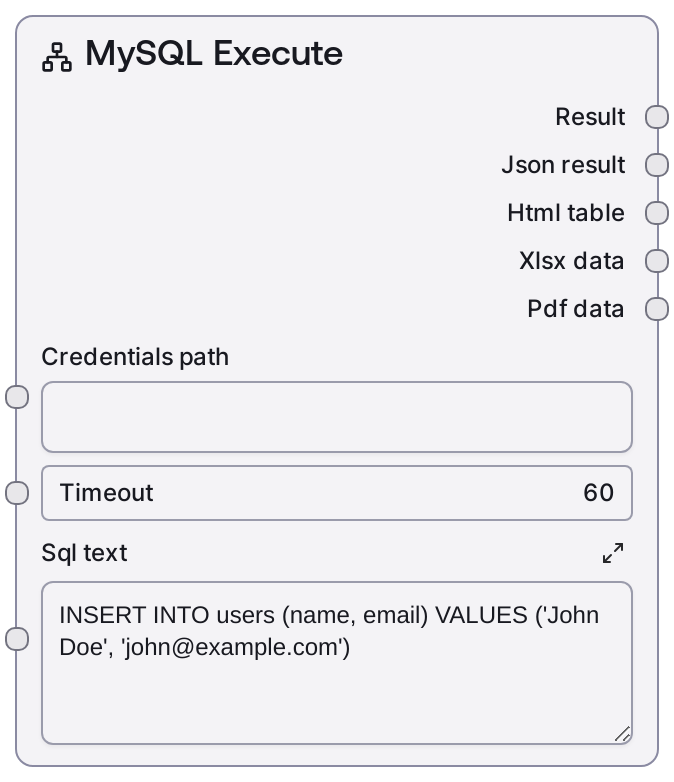
Usage
Use this node whenever your workflow needs to modify MySQL data or schema instead of reading it. Typical scenarios include inserting new records after processing inputs, updating order or ticket statuses, deleting obsolete data, or applying schema changes within a controlled automation pipeline.
In a typical pipeline, you would use MySQL Test Connection early to validate connectivity, then possibly MySQL List Databases and MySQL List Tables to explore what you can modify. Nodes like MySQL Table Info, MySQL Query Builder Helper, or MySQL Visual Query Builder can help you design the correct table structure and statements. Once you have the final non-SELECT SQL, pass it into MySQL Execute along with the proper credentials. Downstream, you can parse the JSON output to check fields such as success, affected_rows, or insert_id and branch your workflow accordingly or trigger follow-up reads via MySQL Query.
This node works well together with MySQL Connection String (for building connection URIs used in your credential configuration) and with logic or control-flow nodes that implement retries or conditional execution based on the JSON result. Use it in production only after testing statements against a staging environment, and keep SQL generation controlled to avoid unsafe dynamic queries.
Inputs
| Field | Required | Type | Description | Example |
|---|---|---|---|---|
| sql_text | True | STRING | The SQL statement to execute against MySQL. Designed for INSERT, UPDATE, DELETE, and DDL operations, not for SELECT queries. Multiline is supported. The SQL must be valid for the target MySQL version and safe to run under the configured user privileges. If you interpolate user input, ensure it is sanitized or parameterized upstream. | INSERT INTO customers (email, first_name, last_name, created_at) VALUES ('alice@example.com', 'Alice', 'Nguyen', NOW()); |
Outputs
| Field | Type | Description | Example |
|---|---|---|---|
| text | STRING | Human-readable summary string describing the outcome of the execute operation. Commonly includes whether the statement was successful, how many rows were affected, and may mention insert IDs or error information. Intended for logs, operator review, or display in user interfaces. | MySQL Execute Results: Statement executed successfully. Rows affected: 1 Last insert ID: 10427. |
| json | STRING | JSON-encoded string with the raw result returned by the MySQL backend service. Typically contains fields such as success (boolean), affected_rows (integer), insert_id (integer or null), warnings (list), and error (object or string) when something goes wrong. Downstream nodes should parse this JSON to implement conditional behavior, error handling, or to capture generated keys. | {"success": true, "affected_rows": 1, "insert_id": 10427, "warnings": []} |
Important Notes
- Performance: Large batch updates, deletes without selective WHERE clauses, or heavy DDL (for example ALTER TABLE on big tables) can be slow and lock significant portions of the database; keep statements targeted and schedule heavy operations during low-traffic windows.
- Limitations: This node does not return row sets from SELECT queries; using SELECT here may result in backend errors or empty data. Use the MySQL Query or MySQL Visual Query Builder nodes when you need to retrieve and inspect table data.
- Behavior: Execution is delegated to a remote MySQL service via an execute endpoint; the exact shape of the JSON result may vary slightly by environment or connector version, so always inspect a sample output before building strict parsers around it.
- Behavior: The node does not wrap multiple statements in explicit transactions on its own. If you need atomic multi-step updates, manage transactions directly in your SQL (using BEGIN, COMMIT, and ROLLBACK) or through database-side configuration.
Troubleshooting
- Common Error 1: The text output includes an error message such as "syntax error near" and the JSON output has success set to false. Verify that sql_text is valid MySQL syntax, ensure table and column names are correct, and test the statement directly on the target database.
- Common Error 2: Execution times out, especially on large tables or complex DDL. Increase the timeout input, optimize the query with indexes and selective WHERE clauses, or break the operation into smaller batches. Confirm there are no blocking locks on the affected tables.
- Common Error 3: JSON output indicates access denied or insufficient privileges. Update the credentials referenced by credentials_path to grant necessary INSERT, UPDATE, DELETE, or DDL privileges, or change the target database or schema to one where the user has appropriate rights.