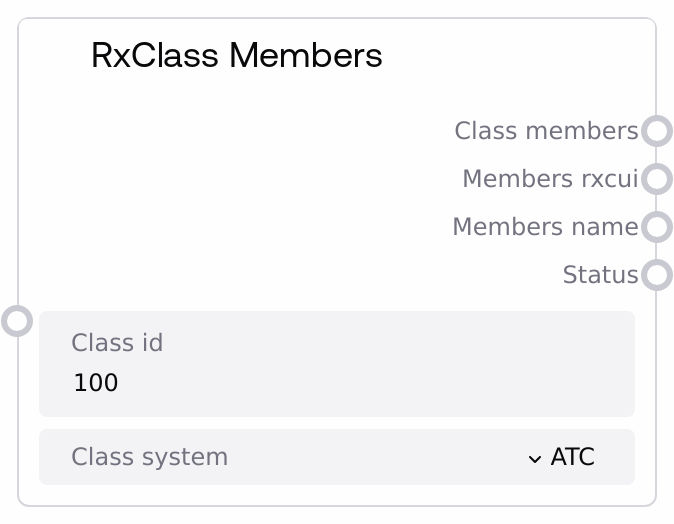
RxClass Members
This node queries the RxNorm RxClass service to list the drug members of a specified RxClass. It returns the complete API payload as a formatted JSON string, and also extracts two convenience lists: one of member RxCUIs and one of member names, along with a status message. It is useful when you need both the raw response and easy-to-consume identifiers for downstream analysis.
Usage
Use this node when you have an RxClass identifier and need to enumerate the drugs that belong to that class in a given classification system. A common workflow is: (1) use a node such as SaltAIRxClassSearch to find relevant classes by name, or SaltAIRxClassInfo to confirm a class_id; (2) pass that class_id and a class_system (for example, ATC) into this node; (3) feed the resulting member RxCUI list into downstream nodes that operate on individual drugs (for example, population analysis, drug class analysis, or custom filtering or reporting). The node typically sits mid-pipeline, after you have identified a target class and before per-drug analysis. Best practice is to choose a class_system that matches your use case, such as ATC for anatomical–therapeutic–chemical classes, and to validate that the returned member lists are non-empty before further processing. Combine it with SaltAIRxClassDrugMembers when you specifically need RxNorm drugs by class, or with SaltAIDrugClassAnalysis when you are exploring classes and mechanisms of action for the member drugs.
| Field | Required | Type | Description | Example |
|---|
| class_id | True | STRING | RxClass identifier of the target class whose members you want to retrieve. Must be a non-empty string and should correspond to a valid RxClass ID from the RxNorm system. Whitespace-only values are rejected. | 100 |
| class_system | True | STRING | Classification system or relationship source to use when looking up class members. Options are drawn from RxNormAPI.drug_class_source_relations (for example, ATC and other supported systems). This controls which class hierarchy or source vocabulary is used to determine membership. | ATC |
Outputs
| Field | Type | Description | Example |
|---|
| class_members | STRING | A JSON-formatted string containing the full RxClass members API response, wrapped with the passed class_id for context. The structure is a JSON object with a class_id field and a data field containing the raw rxclass_members payload. This is suitable for logging, inspection, or advanced custom parsing in downstream nodes. | { "class_id": "100", "data": { "drugMemberGroup": { "drugMember": [ { "minConcept": { "rxcui": "83367", "name": "atorvastatin 20 MG Oral Tablet" } }, { "minConcept": { "rxcui": "617319", "name": "rosuvastatin 10 MG Oral Tablet" } } ] } } } |
| members_rxcui | STRING | A JSON-encoded list of RxNorm Concept Unique Identifiers (RxCUIs) for the member drugs. Extracted from the drugMemberGroup.drugMember[*].minConcept.rxcui fields. Use this when you want a clean list of identifiers to pass into other RxNorm-based nodes or external services. | ["83367", "617319", "617314"] |
| members_name | STRING | A JSON-encoded list of human-readable drug names for the member drugs, taken from drugMemberGroup.drugMember[*].minConcept.name. This is useful for reports, user interface displays, or quick sanity checks on the class membership. | ["atorvastatin 20 MG Oral Tablet", "rosuvastatin 10 MG Oral Tablet", "simvastatin 20 MG Oral Tablet"] |
| status | STRING | A human-readable status message describing the result of the operation. On success it confirms that members were retrieved for the given class_id; on failure it contains an error description, for example an empty class_id or upstream API error. | Successfully retrieved RxClass members for class ID 100 |
Important Notes
- Performance: The node makes a live call to the RxNorm RxClass service via RxNormAPI.get_rxclass_members; response time depends on network latency and RxNorm availability, especially for large classes with many members.
- Limitations: If the RxClass API returns no drugMemberGroup or drugMember entries, the member lists will be empty even though the call may be considered successful; this is typically a data issue, such as a class with no members, rather than a node error.
- Behavior: The members_rxcui and members_name outputs are always JSON-encoded strings, not native list types; downstream consumers must parse them if they need list structures.
- Behavior: When class_id is empty or whitespace, the node returns an empty JSON object string for class_members, empty JSON array strings for both lists, and a descriptive error status without calling the external API, which you can use for input validation in workflows.
- Error Handling: If the underlying API response includes an error field, that payload is returned in class_members and the lists are set to empty JSON arrays with an API Error status, allowing workflows to branch on status rather than failing hard.
Troubleshooting
- Empty outputs with status 'Error: Class ID cannot be empty': This occurs when class_id is blank or contains only spaces. Provide a valid RxClass identifier from a search or info node and rerun the workflow.
- Status shows 'API Error: ...' and member lists are empty: The RxNorm service returned an error, such as an invalid class_id or unsupported class_system. Inspect the class_members JSON for the detailed error, verify that class_id and class_system are valid, and adjust the inputs accordingly.
- class_members has data but members_rxcui and members_name are empty arrays: The API response did not include a drugMemberGroup.drugMember section. Confirm that the chosen class_id actually has associated drugs in the selected class_system, or try a different classification system such as ATC.
- Downstream node fails when treating members_rxcui as a list: The members_rxcui output is a STRING containing JSON. Parse it into a list in your downstream logic or use a helper node that converts JSON strings to structured lists before iterating over members.