Notion Writer
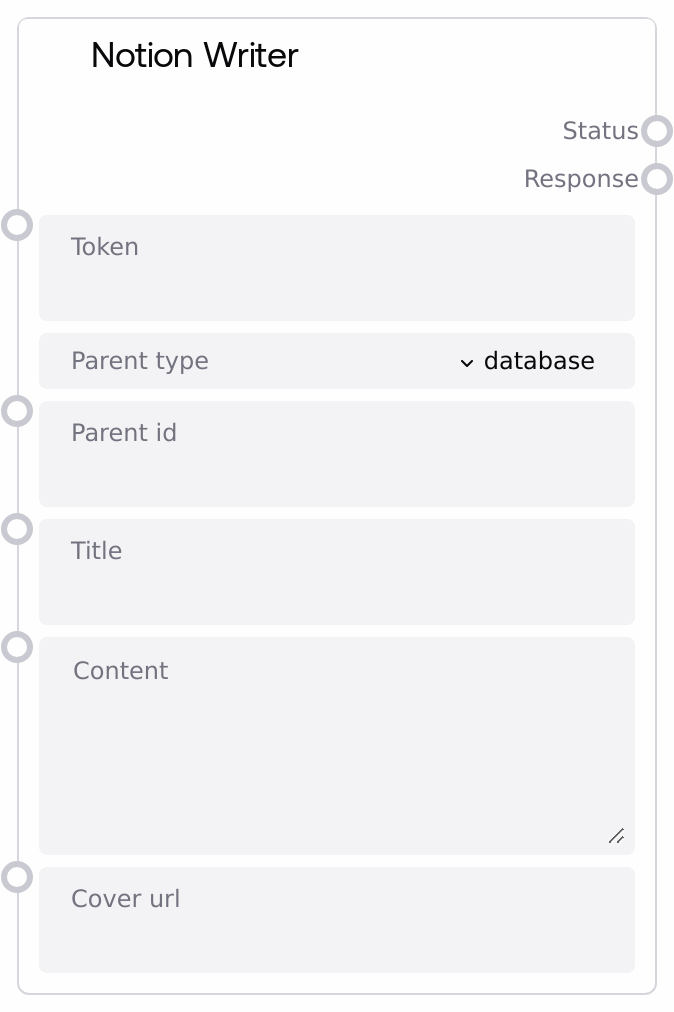
Usage
Use Notion Writer to automatically store AI-generated content, notes, or reports into Notion as part of a Salt pipeline. Typical workflows include: sending LLM-generated meeting summaries into a team knowledge database, logging experiment runs under a lab notebook page, or creating structured documentation pages from templates. Upstream nodes usually generate or assemble the text (for example, a chat model node or a summarization node) and pass it into the title and content inputs. Downstream, the Response output can be parsed to extract the created page url, logged for auditing, or forwarded to notification nodes so users can quickly open the new page.
Choose parent_type = "database" when you want each run to create a new database entry in a specific Notion database (using its database ID), or parent_type = "page" to create a standalone child page under an existing page. Ensure the token corresponds to a Notion integration with access to the target workspace object and that the integration has been added to the relevant database or page in Notion. For best results, pass well-structured markdown into content (headings, bullet lists, code blocks) and use cover_url when you want visually distinctive pages, such as dashboards or executive summaries.
Inputs
| Field | Required | Type | Description | Example |
|---|---|---|---|---|
| token | True | STRING | Notion API integration token for authenticating requests. It must come from a Notion internal integration that has access to the specified parent database or page. | |
| parent_type | True | ["database", "page"] | Indicates whether `parent_id` refers to a Notion database or a page. Use `database` to create new entries in a database; use `page` to create a child page under a specific parent page. | database |
| parent_id | True | STRING | The Notion ID of the parent object. For `database`, provide the database ID; for `page`, provide the parent page ID. You can use either the raw UUID or the standard hyphenated Notion ID format. | b3f0a2e4-1234-5678-9abc-d0e1f2345678 |
| title | True | STRING | Title of the new Notion page or database entry. This is what users see as the page name in Notion. | Weekly Product Sync – 2026-04-27 |
| content | True | STRING | Body content of the Notion page, written as plain text or markdown. It is converted to Notion blocks internally, supporting standard markdown constructs like headings, lists, and code blocks. | # Meeting Summary **Attendees:** Alex, Jordan, Priya - Decisions: - Launch v2 to beta users next sprint - Action items: - @Alex finalize rollout plan - @Priya update documentation |
| cover_url | False | STRING | Optional URL for the page cover image. This should be a publicly accessible image URL to ensure Notion can fetch and display it reliably. | https://assets.example.com/covers/product-sync-cover.png |
Outputs
| Field | Type | Description | Example |
|---|---|---|---|
| Status | STRING | High-level status of the write operation. Typically returns `Success` if the Notion page was created, or `Error` if an exception occurred during conversion or API communication. | Success |
| Response | STRING | JSON-serialized response object from the Notion write process. On success, it includes a `url` field for the created page; on failure, it contains an `error` field describing what went wrong. Downstream nodes should parse this string as JSON if they need structured fields. | {"url": "https://www.notion.so/Workspace/Weekly-Product-Sync-2026-04-27-b3f0a2e4123456789abcd0e1f2345678"} |
Important Notes
- Performance: Each execution makes an external HTTP request to Notion. Latency depends on network conditions and content size, so expect up to a few seconds for large pages.
- Limitations: Notion imposes limits on page size and block counts. Extremely long markdown documents or very large embedded content may fail or be truncated during conversion.
- Behavior: Any exception (invalid token, bad parent ID, markdown conversion failure) is captured and returned as
Status = "Error"with anerrormessage inside the JSON-encodedResponse. - Behavior: The node always returns JSON as a string in
Responserather than a structured object. Consumers that need the page URL or error details must parse the string themselves.
Troubleshooting
- Authentication or permission errors: If
StatusisErrorandResponsecontains messages about an invalid key or insufficient permissions, verify that thetokenbelongs to a Notion integration added to the target workspace and explicitly granted access to theparent_idobject. - Invalid parent_id or wrong parent_type: Errors mentioning an unknown or unsupported parent usually mean
parent_idis incorrect orparent_typedoes not match the actual object. Confirm the database or page ID in Notion and ensure you selecteddatabasevspageappropriately. - Content conversion or size issues: If the error suggests payload or block limits, reduce
contentsize or split it into multiple pages. Remove unusual markdown constructs that the converter might not support well. - Missing or unexpected URL in Response: If
StatusisSuccessbut you cannot find the expectedurlfield, log and inspect the rawResponsestring to see the exact structure, then adjust any downstream JSON parsing or assumptions accordingly.