Agent
Usage
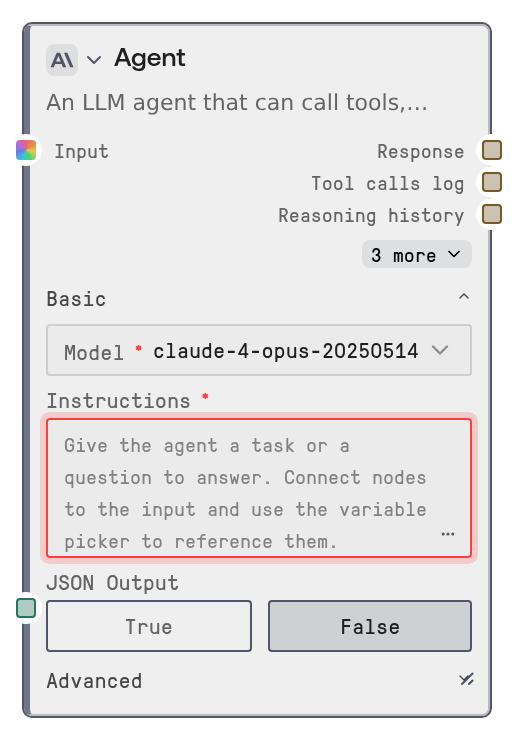
Use this node when a workflow needs reasoning, decision-making, or multi-step automation rather than a single text completion. Typical scenarios include answering questions from connected workflow data, summarizing documents with knowledge base context, deciding which SaaS connector tool to call, producing structured JSON for downstream automation, or coordinating several tools to complete a task.
Place Agent after upstream data-producing nodes and connect their outputs to context_data, then reference those values in user_prompt or system_prompt with the variable picker. Configure available tools in the Tools panel, usually using app/tool nodes such as SaltToolNode variants as the source of connector actions. Configure knowledge bases in the Knowledge Bases panel when the agent should retrieve relevant document context before answering.
Common downstream consumers are text processing nodes, JSON parsing or routing nodes, notification/action nodes, and loop nodes that use conversation_history to drive one agent iteration per loop cycle. Use response for the final answer, is_complete to branch on completion, tool_calls_log for audit/debug output, and conversation_history when building iterative agent workflows.
Best practices: keep system_prompt stable and rule-focused, put the task-specific request in user_prompt, expose only the tool inputs the model should decide, set static/manual tool inputs in the tool configuration, keep max_iterations as low as practical, enable JSON Output with a schema when downstream nodes require structured data, and use a fallback model for production workflows where primary model failures should not stop execution.
Inputs
| Field | Required | Type | Description | Example |
|---|---|---|---|---|
| user_prompt | True | DYNAMIC_STRING | The task, question, or instructions for the agent. Supports dynamic text and connected upstream values through variable substitution. | Review the attached customer onboarding notes and draft a concise follow-up email. Use {{CRM Lead.output}} for the lead details. |
| model | True | COMBO | Primary LLM model used for the agent loop. Available options are loaded from the configured model catalog and may vary by workspace. | gpt-4.1 |
| max_tokens | True | INT | Maximum number of tokens the model may generate in a response. Use 0 to omit the explicit limit. Range: 0 to 128000. | 4096 |
| system_prompt | False | DYNAMIC_STRING | Role, behavior, tone, and boundaries for the agent before it handles the user request. If empty, a default helpful assistant prompt is used. | You are a careful customer support analyst. Use tools only when needed, cite knowledge base facts, and return concise recommendations. |
| context_data | False | * | Connected upstream workflow data available for prompt variable substitution. Supports multiple connections and can carry text, JSON, or other node outputs. | {"CRM Lead.output":"Acme Corp, renewal due July 15","Ticket Summary.response":"Customer reported delayed invoice sync."} |
| temperature | False | FLOAT | Controls randomness. Lower values are more deterministic; higher values are more creative. Range: 0 to 2. | 0.4 |
| top_p | False | FLOAT | Nucleus sampling parameter that limits token choices to a probability mass. Not supported by all providers. Range: 0 to 1. | 0.9 |
| top_k | False | INT | Limits token choices to the top K candidates. Not supported by all providers. Range: 1 to 500. | 40 |
| frequency_penalty | False | FLOAT | Penalizes repeated wording to reduce repetitive phrasing. Availability depends on the selected provider. Range: -2 to 2. | 0.3 |
| presence_penalty | False | FLOAT | Encourages the model to introduce new topics instead of repeating existing ones. Availability depends on the selected provider. Range: -2 to 2. | 0.2 |
| max_iterations | False | INT | Maximum number of LLM/tool-calling rounds before stopping. Higher values allow more complex tasks but increase latency and cost. Range: 1 to 50. | 8 |
| memory_window_size | False | INT | Number of previous user/assistant message pairs to remember across executions for this workflow and node. 0 disables memory. Range: 0 to 100. | 5 |
| enable_guardrails | False | BOOLEAN | When enabled, detects and redacts common PII patterns such as email addresses, phone numbers, SSNs, and credit card numbers in inputs and outputs. | True |
| json_mode | False | BOOLEAN | Requests a pure valid JSON final response. Works best when paired with `response_schema` and downstream JSON parsing. | True |
| response_schema | False | STRING | JSON schema describing the desired shape of the final response when JSON Output is enabled. Invalid schema text is still included as format guidance. | {"type":"object","properties":{"summary":{"type":"string"},"priority":{"type":"string","enum":["low","medium","high"]},"next_steps":{"type":"array","items":{"type":"string"}}},"required":["summary","priority","next_steps"]} |
| max_kb_context_chars | False | INT | Maximum number of knowledge base result characters injected into the prompt. Larger values provide more context but consume more model context. Range: 1000 to 500000. | 50000 |
| fallback_model | False | COMBO | Backup model to try automatically if the primary model call fails. Available options are loaded from the model catalog. | claude-opus-4-6 |
| tools_json | False | STRING | Tool configuration JSON managed by the Agent Tools panel. Defines connector tools or custom node tools the agent may call. | [{"type":"tool","tool_id":"send_slack_message","name":"Send Slack Message","credential_id":"slack-workspace-connection","input_schema":{"agent_decided_inputs":["channel","text"]}}] |
| knowledge_bases_json | False | STRING | Knowledge base configuration JSON managed by the Knowledge Bases panel. Only configured knowledge base IDs can be searched by the agent. | [{"kb_id":"kb-support-runbooks","name":"Support Runbooks"},{"kb_id":"kb-product-docs","name":"Product Documentation"}] |
| encrypted_credentials_json | False | STRING | Encrypted credential map injected by the platform for tool execution. This is platform-managed and should not be edited manually. | {"slack-workspace-connection":" |
Outputs
| Field | Type | Description | Example |
|---|---|---|---|
| response | STRING | Final answer from the agent, or the latest assistant text if the agent stops before completion. In JSON Output mode, this is coerced to valid JSON when possible. | {"summary":"The customer is blocked by a delayed invoice sync.","priority":"high","next_steps":["Open a billing engineering ticket","Notify the account owner","Send the customer a status update"]} |
| tool_calls_log | STRING | JSON-formatted audit log of tool calls made by the agent, including iteration number, tool name, arguments, and result. Useful for debugging and traceability. | [{"iteration":1,"reasoning":"I need to check the runbook before recommending next steps.","tool_call_id":"call_7x2","tool_id":"search_knowledge_base","arguments":"{\"query\":\"invoice sync delay remediation\",\"knowledge_base_id\":\"kb-support-runbooks\"}","result":"{\"results\":[{\"title\":\"Invoice Sync Runbook\",\"content\":\"Check sync queue status and retry failed jobs.\"}],\"result_count\":1}"}] |
| reasoning_history | STRING | JSON-formatted per-iteration reasoning trace showing whether the agent called tools or produced a final answer. | [{"iteration":1,"reasoning":"I should search the support runbook for invoice sync guidance.","action":"tool_call","tools_called":["search_knowledge_base"],"model":"gpt-4.1"},{"iteration":2,"reasoning":"I found the relevant runbook and can now answer.","action":"final_answer","tools_called":[],"model":"gpt-4.1"}] |
| is_complete | BOOLEAN | True when the agent reached a final response before hitting `max_iterations`; false when it stopped early due to an error or iteration limit. | True |
| conversation_history | STRING | JSON-formatted message history after execution. Feed this back into `conversation_history` for loop-based workflows or retain it for inspection. | [{"role":"system","content":"You are a support triage assistant."},{"role":"user","content":"Triage ticket TCK-1842."},{"role":"assistant","content":"{\"summary\":\"Invoice sync delay detected.\",\"priority\":\"high\"}"}] |
| error | STRING | Error or warning text from the run. Empty when the agent completes without warnings; may contain model failures, iteration-limit messages, invalid configuration errors, or PII warnings. | Agent reached max iterations (10) |
Important Notes
- Performance: Each iteration can make one LLM call plus one or more tool calls. Higher
max_iterations, large knowledge base context, and slow external connectors increase latency and cost. - Tool security: Connector tools are executed through the platform backend so credentials remain server-side. The executing user must be authorized to use the configured connection or credential.
- Knowledge base access: The agent can only search knowledge bases configured on the node, and searches require a valid platform user identity. Unauthorized, missing, or unknown knowledge bases return no results rather than exposing content.
- JSON behavior: JSON Output mode strongly instructs the model to return JSON and performs best-effort cleanup, but malformed model output may be wrapped or coerced rather than matching the schema perfectly.
- Memory behavior: Conversation memory is scoped to the workflow, node, and system prompt. Changing the system prompt starts a separate memory context, and setting
memory_window_sizeto 0 disables memory.
Troubleshooting
Model not foundor no models appear: The selected model is not available in the model catalog or the catalog service is unavailable. Refresh available models, choose a listed model, or verify model-provider configuration.- Agent stops with
Agent reached max iterations: The model continued calling tools without producing a final answer. Lower tool ambiguity, improve the system prompt, reduce available tools, or increasemax_iterationsif the task genuinely needs more steps. - Tool call returns an authorization or credential error: The configured connection or credential may be missing, revoked, or not accessible to the executing user. Reconnect the app, select the correct credential, and confirm the user has permission to use it.
- Knowledge base search returns empty results: The knowledge base may not be configured on the node, the executing user may lack access, the query may be too vague, or the KB may have no matching indexed content. Verify the selected KB and test a more specific query.
- Downstream JSON parsing fails: Enable
json_mode, provide a strictresponse_schema, and make the prompt explicitly request only the fields your downstream workflow expects. Inspectresponseto confirm it is valid JSON before parsing.