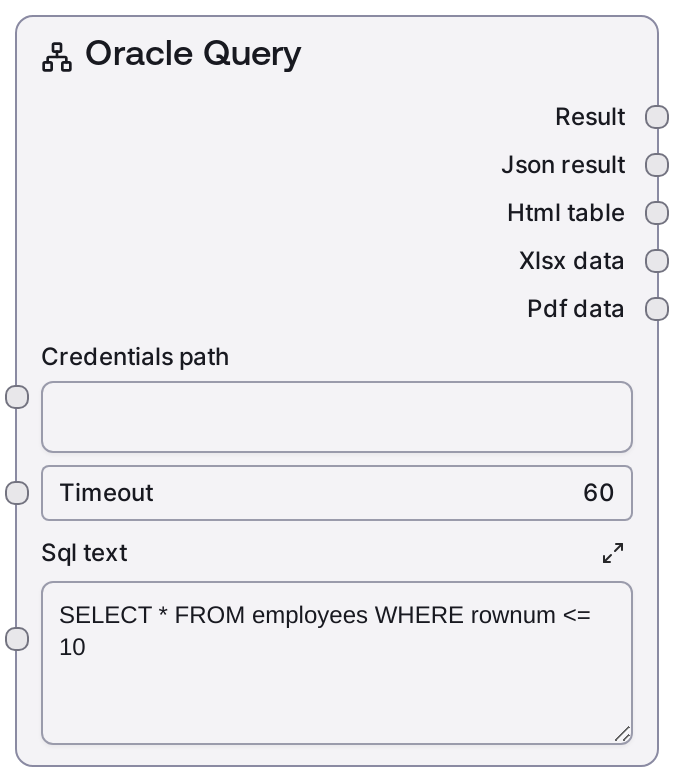
Oracle Query
This node connects to an Oracle database using pre-configured credentials and runs a user-provided SQL SELECT statement. It sends the query to an Oracle service endpoint with an optional timeout and formats the response into a human-readable text summary along with JSON data. It is focused on read-only data retrieval and is not intended for INSERT, UPDATE, DELETE, or DDL operations.
Usage
Use SaltOracleQuery when you need to fetch data from an Oracle database as part of your Salt workflow, such as listing employees in a department, retrieving customer profiles, or pulling reference tables for downstream analysis. Typically, you first configure Oracle credentials using the 'oracle' credential template or a related credential/config node; those credentials are referenced via credentials_path and then combined with your SELECT query in sql_text. Place this node after credential or connection setup nodes and before nodes that parse, transform, enrich, or summarize the resulting JSON. For write or schema-modifying operations, use SaltOracleExecute instead. A common pipeline is: configure credentials → optionally validate with an Oracle info node → run SaltOracleQuery to retrieve rows → send the JSON output to data cleaning, aggregation, or LLM reasoning nodes.
| Field | Required | Type | Description | Example |
|---|
| credentials_path | True | STRING | Reference or file path to Oracle credentials defined with the 'oracle' credential template. This must include all connection information (such as host, port, service name or SID, and authentication details) expected by the Oracle integration. If this path is invalid or the credentials are malformed, the node cannot connect to the database. | /workspace/credentials/oracle/hr_prod_credentials.json |
| timeout | False | INT | Maximum time, in seconds, that the node will wait for the Oracle query to complete before failing. Use a higher value for complex analytic queries and a lower value for simple lookups. Must be a positive integer; too small a timeout may interrupt queries that would otherwise complete successfully. | 45 |
| sql_text | True | STRING | The SQL SELECT statement to be executed on the Oracle database. Must be valid Oracle SQL and is intended only for read operations. Multi-line statements are supported. Non-SELECT commands (INSERT, UPDATE, DELETE, DDL) should not be used here and may result in errors or undefined behavior; use SaltOracleExecute for those scenarios. | SELECT employee_id, first_name, last_name, department_id FROM employees WHERE department_id = 60 AND rownum <= 25 |
Outputs
| Field | Type | Description | Example |
|---|
| text | STRING | A human-readable summary of the Oracle query results. This typically includes the number of rows returned, a list of column names, and a sample row or abbreviated view of the dataset, suitable for quick inspection or logging. | Oracle Query Results Rows returned: 5 Columns: EMPLOYEE_ID, FIRST_NAME, LAST_NAME, DEPARTMENT_ID Sample row: {"EMPLOYEE_ID": 104, "FIRST_NAME": "Bruce", "LAST_NAME": "Ernst", "DEPARTMENT_ID": 60} |
| json | JSON | Structured JSON output containing the query response from Oracle. Typically includes an array of rows and associated column metadata, enabling downstream nodes to programmatically access and transform the data. | {"columns":["EMPLOYEE_ID","FIRST_NAME","LAST_NAME","DEPARTMENT_ID"],"rows":[[104,"Bruce","Ernst",60],[105,"David","Austin",60],[106,"Valli","Pataballa",60],[107,"Diana","Lorentz",60],[108,"Nancy","Greenberg",60]],"rowCount":5,"query":"SELECT employee_id, first_name, last_name, department_id FROM employees WHERE department_id = 60 AND rownum <= 25"} |
Important Notes
- Performance: The execution time and resource usage depend heavily on your SQL and database size. Prefer selective WHERE clauses, appropriate indexes, and row limits for exploratory queries to avoid large, slow result sets.
- Limitations: This node supports SELECT-style retrieval queries only. DML and DDL commands (INSERT, UPDATE, DELETE, CREATE, ALTER, DROP, etc.) should be executed with SaltOracleExecute to avoid errors or unexpected behavior.
- Behavior: The node uses underlying Oracle credentials loaded from
credentials_path and calls an Oracle integration endpoint. If credentials cannot be loaded or the service is unreachable, the query is never executed and the node will raise a connection or authentication error.
- Behavior: The text output is primarily for human consumption and may change formatting over time. For stable integrations, rely on the JSON output instead of parsing the text summary.
Troubleshooting
- Connection or authentication errors: If you see messages about invalid credentials, failed authentication, or unreachable host, verify that
credentials_path points to the correct Oracle credential file, that its contents conform to the 'oracle' template, and that the database is reachable from the Salt environment.
- Timeout exceeded: When the node fails with a timeout, either increase the
timeout value or optimize the SQL (add indexes, narrow WHERE conditions, reduce joins, or apply rownum limits). Start with smaller result sets when designing queries.
- SQL errors or ORA- codes: Errors reporting invalid SQL or ORA-xxxx codes typically indicate issues in
sql_text such as syntax errors, invalid object names, or insufficient privileges. Validate and correct the query in an Oracle client using the same user/schema before retrying.
- No or unexpected rows: If the query runs but returns no data or fewer rows than expected, double-check your filters, rownum constraints, and target schema. Confirm you are in the right environment (for example, test versus production) and that the underlying tables contain the expected data.