Memory Write
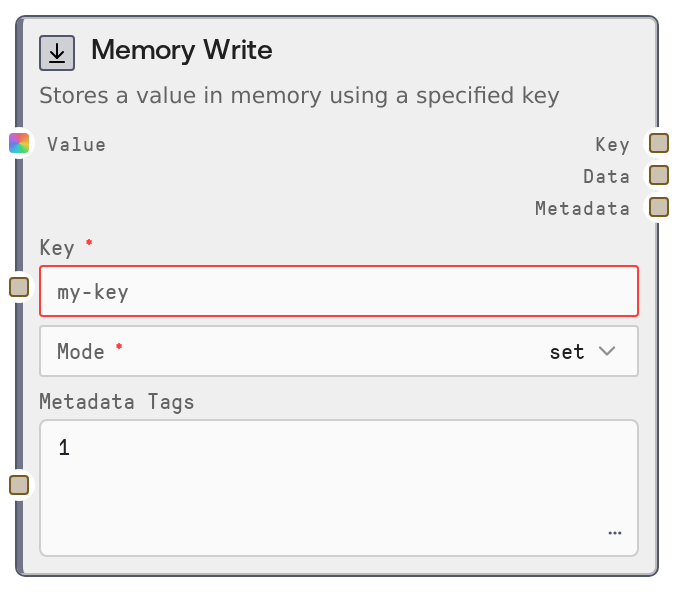
Usage
Use Memory Write whenever you need to persist intermediate data during a single workflow execution so that later nodes can retrieve it by key. Typical use cases include storing model responses (for example, a running conversation summary), intermediate feature representations, or accumulating logs and events across steps. Place this node downstream of data-producing nodes (such as LLM response generators, API callers, or data transformers) and upstream of memory consumer nodes, such as SaltMemoryRead or custom logic that looks up values by key.
Configure the key as a descriptive, stable identifier that is unique within each workflow execution (for example, "conversation.summary.v1" or "pipeline.logs.steps"). Choose mode = "set" for one-off values that should always reflect the latest state (like the current summary), and mode = "append" to build up an ordered list over multiple writes (like a chat transcript or a list of processed items). Feed any JSON-serializable value coming from upstream nodes. Use metadata_tags to encode contextual information (such as stage, environment, or run number) as a JSON object string, which can be helpful when inspecting or aggregating stored memory entries outside the workflow. This node pairs naturally with storage-related nodes like SaltMemoryRead for retrieval, and with logging/reporting nodes that consume its outputs for monitoring or debugging.
Inputs
| Field | Required | Type | Description | Example |
|---|---|---|---|---|
| key | True | STRING | Identifier for this memory entry, scoped to a single workflow execution. Must pass storage-key validation and should be unique within an execution to avoid unwanted overwrites. Reader nodes will use this same key to look up the stored value. | conversation.summary.v1 |
| value | True | * | The data to store in memory. Must be JSON-serializable: allowed types include null, booleans, numbers, strings, lists, and dictionaries (possibly nested). If bytes are provided, they must contain valid JSON text. Other complex objects must be convertible to JSON, otherwise a serialization error is raised. | {"user_id": "user-123", "turn_index": 5, "summary": "User asked for a project plan and prefers weekly milestones.", "timestamp": "2026-04-27T10:37:12Z"} |
| mode | True | ["set", "append"] | Write strategy for this key. "set" overwrites any existing value with the new one. "append" performs a read-modify-write: if no value exists, it creates a single-element list; if a list exists, it appends the new value; if a non-list exists, it converts it into a list containing the previous and new values. | append |
| metadata_tags | False | STRING | Optional metadata attached to the memory entry, encoded as a JSON object string mapping string keys to string values. Used for organization, filtering, or analytics. Must be valid JSON when provided; use an empty string to omit metadata. | {"stage": "postprocessing", "run": "42", "source": "chat-flow"} |
Outputs
| Field | Type | Description | Example |
|---|---|---|---|
| key | STRING | The key under which the value was stored. Useful for wiring into downstream nodes that log, inspect, or dynamically choose which key to read from. | conversation.summary.v1 |
| data | STRING | The stored value as a string. If the original value was not a plain string, it is returned as JSON text. Downstream nodes can parse this string to recover the structured data. | {"user_id": "user-123", "turn_index": 5, "summary": "User asked for a project plan and prefers weekly milestones.", "timestamp": "2026-04-27T10:37:12Z"} |
| metadata | STRING | JSON string representing the storage service’s response to the write operation, typically including the key, execution ID, metadata, and possibly a version or status. Useful for debugging, auditing, or flows that branch based on write results. | {"key": "conversation.summary.v1", "execution_id": "exec-20260427-10h37m-8c96", "metadata": {"stage": "postprocessing", "run": "42"}, "version": 3} |
Important Notes
- Performance: Each call performs a storage write; in "append" mode the node may also perform a prior read, so frequent small appends can be more expensive than batching data and writing less often.
- Limitations: Only JSON-serializable values are supported. Arbitrary objects, non-JSON binary data, or extremely large and deeply nested structures may fail to serialize or cause slow writes.
- Behavior: In "append" mode, if the existing value at a key is not a list, it is transparently converted into a list containing the previous and new values. Downstream consumers should be prepared to handle lists when using append.
- Behavior: Memory is scoped by workflow execution ID. The same key used in different executions refers to separate entries and does not provide global or cross-run persistence.
- Limitations: If no workflow_execution_id is available (for example, outside a normal workflow run), the node raises an error and does not persist any data.
Troubleshooting
- Error: Cannot serialize value of type 'X' to JSON. The value contains a non-JSON-serializable object (for example, a custom class or unsupported type). Convert it upstream into dictionaries, lists, or primitives before sending it to this node.
- Error: Cannot serialize bytes to JSON. Got N bytes that are not valid JSON. The input is raw bytes that do not contain valid JSON text. Decode and parse them into a structured object or convert them into a JSON-compatible string before writing.
- Error: Execution ID is not available in this context. The node is running without a workflow_execution_id, typically because it is not executed within a standard workflow run. Ensure the node is part of a properly started workflow execution managed by Salt.
- Key validation failures. If the UI or validation rejects your key, it likely contains invalid characters or format. Use a simple identifier with letters, numbers, underscores, or dots (for example, "session.summary_1") and avoid spaces and special symbols.