Data Monitor
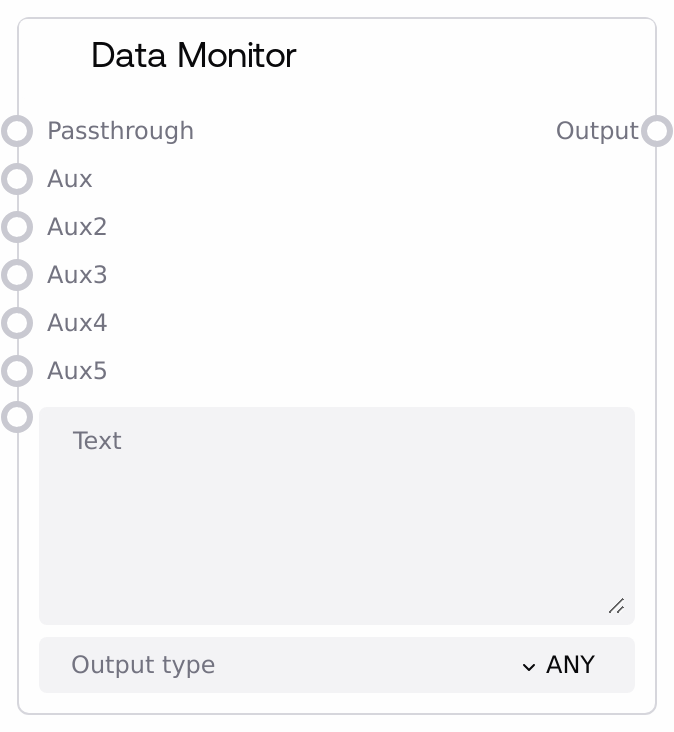
Usage
Use Data Monitor whenever you need to inspect or reshape data in a Salt workflow. Typical scenarios include: previewing intermediate outputs from upstream nodes; converting strings into numbers, lists, dictionaries, or JSON; evaluating lightweight expressions in FORMULA mode (for example, combining or scaling values); and building templated text where placeholders like %aux%, %aux2%, etc. are replaced with auxiliary inputs.
In a typical pipeline, upstream nodes feed arbitrary values into passthrough and optional aux inputs. Data Monitor then applies variable substitution and type conversion based on output_type, and downstream nodes consume the normalized output. For instance, you can connect a configuration text node to text, send a numeric parameter to aux, choose JSON or FORMULA as output_type, and feed the resulting structured configuration into a model or control node.
This node works well alongside generic WILDCARD-compatible nodes. Upstream, any node that emits configuration blobs, model parameters, prompts, or debug info can feed into passthrough or aux (e.g., prompt builders, metadata aggregators). Downstream, model invocation nodes, control nodes, or logging nodes can consume the processed output. Best practices: (1) if you just want to observe data without changing types, set output_type to ANY; (2) when preparing structured configs, prefer JSON or DICT so downstream consumers receive predictable structures; (3) use aux placeholders and FORMULA to keep small calculations and dynamic text assembly inside this node instead of scattering conversions across multiple nodes.
Inputs
| Field | Required | Type | Description | Example |
|---|---|---|---|---|
| text | True | STRING | Base text content used when no passthrough data is provided. This string is also the template for variable substitution: placeholders %aux%, %aux2%, %aux3%, %aux4%, and %aux5% (case-insensitive) are replaced with the corresponding auxiliary inputs. When `passthrough` is not connected, this text is then converted according to `output_type`. | {"user_id": "%aux%", "score": %aux2%, "segment": "%aux3%"} |
| output_type | True | STRING (enum: ANY, STRING, INT, FLOAT, BOOLEAN, LIST, TUPLE, DICT, JSON, FORMULA) | Specifies how the node transforms the effective input (passthrough if present, otherwise text). ANY forwards the underlying value unchanged. STRING converts to a string. INT, FLOAT, and BOOLEAN cast to their scalar types. LIST and TUPLE attempt to iterate the value and wrap it in the respective container. DICT converts a mapping or iterable of key/value pairs to a dictionary. JSON parses a JSON string into a dictionary or list. FORMULA evaluates the substituted text as an expression and uses the evaluation result as output. | FORMULA |
| passthrough | False | WILDCARD | Optional primary data input to visualize and transform. If provided, it overrides `text` as the data source. The node converts this value to a string for display and variable substitution, then applies `output_type` to produce the final output. Ideal for probing intermediate outputs, converting types, or running formulas over actual upstream data. | {"temperature": 0.7, "top_p": 0.9} |
| aux | False | WILDCARD | First auxiliary input used for variable substitution. Any occurrence of %aux% (case-insensitive) in the source text (or string representation of passthrough) will be replaced by this value's string form. Useful for injecting a single key parameter such as a user ID, score, or threshold into templates or formulas. | user_42 |
| aux2 | False | WILDCARD | Second auxiliary input for variable substitution. Any %aux2% placeholder (case-insensitive) is replaced with this value. Often used to inject a numeric factor, weight, or secondary parameter into a JSON template or formula expression. | 0.85 |
| aux3 | False | WILDCARD | Third auxiliary input for variable substitution, replacing %aux3% (case-insensitive). Use this for additional context fields such as segment labels, feature flags, or environment identifiers. | "beta_segment" |
| aux4 | False | WILDCARD | Fourth auxiliary input for variable substitution, replacing %aux4% (case-insensitive). | "experiment_A" |
| aux5 | False | WILDCARD | Fifth auxiliary input for variable substitution, replacing %aux5% (case-insensitive). | "2026-04-27T12:00:00Z" |
Outputs
| Field | Type | Description | Example |
|---|---|---|---|
| output | WILDCARD | The final processed value after optional variable substitution and type conversion. If `passthrough` is connected, this is derived from that value (or the original passthrough when output_type is ANY); otherwise it is derived from `text`. The concrete data type depends on `output_type`: for JSON you get a dictionary or list, for DICT a dictionary, for LIST/TUPLE a sequence, for INT/FLOAT/BOOLEAN a scalar, for STRING a string, and for FORMULA the evaluated result of the expression. | If output_type = "JSON": {"user_id": "user_42", "score": 0.85, "segment": "beta_segment"} If output_type = "INT": 128 If output_type = "FORMULA": 1.5 |
Important Notes
- Performance: The node performs string conversions and up to five case-insensitive regex substitutions for aux placeholders. This is lightweight for typical prompt and config sizes, but extremely large text blobs or very rapid updates may add overhead.
- Limitations: JSON mode strictly requires valid JSON strings (double-quoted keys and strings, no trailing commas, and correct literals). Python-style structures (single quotes, None, True/False) will not parse and will cause JSON conversion failures.
- Limitations: LIST, TUPLE, and DICT conversions rely on the input already being iterable in a compatible way. Converting a plain string to LIST or TUPLE yields a sequence of characters, and badly structured key/value data will fail when converting to DICT.
- Behavior: When
passthroughis provided (non-null), it always takes precedence as the data source;textis then only used as a visual or intermediate representation. Disconnect passthrough if you want the node to use the manually entered text instead. - Behavior: In FORMULA mode, the node evaluates the substituted text as an expression, so the output type may differ from the input (for example, computing
(%aux2% * 100) // 1yields an integer). Downstream nodes should be prepared for this type change.
Troubleshooting
- Type conversion errors (INT/FLOAT/BOOLEAN): If conversion fails or logs an error, inspect the displayed text in the node to see the actual string after aux substitution, and ensure it is a valid literal for the target type (for example, "42" for INT or "3.14" for FLOAT). Adjust the template or aux values accordingly.
- JSON parsing failures: If using JSON output_type and you see parse errors, verify that the text after substitution is valid JSON: double quotes around all keys and string values, no trailing commas, and no Python-specific literals. If necessary, correct the template or pre-format the data upstream.
- Unexpected LIST/TUPLE contents: If you get a list of characters instead of logical elements, it usually means a plain string was converted directly. Provide an actual list/iterable from upstream, or choose a different output_type that better fits the data structure you want.
- Placeholders not replaced: If %aux%, %aux2%, etc. remain unchanged in the output, confirm that the corresponding aux inputs are connected and non-null, and that the placeholder names are spelled exactly (no extra underscores or spaces). Remember that matching is case-insensitive but the pattern name itself must be correct.
- Output seems empty or unchanged with passthrough set: If passthrough is connected but holds an empty string, None-like value, or an unexpected type, the node may appear to do nothing or return an empty representation. Check the upstream node's output, or temporarily disconnect passthrough to verify behavior with the manual text input instead.