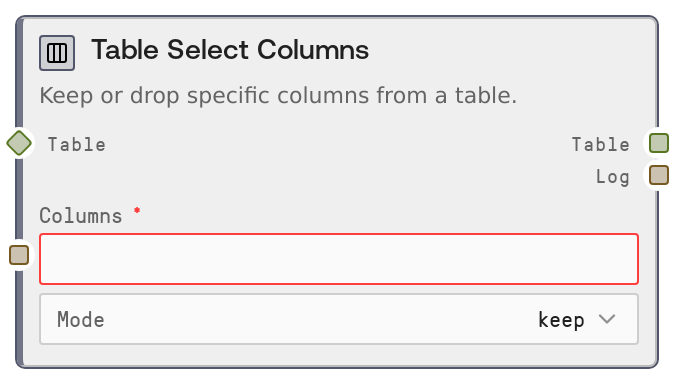
Table Select Columns
This node modifies a table's schema by either keeping only selected columns or dropping specified columns. You pass a comma-separated list of column names and choose a mode—keep or drop. It returns the updated table plus a human-readable summary of the change.
Usage
Use this node whenever you need to simplify or reshape a table by selecting only relevant columns or removing unnecessary ones. Common use cases include trimming wide datasets before visualization, hiding sensitive fields (for example, emails or IDs) before sharing, or preparing features for downstream analytics and machine learning nodes. Typically, this node appears after a table creation or loading step such as SaltTableFromCSV, SaltTableFromJSON, or a join/aggregation node like SaltTableJoin or SaltTableGroupBy. Downstream, its output is often consumed by SaltDisplayTable, SaltTableToCSV, SaltTableToJSON, SaltChart, or further transforms like SaltTableFilter and SaltTableSort. To use it, connect a table to the table input, type a comma-separated list of column names in columns (matching existing column names exactly, including case), and set mode to keep (to retain only those columns) or drop (to remove them). For complex workflows, consider chaining multiple transforms, for example, first SaltTableSelectColumns to remove personally identifiable information, then SaltTableFilter to limit rows, then SaltTableOutput to export. Keep your column list small and explicit to avoid accidentally removing important data.
| Field | Required | Type | Description | Example |
|---|
| table | True | TABLE | The input tabular data to modify. Can be a TABLE produced by other Salt table nodes or a DATAFRAME-compatible structure. The table must have named columns; column names are used verbatim for selection or dropping. | A customer transactions table with columns: ["customer_id", "email", "country", "order_id", "order_total", "created_at"]. |
| columns | True | STRING | Comma-separated list of column names to keep or drop, depending on mode. Names are trimmed for whitespace and must match existing columns. At least one non-empty name is required; if no valid names are provided, the node will raise an error. | customer_id, country, order_total |
| mode | True | STRING | Selection behavior. "keep": keep only the listed columns and drop all others. "drop": remove the listed columns and keep everything else. Using "keep" with a small set is best for building minimal feature tables; "drop" is useful for stripping a few unwanted or sensitive columns. | keep |
Outputs
| Field | Type | Description | Example |
|---|
| table | TABLE | The resulting table after applying the column selection. If mode is "keep", it contains only the listed columns in their original order; if mode is "drop", it contains all original columns except those listed. Row count and cell values remain unchanged. | From an input with columns ["customer_id", "email", "country", "order_total"], columns = "customer_id, country" and mode = "keep" produces a table with columns ["customer_id", "country"]. |
| log | STRING | A human-readable summary of the operation, indicating whether columns were kept or dropped and how many. Useful for debugging and audit trails in complex workflows. | Kept 3 columns: customer_id, country, order_total |
Important Notes
- Performance: Column selection is fast and memory-light compared to row operations; it is safe to use on large tables as a first step to reduce width before more expensive transforms.
- Limitations: The columns string must contain at least one valid, non-empty name. If the resulting list is empty after trimming (for example, an empty string or just commas), the node will raise a ValueError.
- Behavior: Column names are trimmed for whitespace but otherwise matched exactly; they are case-sensitive if your upstream table schema is case-sensitive. Listing a column that does not exist will cause the underlying table helper methods to raise a clear error.
- Behavior: In keep mode, all columns not listed are dropped, which can remove required keys for later joins or group-bys; double-check your schema before using keep in the middle of a workflow.
Troubleshooting
- Error: At least one column name is required: This occurs when columns is empty or only contains commas and spaces. Provide at least one column name, for example "id" or "id, name".
- Downstream error: Column 'xyz' not found: If later nodes such as SaltTableJoin, SaltTableGroupBy, or SaltTableFilter complain about missing columns, you may have removed that column here using keep mode. Inspect your columns list and ensure required columns are preserved.
- Columns not being removed or kept as expected: Check for typos and extra spaces in columns. Ensure each name exactly matches the column in the table (for example, "order_total" vs "orderTotal"), and verify that mode is set correctly to "keep" or "drop".
- Workflow suddenly produces very narrow tables: If you see only a few columns propagating through many nodes, you may have set mode = "keep" with too short a list. Switch to "drop" if your intent was only to remove a couple of columns, or expand the list of columns to keep.