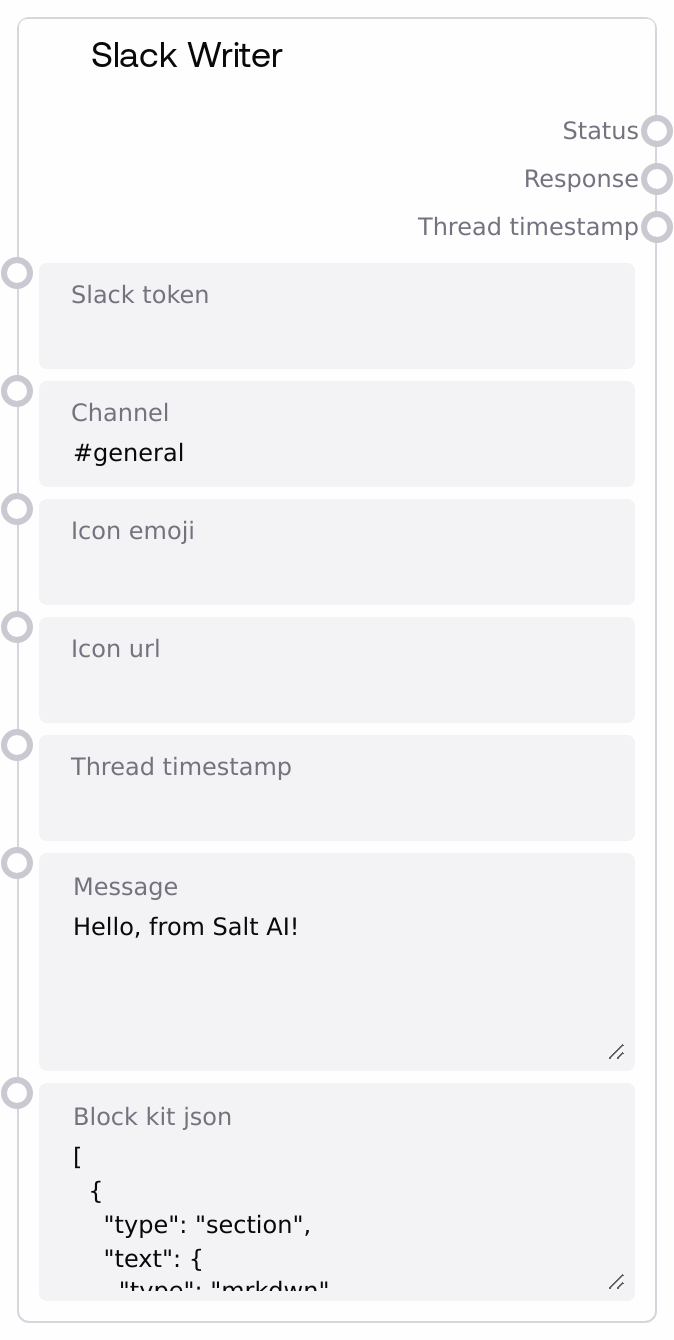
Slack Writer
Slack Writer posts messages to Slack via a bot token using the official Slack WebClient. It can send plain text messages or rich Block Kit JSON and automatically generates fallback text for clients that cannot render blocks. The node supports posting to channels, direct messages (by user ID), and replying in existing threads via a timestamp.
Usage
Use Slack Writer when you need your Salt workflows to notify users or channels in Slack, for example for pipeline status updates, alerts, summaries, or rich interactive messages. Place this node near the end of a workflow, after upstream nodes have generated the content you want to send, such as model-generated summaries, report URLs, or monitoring results. Text-producing nodes can feed into the message or block_kit_json inputs, and the resulting status, response, and thread_timestamp outputs can be consumed by logging or orchestration nodes, or used to continue a threaded conversation in a subsequent Slack Writer call. Common patterns include posting a notification to #alerts when a validation node fails, sending a DM to a user when a personalized report is ready (with the link produced by a SaveToBucketNode or SaveToZipNode), and replying in a Slack thread by wiring the thread_timestamp output from one Slack Writer into a later Slack Writer call to build a multi-step, threaded update.
| Field | Required | Type | Description | Example |
|---|
| slack_token | True | PASSWORD | Slack Bot OAuth token used to authenticate API calls. This must be a bot token with at least `chat:write` permission, and `chat:write.customize` if you plan to set `icon_emoji` or `icon_url`. The node will fail if this is empty. | |
| channel | True | STRING | Destination for the message: a channel name such as `#general`, a channel ID such as `C05NNPR6A42`, or a user ID such as `U031AFC238B`. If a user ID is provided, the node opens or reuses a DM channel with that user before sending the message. | #data-alerts |
| icon_emoji | False | STRING | Emoji code to use as the bot’s icon, such as `:rotating_light:`. Requires the bot to have `chat:write.customize` permission. If empty, Slack uses the app’s default icon or the `icon_url` if provided. | :satellite_antenna: |
| icon_url | False | STRING | Direct URL to an image to use as the bot icon. Should generally be 512×512 or smaller. Requires `chat:write.customize` permission. Leave blank to use the default app icon or `icon_emoji` if set. | https://example.com/assets/alert-bot-512.png |
| thread_timestamp | False | STRING | Slack message timestamp (`ts`) indicating the parent message of a thread. When set, the message is posted as a reply in that thread. Typical usage is to feed in the `thread_timestamp` output of a previous Slack Writer call. | 1734479286.246919 |
| message | True | STRING | Plain text body of the Slack message. Supports multiline text. This is used when `block_kit_json` is empty. If `block_kit_json` is provided, this value is ignored and a fallback text is auto-generated from the blocks instead. | Data pipeline run 2024-05-14 completed successfully. Report: https://example.com/reports/run-2024-05-14 |
| block_kit_json | False | STRING | Raw Block Kit JSON describing an array of Slack block objects. It must parse to a JSON list (array); otherwise the node raises an error and does not send any message. When present, the node sends this as the `blocks` payload and automatically extracts all nested text to create a `text` fallback for clients that do not render blocks. | [{"type":"section","text":{"type":"mrkdwn","text":"*Pipeline status:* Success"}},{"type":"context","elements":[{"type":"mrkdwn","text":"Run ID: 2024-05-14-001"}]}] |
Outputs
| Field | Type | Description | Example |
|---|
| status | STRING | The final text of the posted Slack message. For Block Kit posts, this is the fallback text string generated from all text fields in the blocks; for plain messages, it mirrors the `message` content as stored by Slack. | Data pipeline run 2024-05-14 completed successfully. Report: https://example.com/reports/run-2024-05-14 |
| response | STRING | The full Slack API response serialized as a JSON string. Includes fields such as `ok`, `channel`, `ts`, and `message`. This can be logged for auditing, inspected for debugging, or parsed by downstream nodes that need detailed metadata. | {"ok": true, "channel": "C05NNPR6A42", "ts": "1734479286.246919", "message": {"text": "Data pipeline run 2024-05-14 completed successfully. Report: https://example.com/reports/run-2024-05-14", "user": "U031AFC238B"}} |
| thread_timestamp | STRING | The Slack message timestamp (`ts`) of the posted message, or an empty string if not present in the response. This can be used as the `thread_timestamp` input for later Slack Writer calls to create or continue a thread. | 1734479286.246919 |
Important Notes
- Performance: Each node run performs at least one Slack API call, and if a user ID is used as
channel it also calls conversations.open. Avoid high-frequency loops of many messages to reduce the risk of Slack rate limiting.
- Limitations: The
block_kit_json input must be valid JSON whose top-level structure is a list of blocks. Providing an object or malformed JSON causes the node to raise an error before sending anything.
- Behavior: When a user ID is supplied as
channel, the node resolves it to a DM channel ID and uses that ID for the post. The Slack API response will show the resolved channel ID, not the original user ID.
- Behavior: On errors while posting, the node redacts the actual Slack token from error messages, replacing it with
[TOKEN_REDACTED], so logs remain safe while still exposing Slack’s error reason.
- Limitations: Using
icon_emoji or icon_url to customize the bot’s appearance requires the chat:write.customize scope. Without it, Slack may silently ignore these attributes even if the call succeeds.
Troubleshooting
- Missing token error: If you see
A Slack bot token is required to send a message through the Slack API., ensure slack_token is set, is not empty, and corresponds to a valid bot token with the chat:write scope.
- Invalid Block-Kit JSON: Errors like
Invalid Block-Kit JSON: ... or Block-Kit JSON must be a list of valid Black-Kit blocks indicate malformed or incorrectly shaped JSON. Validate it with Slack’s Block Kit builder and ensure the top-level value is an array.
- Direct message resolution failure: If you receive
Failed to resolve direct message channel ID: ..., the channel likely contains an invalid or unauthorized user ID. Verify the user ID and confirm the bot can open DMs with that user.
- Slack API error: Messages such as
Slack API error: channel_not_found or Slack API error: not_in_channel come directly from Slack. Check that the channel name or ID is correct and that the bot has been invited to that channel.
- Thread reply issues: If replies are not appearing in a thread, verify that
thread_timestamp is set to the ts of an existing message in the same channel, and that you are not changing the channel between the original message and the reply.